Connecting the Receiver and a Computer
P/N 7010-1004
2-23
Establishing an Serial (RS232) Cable
Connection
1. Using the RS232 cable, connect the serial port of the computer
(usually COM1) to the receiver’s serial port.
2. Press the power button on the receiver to turn it on.
3. Run TRU.
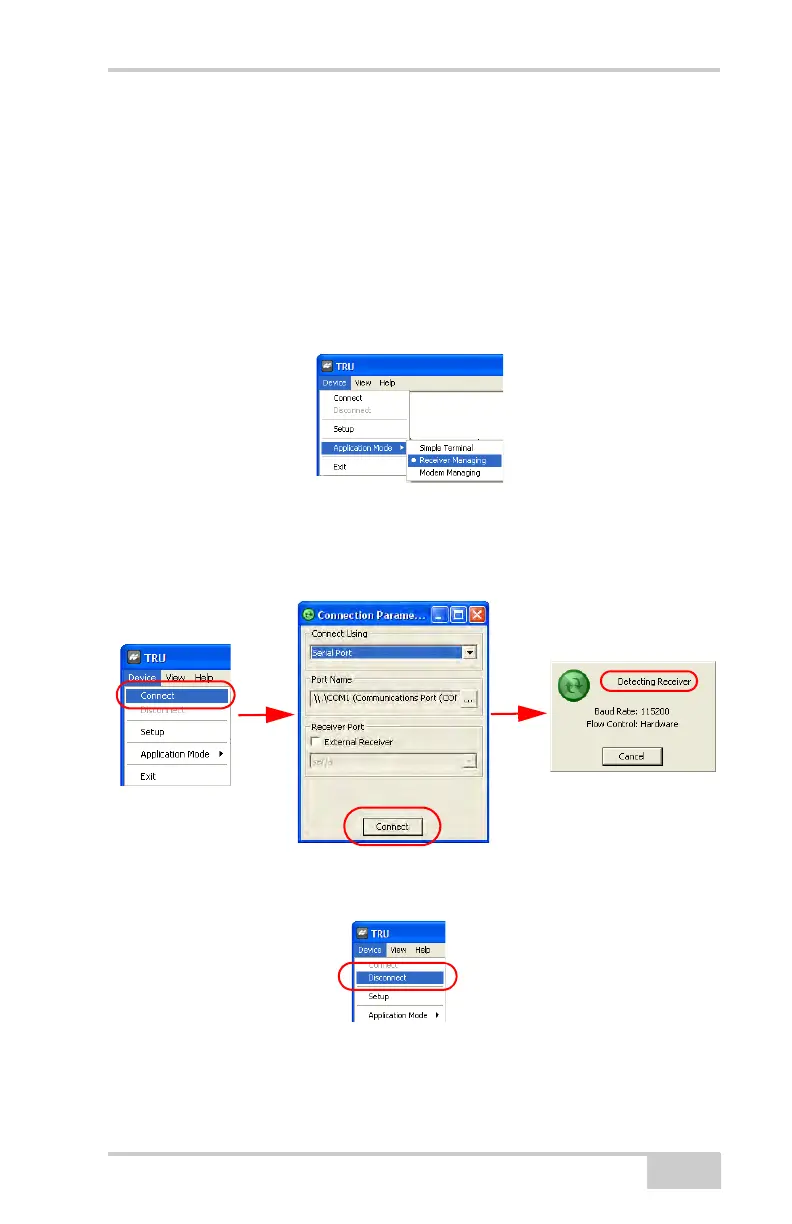
4. Click DeviceApplication mode and select Receiver
Managing mode.
5. Click DeviceConnect. The Connection Parameters dialog box
displays. To establish a connection to the receiver, press the
Connect button. When detecting the receiver, the Detecting
Receiver dialog box displays.
Figure 2-17. Stages for Connecting the Receiver via Serial Cable
6. To close the serial connection to the receiver, click
DeviceDisconnect:



 To Next Page