70
The S-4 Sculpting Sampler - Ofcial Manual
71
The S-4 Sculpting Sampler - Ofcial Manual
Audio Engine
3
Audio Engine
3
NOTES
NOTES
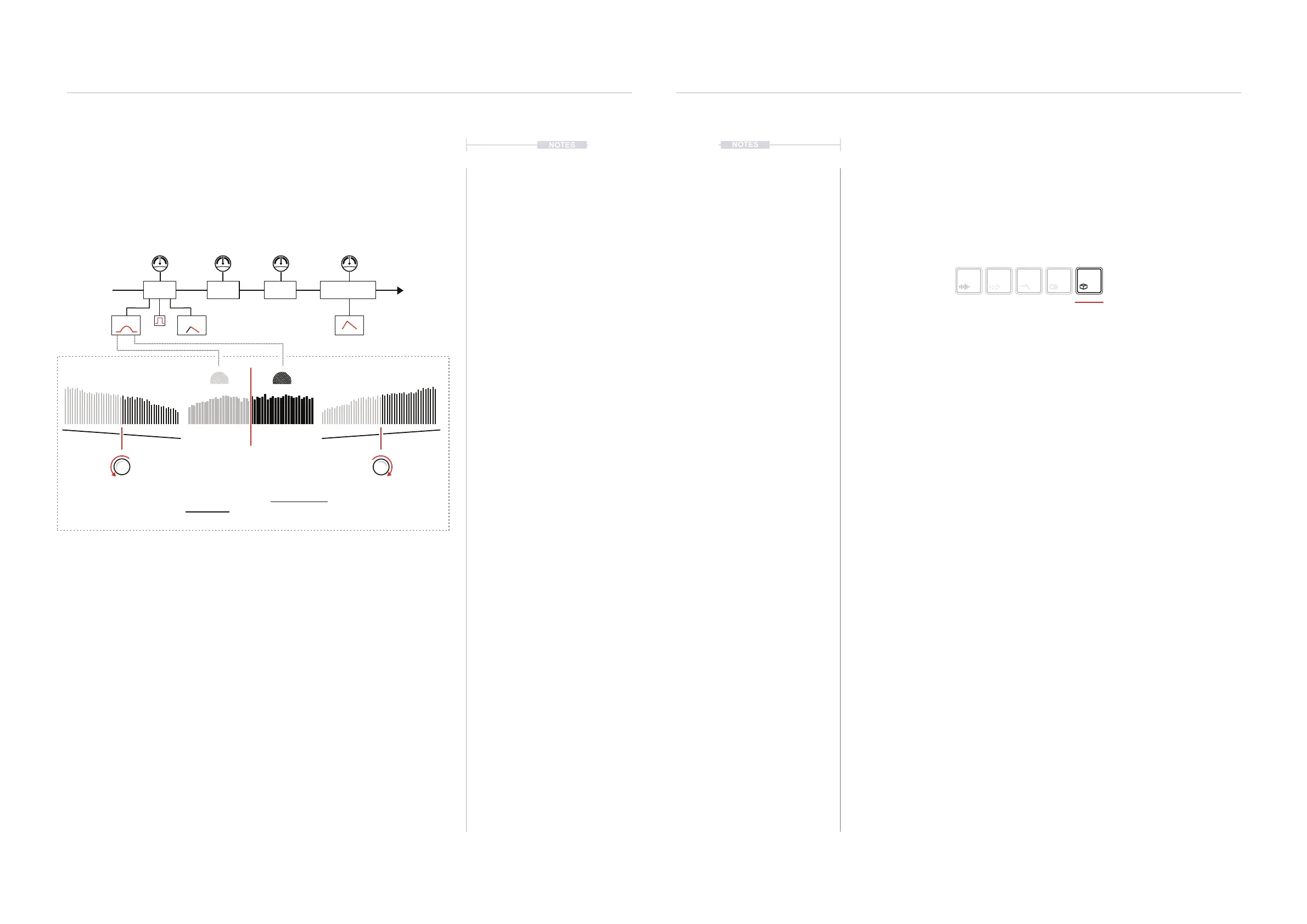
The Deform device is a chain of integrated distortion based effects all of
which are affected by a common dual-band control. The dual bands of low
and high frequency are represented by the two spheres, animated on the
display. The Tilt option operates on all FX parameters as well as the dual
frequency band gain.
▌ SETTING UP DEFORM
1. To adjust the amount of each effect applied to the audio chain, Turn
(NOISE), (DRIVE) or (CRUSH). This is an effect chain so adjustments
are integrated into the nal mix out.
2. To adjust the noise characteristics, Turn (NOISE DECAY) to adjust the
envelope decay time of the noise envelope. A manual [GATE] can be
applied to tame the noise characteristics. Turn (NOISE COLOR) to
affect the bandpass lter cutoff applied to the noise. The BP cutoff is
positioned with a 1 Octave offset between bands.
3. Tilt is applied to all of the effect parameters and the dual band gains.
These characteristics shape the overall sound. Turn (TILT) to apply a
shift to the frequency bands.
4. The compressor is applied at the nal stage. Turn (COMPRESS) to
adjust the compressor and its envelope behaviours. Clockwise for a
longer attack / shorter decay and anti-clockwise to reduce attack /
increase decay.
Selected device button
symbol brightly lit
3.6 Space Devices
The Space audio slots is the fth and nal device in the audio chain. This
section covers time and space based effects including delay and reverb.
The page displayed will reect the lter device loaded.
Space
Press [SPACE] to open the device page.
Hold [CTRL] + Press [SPACE] to open the device list.
Drive CrushNoise Compressor
Color Decay
Amount
Gate
From Filter To Space
Crossover
650Hz
Tilt
Anti-Clockwise
Tilt
Controls each frequency band gain plus
all color FX parameters relatively.
Tilt
Clockwise
Hz KHz



 To Next Page