118
The S-4 Sculpting Sampler - Ofcial Manual
119
The S-4 Sculpting Sampler - Ofcial Manual
MIDI & Sync
7
MIDI & Sync
7
NOTES
NOTES
▌ SETTING UP MIDI SYNC FOR EXTERNAL GEAR
1. Ensure S-4 is connected to another MIDI device and the MIDI channels
are aligned to the same.
2. Decide on which device will be the primary lead and which will be a
secondary follower.
3. Use the action button navigation or the (SELECT) Knob to scroll to the
desired option to change. To toggle the option On / Checked or Off /
Unchecked turn any of the 8 parameter knobs or tap [SELECT].
• CC CONTROL : On / Off. When On the S-4 will receive external CC
messages in order to control dened parameters.
• SYNC IN : On / Off. When On an external device can be used to
control the clock. The S-4 and its global tempo will respond to the
timing of the external clock. Manual tempo adjustments using the
(SELECT) knob will be ignored when Sync In is On and will be
available when Sync In is Off.
• SYNC OUT : On / Off. When On an external device will respond to
the S-4 clock. The S-4 global tempo will be used by the external
device. Manual tempo adjustments using the (SELECT) knob will be
available when Sync In is Off and and external clock is used when
Sync In is On.
• START / STOP : On - The S-4 recognises and acts upon the
incoming start / stop commands from the connected MIDI Device
sending transport. This will control the Play/Stop tracks button.
When off the S-4 Transport will be independently controlled by the
Play/Stop button.
power in 1 out 1 sync in midi inusb in 2 out 2 sync out midi out
project
mod track mix
copy ctrl
temp
cong
scene perform
clear
t|so
S-4
sculpting sampler
shape groove tonal setup
steps cycles sustain length tempopulses velocity pitchdivision
repeats
chrom
/1 /4
/3
/16
/12
/64
/48
/2 /8
/6
/32
/24
minor
hira
tetra
major
penta
iwato
user
voicing timing channel randomtime accent scale
bank pattern temp
clear
ctrl
copy
select
save
mute
range
ramp style delay output ratepace groove rootphrase
rotate probability harmony quantize
t|so
Primary / Secondary Sync Example
T-1 Primary Control
Sync In - On
Sync Out - Off
Stop/Start - On
Cong > MIDI
Notes Out - On
Clock Out - On
Stop/Start Out - On
MIDI USB - T-1 Congurator
USB MIDI
Channel 1
T-1 will control the S-4 Playback. For example the sequencer will trigger the
Poly. Tracks will play/stop from T-1 Transport control.
S-4 Follower
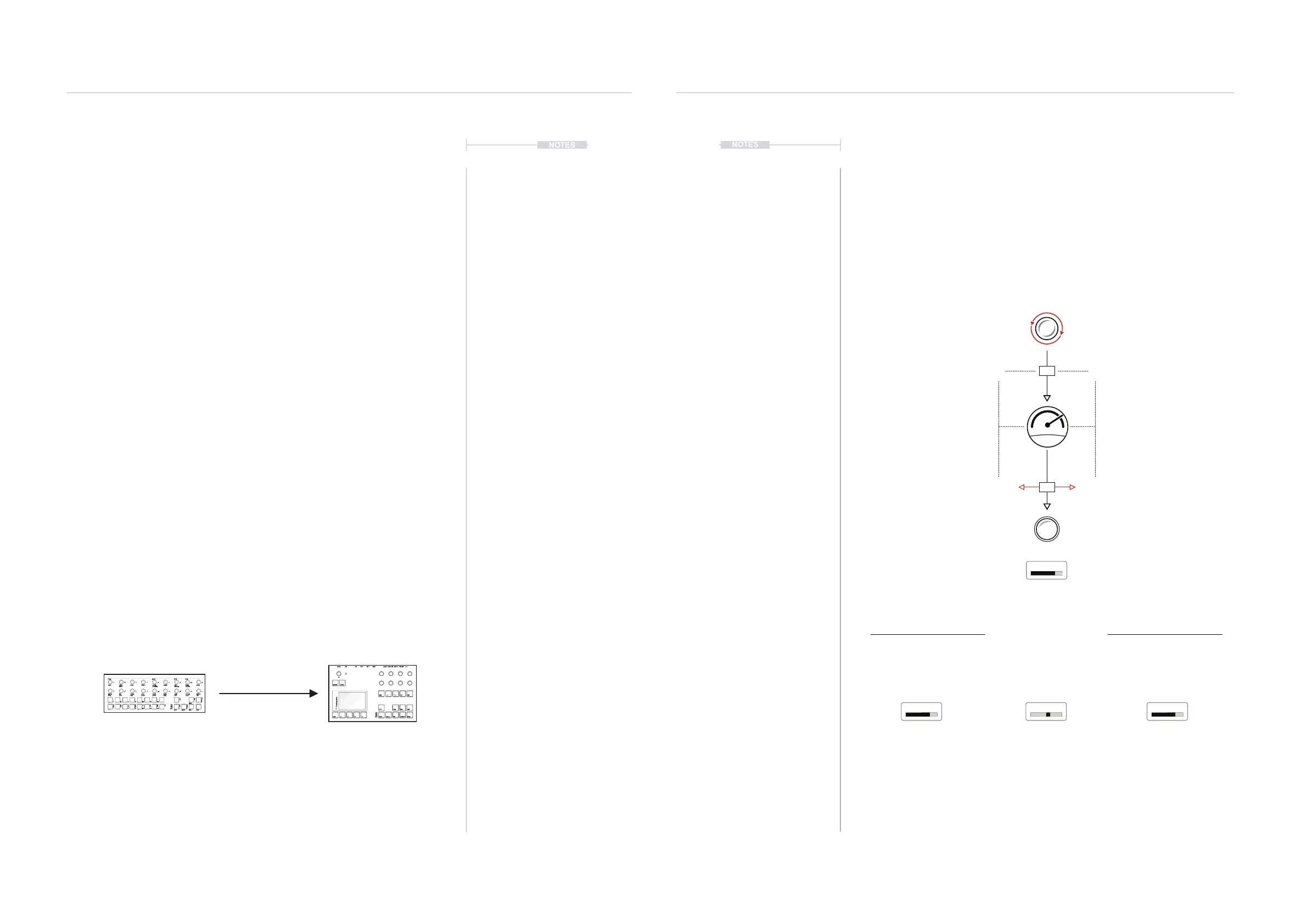
7.4 MIDI CC
MIDI Continuous Control Change Messages, also shortened to CC, are
used in the S-4 to control parameters from external gear. CC Messages are
mapped using a specic CC number. Parameter changes are then
communicated over a value range of 0-127 which then affects the
destination parameter value based on its own designated range. Typically
an external MIDI controller knob or fader will control the S-4 parameter.
+
-
CUTOFF
CUTOFF RELCURVE RATE
External MIDI Control
Examples
CC #79
96
96
75
75%
100%0%
0 127
0-127 input will be scaled
across the destination range
For tracks, the MIDI channel is
as set for the track. e.g Ch1
Set the CC Control to ON in the MIDI Cong parameters in order to use external control
S-4 Filter Cutoff
Example 0-100%
Ranged parameter.
75%
Example -50/+50%
Ranged parameter.
+32%.
Input from CC is 0-127
Example = 96
Example Selection
ranged parameter.
Range divided by # options.
CC #79



 To Next Page