12
The S-4 Sculpting Sampler - Ofcial Manual
13
The S-4 Sculpting Sampler - Ofcial Manual
torso
electronics
S-4
in 1out 1
sync inmidi in
usb
in 2out 2
sync outmidi out
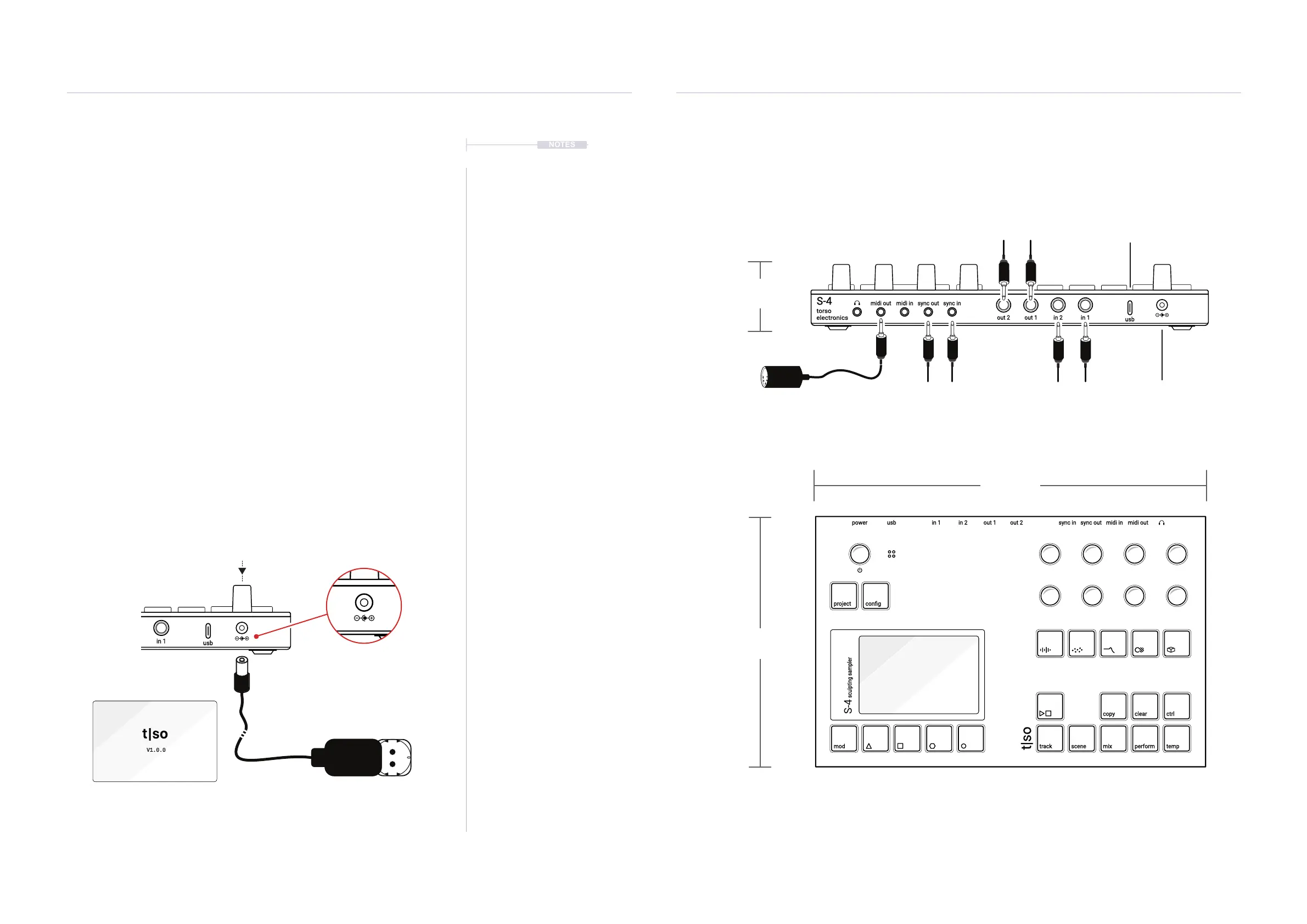
3.5mm Mini Jacks for external
clock synchronisation
USB-C Communication, MIDI
and Audio
12V PSU.
(PSU supplied)
Dimensions include enclosure plus the knobs, buttons and rubber feet. Weight is 820 grams (1,8 lbs).
6.35mm TR Jacks
Audio Outputs.
6.35mm TR Jacks
Audio Inputs.
MIDI In, Out, Thru using a 3.5mm
Jack to 5 Pin MIDI adapter type A.
(Adapter supplied)
1.4 Hardware Overview
The S-4 Sculpting sampler can handle audio, MIDI and Analog Sync in and out as well as the
digital USB interface to a PC or Mac or used for USB Audio.
242 mm
9,5 Inch
156 mm
6,1 Inch
39 mm
1,5 Inch
power in 1 out 1 sync in midi inusb in 2 out 2 sync out midi out
project
mod track mix
copy ctrl
temp
cong
scene perform
clear
t|so
S-4
sculpting sampler
1.3 Power Up
S-4 is powered using the dedicated 12V AC to DC power supply, connected
using the rear socket and is switched on or off by pressing the top panel
On/Off Push encoder. This knob also acts as the tempo, menu navigation
and when in mixer page, the master output volume level control.
▌ POWERING STANDBY MODE ON / OFF
1. Connect the supplied power supply cable to S-4 and then connect to
the PSU mains supply. The mains will immediately and constantly
power up the S-4. It can be placed in standby power mode manually.
2. To turn OFF. Press & Hold S-4 Power Knob >1 Second.
3. A prompt asking, do you want to ‘POWER OFF?’ is presented. Press
[YES], or [NO], Action button to choose the desired option.
4. If yes, the device will enter standby mode. If no, the S-4 will remain
powered on.
5. To turn ON. Press the S-4 Power Knob to switch on
6. The device will start up, displaying the start up screen and rmware
version. This will take a few seconds.
7. It is recommended to completely power the S-4 off, remove the mains
supply connection.
in 1out 1
sync in
usb
in 2out 2
sync out
NOTES
S-4
AC to DC Mains
Supply Adapter
Start Up Splash Screen
with the current Firmware version.
PSU is rated at 12V, 2 Amp
DC Output.
Centre Positive
Getting Started
1
Getting Started
1



 To Next Page