96
The S-4 Sculpting Sampler - Ofcial Manual
97
The S-4 Sculpting Sampler - Ofcial Manual
Master Mix
5
Master Mix
5
NOTES
NOTES
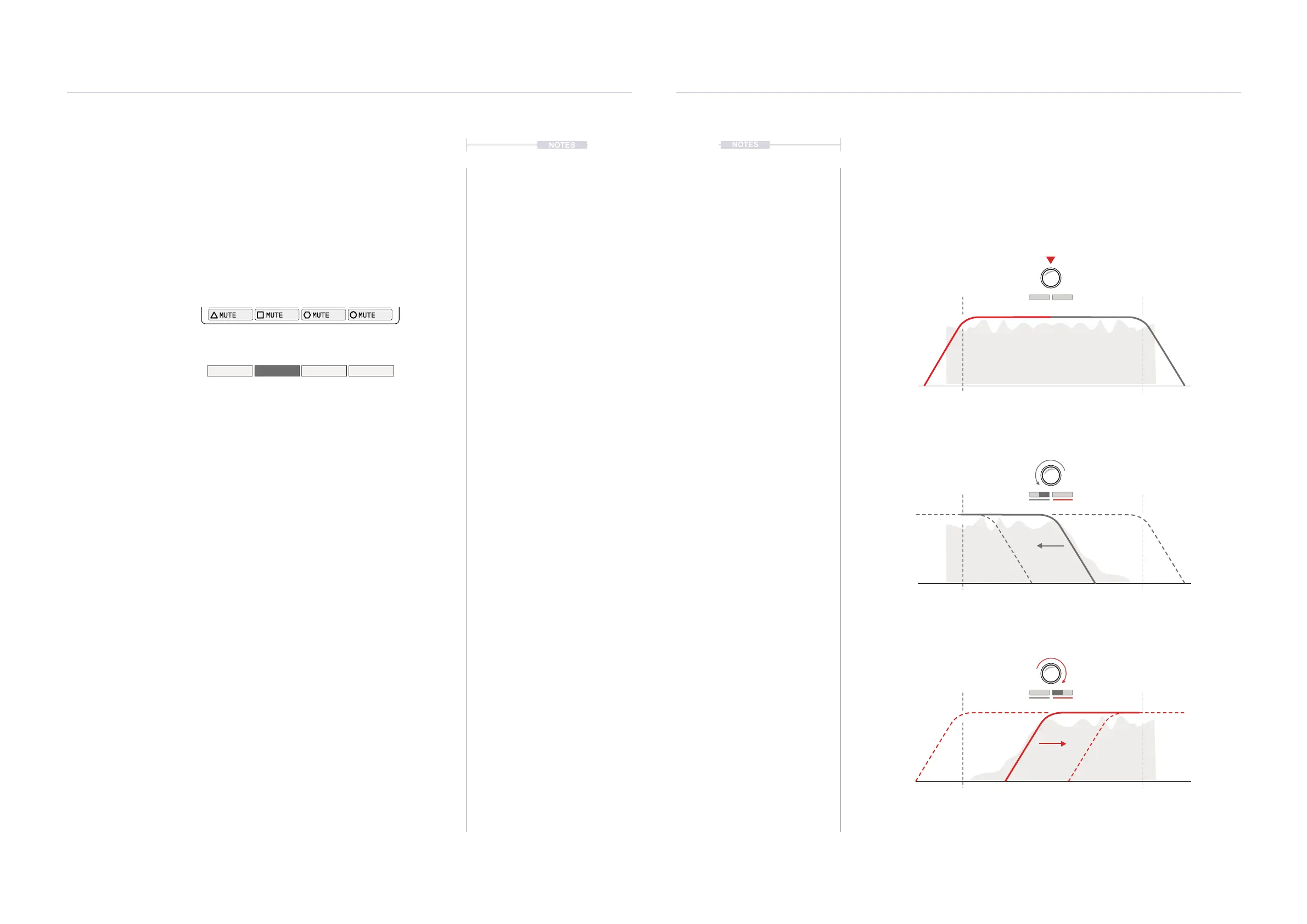
5.4 DJ Style Filters
A DJ Style lter is available for each of the 4 tracks. The lters operate with
integrated Low Pass and High Pass Filtering. The lters allow control of the
lter cutoff as a performance and mixing feature.
ATTENUATION
FREQUENCY
HP LP
20Hz 20KHz
ATTENUATION
FREQUENCY
LP
20Hz 20KHz
ATTENUATION
FREQUENCY
HP
20Hz 20KHz
Filter Value at ‘0’ Central. No Filtering, All Audio Passes
0
0
0
+100
+100
+100
-100
-100
-100
Filter Value at ‘0 to +100%’ Applies High Pass Filtering
Filter Value at ‘0 to -100%’ Applies Low Pass Filtering
5.3 Track Muting
The 4 track channels are represented in the main mixer where levels and
panning can be adjusted. In addition each track channel can be individually
muted or unmuted in the main mix.
▌ MUTING AUDIO TRACKS IN THE MIXER
1. Select the main mix page, Press [MIX].
2. Press the appropriate action button to Mute or Unmute the track.
• Press [MUTE 1] for Track 1 shown by the symbol
• Press [MUTE 2] for Track 2 shown by the symbol.
• Press [MUTE 3] for Track 3 shown by the symbol.
• Press [MUTE 4] for Track 4 shown by the symbol.
• Press a muted track to unmute.
3. The muted track is displayed with a highlighted action button and
labelled suggestion available mute / unmute option. Others will display
as normal.
Mute Track Channels
Tracks are muted or unmuted on each press of
the action button. The button screen label is
highlighted when muted.
Track 1 Track 3Track 2
Muted
Track 4
Press the respective action button
MIX
1 2 3 4
LEVEL LEVEL LEVEL LEVEL
FILTER FILTER FILTER FILTER
MUTE MUTE MUTE MUTE
0 DB-15.129 DB 0 DB0 DB
120.0
MUTE 1
MUTE 4MUTE 3UNMUTE 2



 To Next Page