126
The S-4 Sculpting Sampler - Ofcial Manual
127
The S-4 Sculpting Sampler - Ofcial Manual
MIDI & Sync
7
MIDI & Sync
7
S4 Function MIDI Channel
Note Control Parameter
Mix 16 C0 (24) Start / Stop
Mix 16 C#0 (25) Track 1 Mute
Mix 16 D0 (26) Track 2 Mute
Mix 16 D#0 (27) Track 3 Mute
Mix 16 E0 (28) Track 4 Mute
Mix 16 C1 (36) Main Mix Record
Mix 16 C#1 (37) Track 1 Tape Record
Mix 16 D1 (38) Track 2 Tape Record
Mix 16 D#1 (39) Track 3 Tape Record
Mix 16 E1 (40) Track 4 Tape Record
Mix 16 C#2 (49) Track 1 Tape Overdub
Mix 16 D2 (50) Track 2 Tape Overdub
Mix 16 D#2 (51) Track 3 Tape Overdub
Mix 16 E2 (52) Track 4 Tape Overdub
CC Mapping Reference - Notes
7.5 Sync In / Out
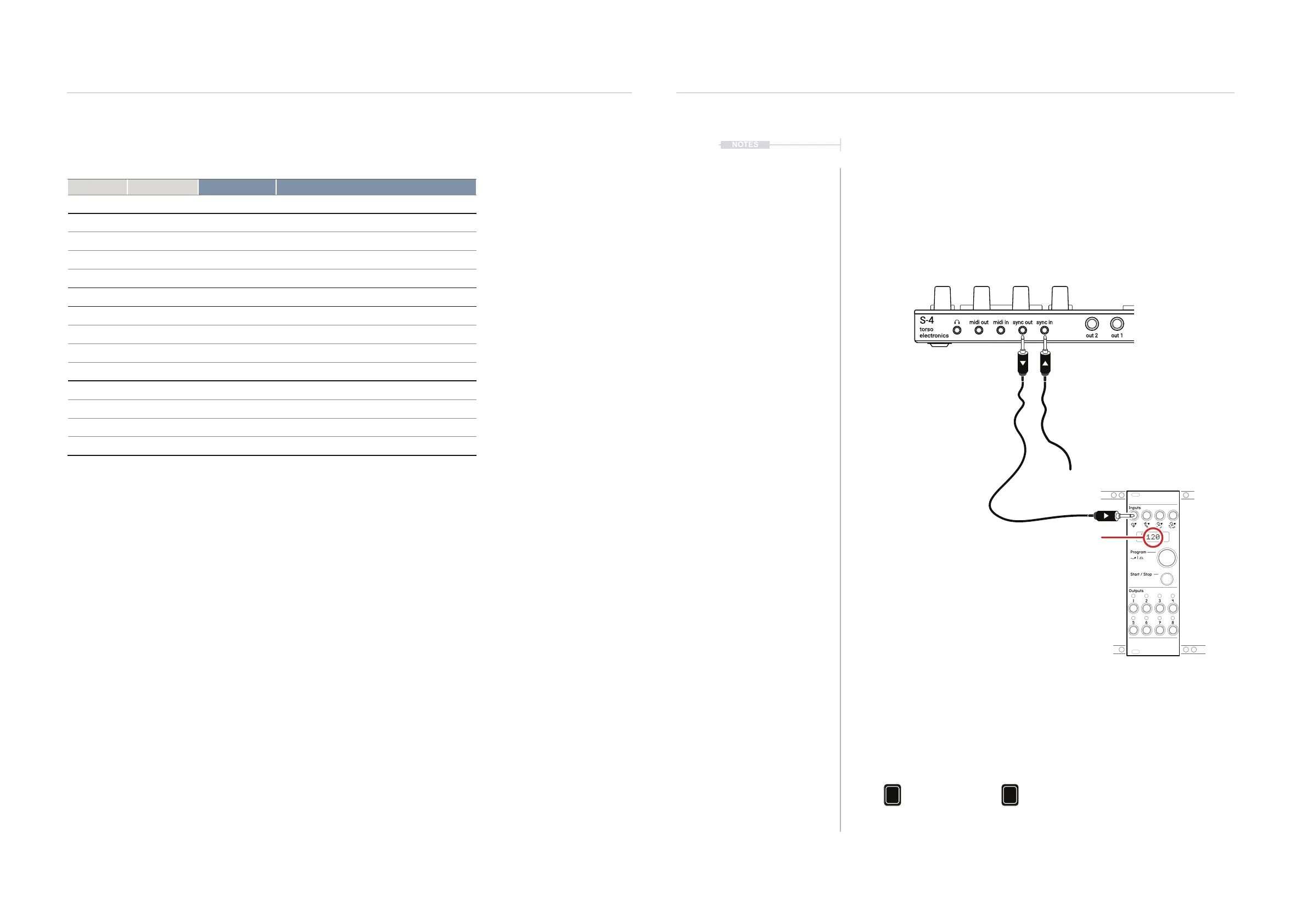
The S-4 can be synchronised with an external analog clock. The S-4 can
send or receive an analog clock at 24 PPQN using the rear Sync In and
Sync Out connections. If multiple clocks are connected to S-4 the hierarchy
dictates the primary lead clock used where the Sync In Analog clock is the
highest in the order.
Pam’s New Workout synchronised as the secondary follower to S-4 which is the
primary clock. Any subsequent connected devices to PNW will be synchronised. An
output from PAM’s could be used to synchronise the S-4 using it’s Sync In as an
option if the Eurorack is to operate as the primary clock.
1 2
Clock Sync Hierarchy
S-4 System
Analog Clock MIDI Clock
Sync In MIDI In
Pam’s New Workout Eurorack Module:
• PPQN = 24 - Matches S-4 Default
• Run? = May need to be set off as there will be no
trigger sent from the S-4 to PAM’s.
Tempo will follow S-4
torso
electronics
S-4
in 1out 1
sync inmidi in
usb
in 2out 2
sync outmidi out
3.5mm TR Mini Jacks can patch to
or from an external analog clock.
Example: Synchronising Eurorack with PAM’s from S-4.
NOTES



 To Next Page