82
The S-4 Sculpting Sampler - Ofcial Manual
83
The S-4 Sculpting Sampler - Ofcial Manual
Modulators
4
Modulators
4
NOTES
NOTES
4.2 Modulators
A modulator is the source which generates the parameter changes. A
variety of modulators are available to select as the source. The destination
will be any device or mixer parameter. Note that modulators are
synchronised to the Play/Stop start control and to the global BPM.
The page displayed will reect the modulator loaded.
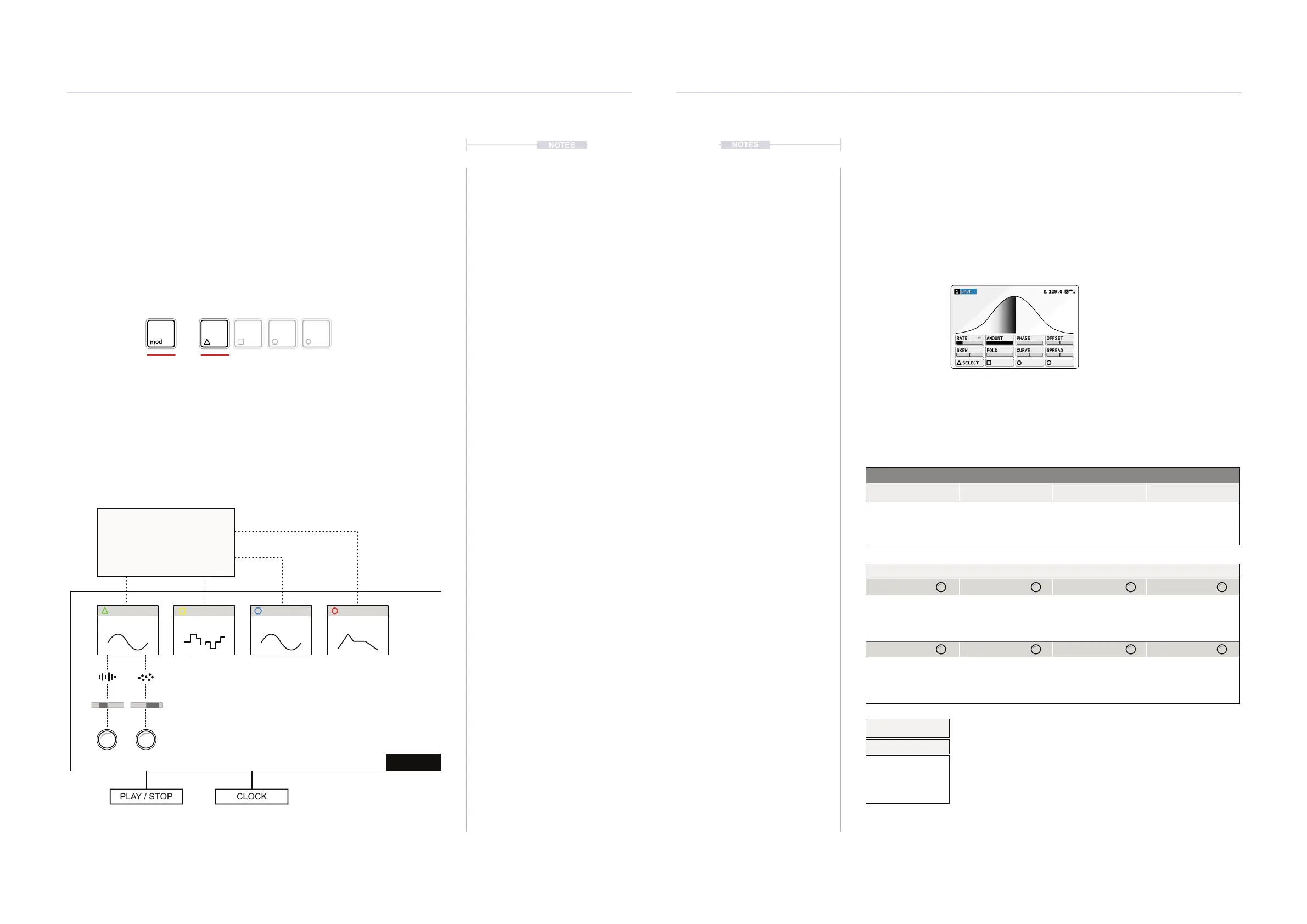
Example of the Modulation Structure
MOD 1 MOD 2 MOD 3 MOD 4
+
Modulators Hold [MOD] + Press Action Button to open the modulator page.
Press [SELECT] to open the modulator selection list.
Modulator Library
Destination Parameter
Speed Pitch
Track 1
Modulation Amount
Destination Audio Device
(also the Mix page parameters can be the destination)
Wave Random Wave ADSR
PLAY / STOP CLOCK
MOD 1 MOD 2 MOD 3 MOD 4
Wave
Random
ADSR
…
Modulation instances loaded to slots
4.2.1 Wave - Modulator
An LFO or Low Frequency Oscillator is a wave which cycles continuously at
a dened rate. An LFO operates slower than an audio level oscillator and is
used for modulation. The Wave modulator is a classic LFO with warping
and morphing features to create complex and interesting shapes.
See Appendix for rate list
WAVE1 120.0
RATE AMOUNT PHASE OFFSET
SKEW FOLD CURVE SPREAD
SELECT
Mod Hold [MOD] + Press Action Button to select modulator
Page 1/1
Parameter Knobs Page 1
Rate
Amount Phase Offset
Rate of modulation.
Determines speed of
the LFO cycles. Press
+ Turn for mode.
Scale the amplitude of
the LFO.
Adjusts the phase of
the LFO cycles
Adjust the LFO Base
offset.
Skew Fold Curve Spread
Tilts the LFO wave
shape at either side.
Adjust the vertical
wave folding amount.
Adjusts the incline
and the shape of the
wave curves.
Increases the ‘stereo’
modulation spread
and phase of the dual
curves.
Action Buttons
Select
Open the modulator
selection pop-up list.
Press [MOD] to select modulation mode on or off when
on a destination parameter page.
Some parameters tagged offer a number of ‘Mode
Select’ options from a pop-up list. This can be accessed
for some parameters by pressing the knob. Press and
turn to select an item from the presented list.
Rate
Rate Mode
Straight
Dotted
Triplet
Free



 To Next Page