16
The S-4 Sculpting Sampler - Ofcial Manual
17
The S-4 Sculpting Sampler - Ofcial Manual
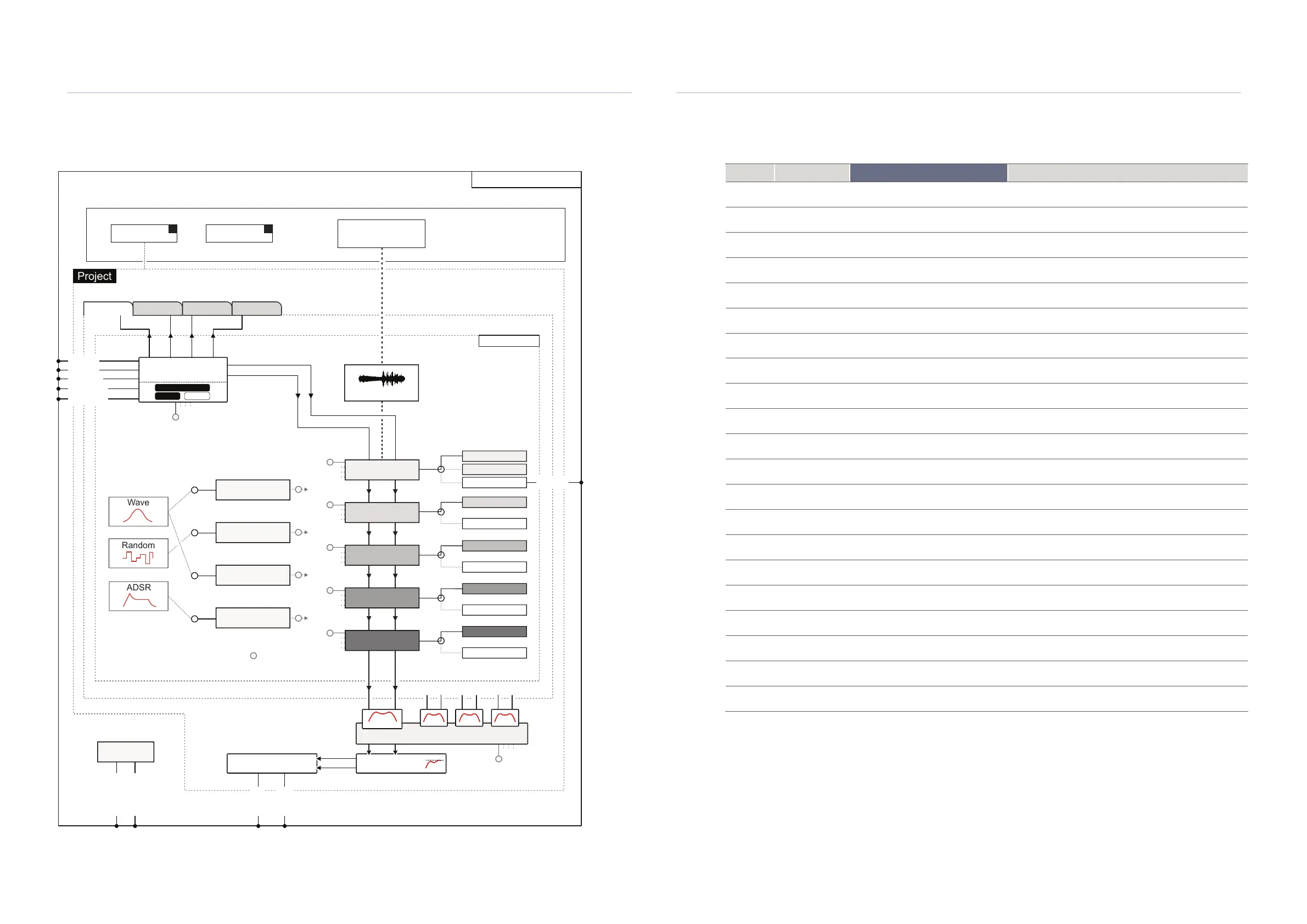
1.5 Architecture
Project
1
Project
X
Sample Library
Track
CompressorMain Volume
MIDI Channel
Stereo Mono
Send1 Send2 Send3 Send4
4GB
Memory
S-4 Sculpting Sampler
Project
Audio Engine
Track 2
Track 3
Track 4
Track 1
Mixer
Projects can be stored within S-4.
Number based on available memory.
…
ADSR
Wave
Random
Material
Tape
Mosaic
Deform
Ring
Vast
Poly
Bypass
Bypass
Bypass
Bypass
Bypass
Audio Devices
Modulator Slots
Audio Source
Modulators
Modulation can be applied to all audio
engines, track and mixer parameters
Track 2 Track 3 Track 4
Sample Buffer
Granular
Mod 1
Filter
Mod 2
Color
Mod 3
Space
Mod 4
M
M
M
M
M
M
M
M
M
M
M
M
In 1
Out 1
Sync In
Sync Out
Clock
Out 2
Line In
MIDI In
MIDI Out
USB*
USB* allows 10 Audio Inputs and 10 Outputs e.g. for a DAW interface.
This will typically cover 4 stereo tracks and 1 stereo master.
In 2
Filter
Getting Started
1
Getting Started
1
1.6 Command Quick Reference
Function Action
S-4 Sequencer Command
Description
General Play / Stop Press [PLAY]
Press the play transport button to play or stop a function, for
example to start and stop the tape looper.
General Main Out Level Press [MIX], Turn (SELECT)
Adjustment of the main audio output level with (SELECT)
within the Mix page. Also adjustable on Page 2.
General Conguration Press [CONFIG] Open the conguration setting options.
General Tempo Adjust Turn (SELECT) Adjusts the tempo 1 BPM per knob indent.
General Select Track View Press [TRACK] Select the track view page.
General Select Track Hold [TRACK] + Action Button Select the active track.
General Material Page
Press [DEVICE]
Select the audio engine page for the desired option.
General Material Devices
Hold [CTRL] + [DEVICE]
Select the device from the list to load into the slot.
General Mix Page Press [MIX] Select the main mixer page for the master output section.
General Adjust Parameter Turn (VALUE KNOB) 1-8
Adjust the parameter rotary knob respective to the displayed
parameter to adjust its value.
General Fine Adjustment Hold [CTRL] + (VALUE KNOB)
Adjust with a knob respective to the displayed parameter to
adjust its value in ne adjustments for some parameters.
Clear Reset Parameter Hold [CLEAR] + Turn or Press Knob
Resets the selected individual parameter for the currently
selected track and device.
Clear Reset Buffer
Hold [CLEAR] + [BUFFER]
Clears the material sample buffer.
Clear
Reset
Parameters
Hold [CLEAR] + [PARAMS]
Resets all general parameters for the currently selected
track and device.
Clear Reset Modulation
Hold [CLEAR] + [MODS]
Resets all modulation amount values for the currently
selected track and device.
Clear Reset All
Hold [CLEAR] + [DEVICE]
Resets all general and modulation parameters for the
currently selected track and device.
Clear Reset Track Hold [CLEAR] + [TRACK]
Resets all general and modulation parameters for all devices
on the currently selected track. Buffer is retained.
Clear Delete Project
Press [CLEAR] on a highlighted project
In the project browser / load page, highlight a project and
press clear to delete the project.
Text Editor Move Cursor [LEFT] or [RIGHT] Action Button
Operates when the text editor is displayed to navigate and
move the edit cursor.
Text Editor
Delete /
Backspace
Press [CLEAR]
In the text editor screen, deletes the highlighted character
and backspaces the cursor
Text Editor
Change
Character
Turn (SELECT) Changes the highlighted character under the cursor



 To Next Page