74
The S-4 Sculpting Sampler - Ofcial Manual
75
The S-4 Sculpting Sampler - Ofcial Manual
Audio Engine
3
Audio Engine
3
NOTES
NOTES
3.7 Bypass Mode
A Bypass mode exists for each device slot in the audio engine. For
example when using Bypass mode in the Material slot, the line in /
microphone audio will be directly routed into and through the Material
device. This enables the track to operate as an effects processor using the
raw incoming live audio as the source audio to process. All slots can be set
to Bypass. There are no adjustable parameters in Bypass mode.
▌ SETTING UP TRACK AUDIO INPUTS TO BYPASS
1. Ensure a track is selected and a Bypass mode set as the device loaded
into the material slot.
2. Open conguration settings, Press [CONFIG].
3. Select ‘AUDIO’ menu option, Turn (SELECT) then Press [OPEN]
4. Highlight ‘INPUT MODE’ menu option, Turn (SELECT) to navigate or
use the action button navigation buttons.
5. With ‘INPUT MODE’ highlighted, Tap [OPEN] or Turn any of the 8
parameter knobs to choose the input option to pass through.
LINE - Audio Line Inputs In 1 / In 2.
MIC - Microphone. Internally front panel access to mic.
HEADSET - Connected USB headset microphone.
6. The microphone audio input gain can also be adjusted also in the
settings if necessary with ‘MIC GAIN’ menu option.
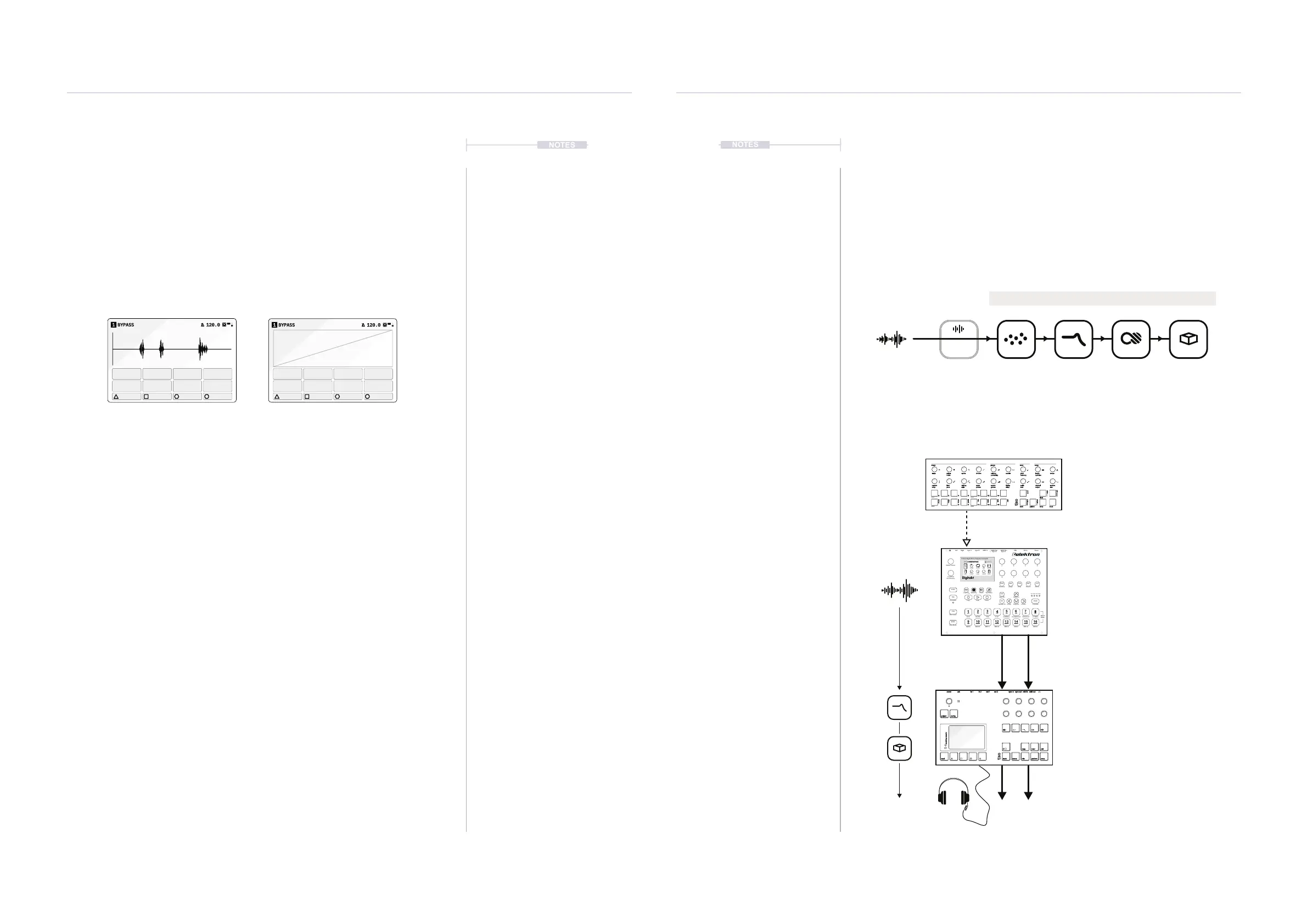
Bypass Application: S-4 As an Effects Processor
Bypass is ideal for delivering a live audio stream to the granular, lter, color
and space audio chain for processing. The chain then performs as an
effect module rather than using its internal audio. On the y processing can
add a new twist to live performances and improvisation sessions and add a
new dimension to other audio gear.
Press [CTRL] + Press device slot to bypass
Example: Press [CTRL] + Tap [MATERIAL] and select Bypass Device
Bypass Processing Effects Chain
Material Bypass Page General Device Bypass Page
power in 1 out 1 sync in midi inusb in 2 out 2 sync out midi out
project
mod track mix
copy ctrl
temp
cong
scene perform
clear
t|so
S-4
sculpting sampler
Another synth, in this case Elektron Digitakt, sequenced by the Torso Electronics
T-1. Audio routed through the S-4 as a lter bank with delay and reverb.
T-1 Sequencer.
T-1 as the main sequencer controlling the
Digitakt over a MIDI connection.
Digitakt Drum Computer & Sampler.
All audio is generated within the Digitakt.
Sequenced from the T-1 but the main
audio is sent out to the S-4 for processing.
S-4 Sculpting Sampler.
S-4 as an audio processor mangling and
transforming the audio pattern generated
at the input. Audio is channeled using the
‘Bypass’ device to effect chain.
Master Output.
16
MIDI H
15
MIDI G
14
MIDI F
13
MIDI EMIDI D
1211
MIDI C
10
MIDI B
9
MIDI A
CYMBAL
8
OPEN HAT
7
CLOSED HAT
6
COWBELL
54
CLAP
3
TOMSNARE
2
KICK
1
BANK
Mute Mode
Metronome
PTN
Chromatic
TRK
Copy Clear Paste
FUNC
Fill/Scale
PAGE
uTime- Rtrg/Oct- uTime+
Rtrg/Oct+
Reload Ptn
Save Ptn
Quantize
TRIG
Assign
SRC
Delay
FLTR
Reverb
AMP
Master
LFO
Imp/Exp. Save Proj Direct Tap Tempo
A
E
B
F
C
G
D
H
Level/Data
Sound Browser
Master Volume
Digitakt
8 Voice Digital Drum Computer & Sampler
AO1
12O.O
SMP
5
18
LEV STRT LEN LOOP LEV
TUNE PLAY BR SAMP
CYBERSPACE
CYBERSPACE
CYBERSPACE
CYBERSPACE
1:4 2:4 3:4 4:4
Sync A Sync B
Left Right Input L Input R MIDI In MIDI Out MIDI Thru USB DC In Power
Quick
Mute
shape groove tonal setup
steps cycles sustain length tempopulses velocity pitchdivision
repeats
chrom
/1 /4
/3
/16
/12
/64
/48
/2 /8
/6
/32
/24
minor
hira
tetra
major
penta
iwato
user
voicing timing channel randomtime accent scale
bank pattern temp
clear
ctrl
copy
select
save
mute
range
ramp style delay output ratepace groove rootphrase
rotate probability harmony quantize
t|so



 To Next Page