116
The S-4 Sculpting Sampler - Ofcial Manual
117
The S-4 Sculpting Sampler - Ofcial Manual
MIDI & Sync
7
MIDI & Sync
7
NOTES
NOTES
Channel View
Hold (CHANNEL)
GREEN ⬛
Available Channels
WHITE ⬛
Selected Channels
1614 1513
86 751 432
1211109
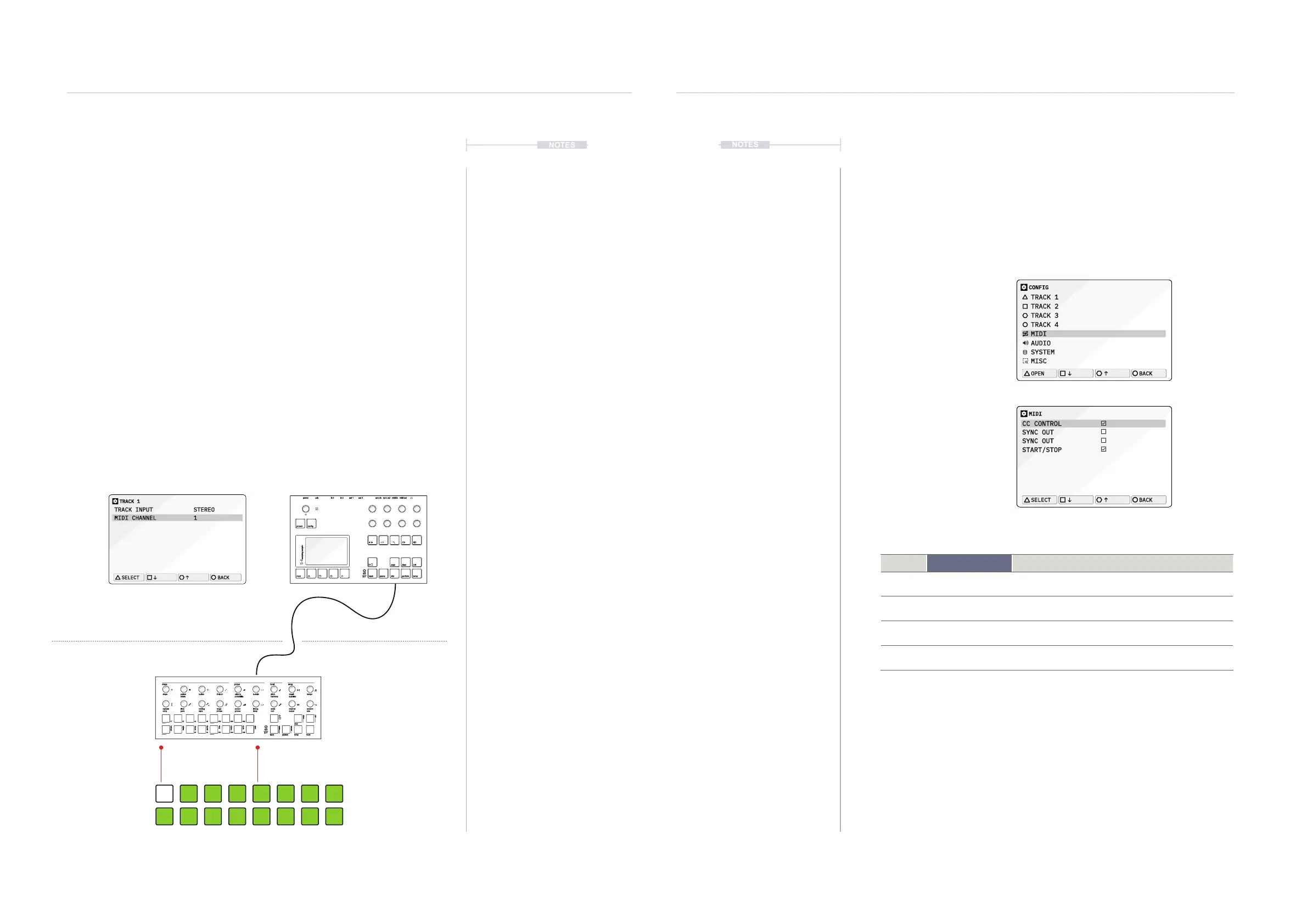
7.2 MIDI Channel
To communicate between the two connected devices the MIDI channel
must be set to the same channel on each. Check with the manufacturers
documentation for any external device MIDI conguration. Each track of
the S-4 can be congured to receive MIDI on its own individual channel.
▌ ADJUSTING THE S-4 MIDI CHANNEL
1. Connect devices using the USB or MIDI ports.
2. Press [CONFIG] to open the conguration settings.
3. Turn (SELECT) to navigate to select the track to edit. Also press the
[DOWN], or [UP], Action buttons to navigate the menu.
4. Press [OPEN], or Press (SELECT) to open the track sub-menu.
5. Navigate to highlight the ‘MIDI CHANNEL’ option.
6. Turn any of the 8 parameter knobs to set the MIDI channel or tap
[OPEN] to cycle channels. Set to the same channel as the external
device, example Channel 1.
MIDI Channels 1-16
T-1 Algorithmic Sequencer
S-4 Sculpting Sampler
TRACK 1
TRACK INPUT STEREO
MIDI CHANNEL 1
SELECT
BACK
shape groove tonal setup
steps cycles sustain length tempopulses velocity pitchdivision
repeats
chrom
/1 /4
/3
/16
/12
/64
/48
/2 /8
/6
/32
/24
minor
hira
tetra
major
penta
iwato
user
voicing timing channel randomtime accent scale
bank pattern temp
clear
ctrl
copy
select
save
mute
range
ramp style delay output ratepace groove rootphrase
rotate probability harmony quantize
t|so
power in 1 out 1 sync in midi inusb in 2 out 2 sync out midi out
project
mod track mix
copy ctrl
temp
cong
scene perform
clear
t|so
S-4
sculpting sampler
7.3 MIDI Synchronisation
The S-4 can be synchronised to an external MIDI Clock. This will then take
over the global tempo BPM of the S-4 device. A clock can also be sent from
the S-4 to synchronise other gear to the S-4. Also the S-4 can respond to
external transport controls to start and stop playback of the tracks.
MIDI Cong Settings [CONFIG] > MIDI
CONFIG
TRACK 1
TRACK 2
TRACK 3
TRACK 4
MIDI
AUDIO
SYSTEM
MISC
OPEN
BACK
MIDI
CC CONTROL
SYNC OUT
SYNC OUT
START/STOP
SELECT
BACK
Menu
Setting Option
Description
MIDI CC Control
Sets the S-4 to receive MIDI CC - Continuous Control
Change messages.
MIDI Sync In
MIDI synchronization of clock. Sync In is ON for S-4
clock control from an external device.
MIDI Sync Out
MIDI synchronization of clock. Sync Out is ON for
external clock control from the S-4 device.
MIDI Start / Stop
MIDI synchronization of transport. Start / Stop is ON to
control the playback of the S-4 from an external device.



 To Next Page