108
The S-4 Sculpting Sampler - Ofcial Manual
109
The S-4 Sculpting Sampler - Ofcial Manual
Audio In & Out
6
Audio In & Out
6
NOTES
6.4 Audio over USB
The S-4 has a class compliant USB interface with an extended array of 10
Audio Inputs and 10 Audio Outputs. The S-4 can be connected to
compatible audio gear as host or device using the USB-C connector and
will be identied as ‘S-4’ in the external devices interface conguration.
Audio Channel Output Assignments.
Routed from each individual track plus the main combined mix output to the USB channels.
Audio Channel Input Assignments.
Routed and mixed into each of the stereo tracks along with existing internal audio
including any line input audio.
Channel Audio Track Description
1 Mono All Tracks Main Audio Output - Left
2 Mono All Tracks Main Audio Output - Right
3 Mono Track 1 Audio Output - Left
4 Mono Track 1 Audio Output - Right
5 Mono Track 2 Audio Output - Left
6 Mono Track 2 Audio Output - Right
7 Mono Track 3 Audio Output - Left
8 Mono Track 3 Audio Output - Right
9 Mono Track 4 Audio Output - Left
10 Mono Track 4 Audio Output - Right
1 / 2 Stereo All Tracks Main Mix Audio Output
3 / 4 Stereo Track 1 Track Output - Left & Right
5 / 6 Stereo Track 2 Track Output - Left & Right
7 / 8 Stereo Track 3 Track Output - Left & Right
9 / 10 Stereo Track 4 Track Output - Left & Right
Channel Audio Track Description
1 Mono Track 1 Audio Input - Left
2 Mono Track 1 Audio Input - Right
3 Mono Track 2 Audio Input - Left
4 Mono Track 2 Audio Input - Right
5 Mono Track 3 Audio Input - Left
6 Mono Track 3 Audio Input - Right
7 Mono Track 4 Audio Input - Left
8 Mono Track 4 Audio Input - Right
9 Mono All Tracks Main, Pre Master FX Audio Input - Left
10 Mono All Tracks Main, Pre Master FX Audio Input - Right
1 / 2 Stereo Track 1 Audio Input - Left & Right
3 / 4 Stereo Track 2 Audio Input - Left & Right
5 / 6 Stereo Track 3 Audio Input - Left & Right
7 / 8 Stereo Track 4 Audio Input - Left & Right
9 / 10 Stereo All Tracks Main, Pre Master FX Input - Left & Right
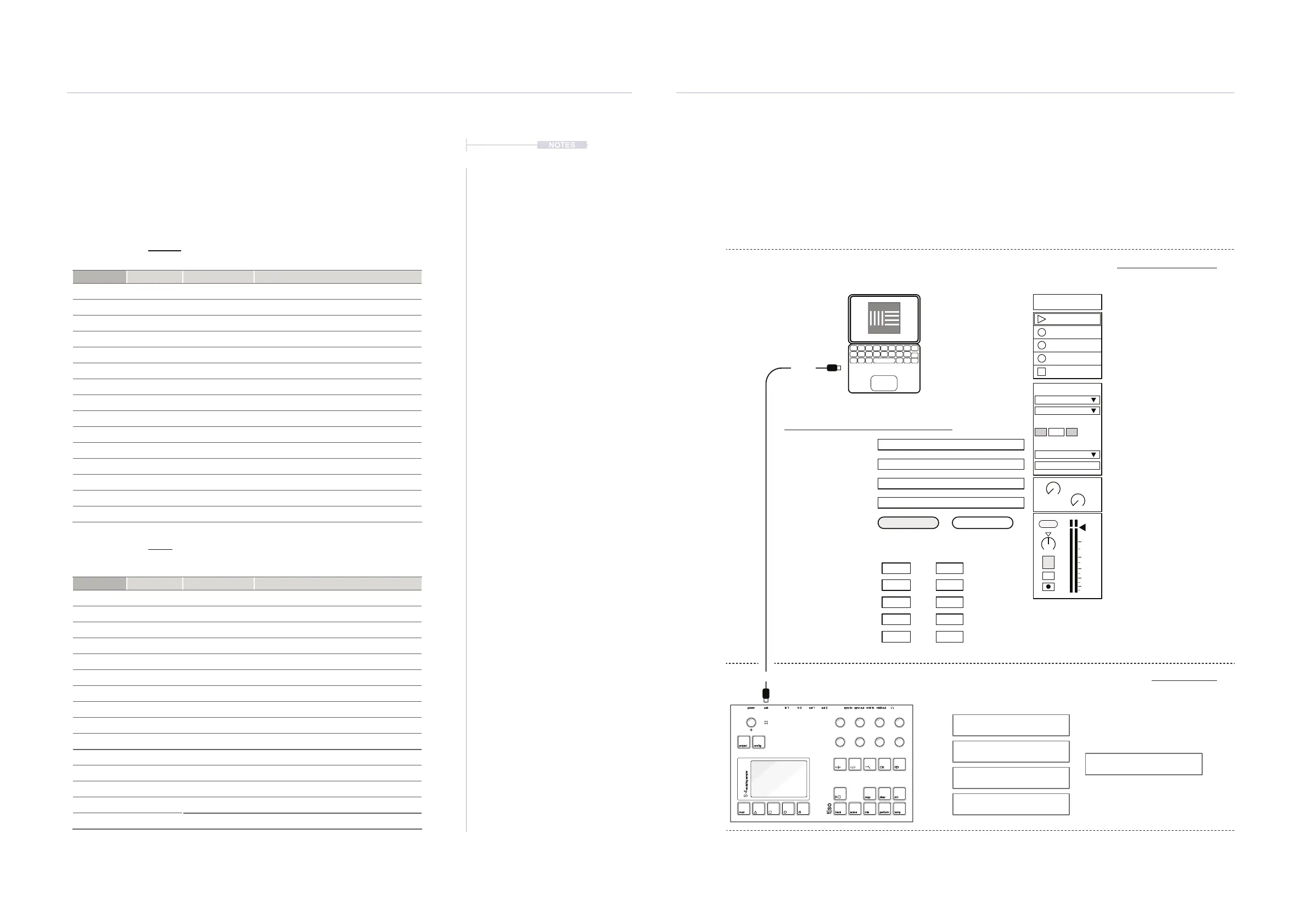
Example: Interfacing USB audio out of S-4 and into Ableton Live
The S-4 is connected to a PC / Mac with the USB cable. The example illustrates Mac settings for
Ableton Live. Tracks in Live can be congured to accept audio from the S-4 Tracks or the master
out. For example 4 Tracks can be set in Live to match each of the S-4 track outputs
1 S-4 Sounds
Audio From
Ext In
Master
3/4
In
1
s
Auto
Monitor
Audio To
A
Sends
B
1.53
0
12
24
36
48
60
power in 1 out 1 sync in midi inusb in 2 out 2 sync out midi out
project
mod track mix
copy ctrl
temp
cong
scene perform
clear
t|so
S-4
sculpting sampler
Auto On to Monitor Input
Audio Output to Master Bus
Track Enabled
Input Cong
Audio Channel 3/4, S-4 Track 1
Audio Interface is the S-4
Audio Input Track from S-4
USB
USB-C
Off
Audio Setting in Ableton Live’s Preferences
Audio Device S-4
Driver Type Core Audio
Audio Input Device S-4 (10 In, 0 Out)
Audio Output Device
MacBook Pro Speakers (0 In, 2 Out)
Channel Conguration Input Cong Output Cong
Mono In Stereo Ins
1 & 2 1 / 2
3 & 4 3 / 4
5 & 6 5 / 6
7 & 8 7 / 8
9 & 10 9 / 10
Ableton Live Environment
S-4 Environment
Track 1 3 & 4 or 3 / 4
Track 2 5 & 6 or 5 / 6
Track 3 7 & 8 or 7 / 8
Track 4 9 & 10 or 9 / 10
Main Out 1 & 2 or 1 / 2
L & R Mono
L & R Mono
L & R Mono
L & R Mono
L & R Mono
L/R Stereo
L/R Stereo
L/R Stereo
L/R Stereo
L/R Stereo



 To Next Page