110
The S-4 Sculpting Sampler - Ofcial Manual
111
The S-4 Sculpting Sampler - Ofcial Manual
Audio In & Out
6
Audio In & Out
6
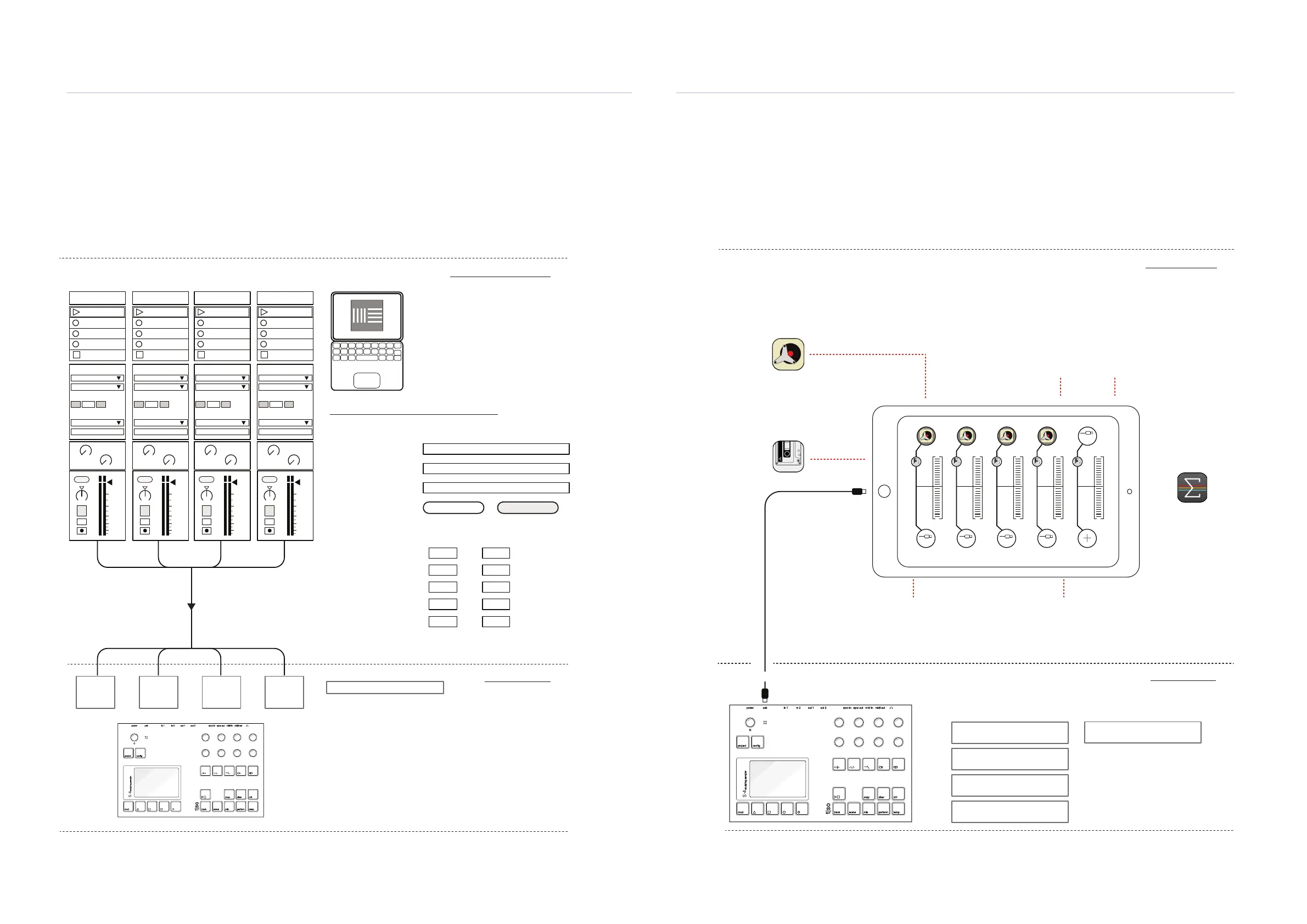
Example: Interfacing USB audio In/out of S-4 and in/out of iPad using AUM
The S-4 is connected to a iPad with the USB cable. The example illustrates iPad settings for the
AUM App. AUM is an app which manages integration of iOS audio apps and external audio and
MIDI gear. Connect the S-4 and iPad, maybe an interface is needed, then power up the S-4.
power in 1 out 1 sync in midi inusb in 2 out 2 sync out midi out
project
mod track mix
copy ctrl
temp
cong
scene perform
clear
t|so
S-4
sculpting sampler
USB-C
1: Retro Piano
USB 1+2
2: Retro Piano
USB 3+4
3: Retro Piano
USB 5+6
4: Retro Piano
USB 7+8
5. S-4 1 + 2
USB 1&2
AUM Environment
S-4 Environment
Track 1 1 & 2 or 1 / 2
Track 2 3 & 4 or 3 / 4
Track 3 5 & 6 or 5 / 6
Track 4 7 & 8 or 7 / 8
Main Out 1 & 2 or 1 / 2
L & R Mono
L & R Mono
L & R Mono
L & R Mono
L & R Mono
L/R Stereo
L/R Stereo
L/R Stereo
L/R Stereo
L/R Stereo
Example: Interfacing USB audio in to the S-4 from Ableton Live
The S-4 is connected to a PC / Mac with the USB cable. The example illustrates Mac settings for
Ableton Live. Tracks in Live can be congured to send audio to the S-4 Tracks or the master out.
For example 4 Tracks can be set in Live to match transfer audio to each of the S-4 tracks
1 S-4 SoundA
Audio From
Ext Out
1/2
In
1
s
Auto
Monitor
Audio To
A
Sends
B
1.53
0
12
24
36
48
60
2 S-4 SoundB
Audio From
Ext Out
3/4
In
1
s
Auto
Monitor
Audio To
A
Sends
B
1.53
0
12
24
36
48
60
3 S-4 SoundC
Audio From
Ext Out
5/6
In
1
s
Auto
Monitor
Audio To
A
Sends
B
1.53
0
12
24
36
48
60
4 S-4 SoundD
Audio From
Ext Out
7/8
In
1
s
Auto
Monitor
Audio To
A
Sends
B
1.53
0
12
24
36
48
60
Off Off Off Off
Ableton Live Environment
S-4 Environment
Track 1
1 / 2
L/R Stereo
Track 2
3 / 4
L/R Stereo
Track 3
5 / 6
L/R Stereo
Track 4
7 / 8
L/R Stereo
Main Mix 9 & 10
L/R Stereo
power in 1 out 1 sync in midi inusb in 2 out 2 sync out midi out
project
mod track mix
copy ctrl
temp
cong
scene perform
clear
t|so
S-4
sculpting sampler
Output Cong
Audio Setting in Ableton Live’s Preferences
Audio Device S-4
Driver Type Core Audio
Audio Input Device
MacBook Pro Speakers (0 In, 2 Out)
Audio Output Device S-4 (0 In, 10 Out)
Channel Conguration Input Cong Output Cong
Mono Out Stereo Outs
1 & 2 1 / 2
3 & 4 3 / 4
5 & 6 5 / 6
7 & 8 7 / 8
9 & 10 9 / 10
Audio is mixed into each track with the existing
audio for the respective track. Audio can be sent out
or received in simultaneously over USB.
Main mix input is Pre Master FX.
As the host Audio / MIDI
Mixer and hub.
4 Audio Output Channels
Audio Input
iPad / iPhone
S-4 Inputs S-4 Output
MSXII Fly Tape
Plug-in effect in the audio chain
Audiokit Retro Piano
Plug-in Audio instrument
Channels to transmit audio from the iPad out
to the S-4 via the USB interface connection
1 Channel to receive audio from the S-4 main
out to the iPad via the USB interface connection
Various iPad iOS apps as Audio Unit extensions or interfaced devices on the iPad through AUM can be used as audio sources
on the iPad. The example shows Retro Piano with an inline FlyTape effect. The Audio is processed in the S-4 and the main out
returned to the iPad for recording or other audio capture or processing within AUM.



 To Next Page