14
The S-4 Sculpting Sampler - Ofcial Manual
15
The S-4 Sculpting Sampler - Ofcial Manual
S-4 Sculpting Sampler
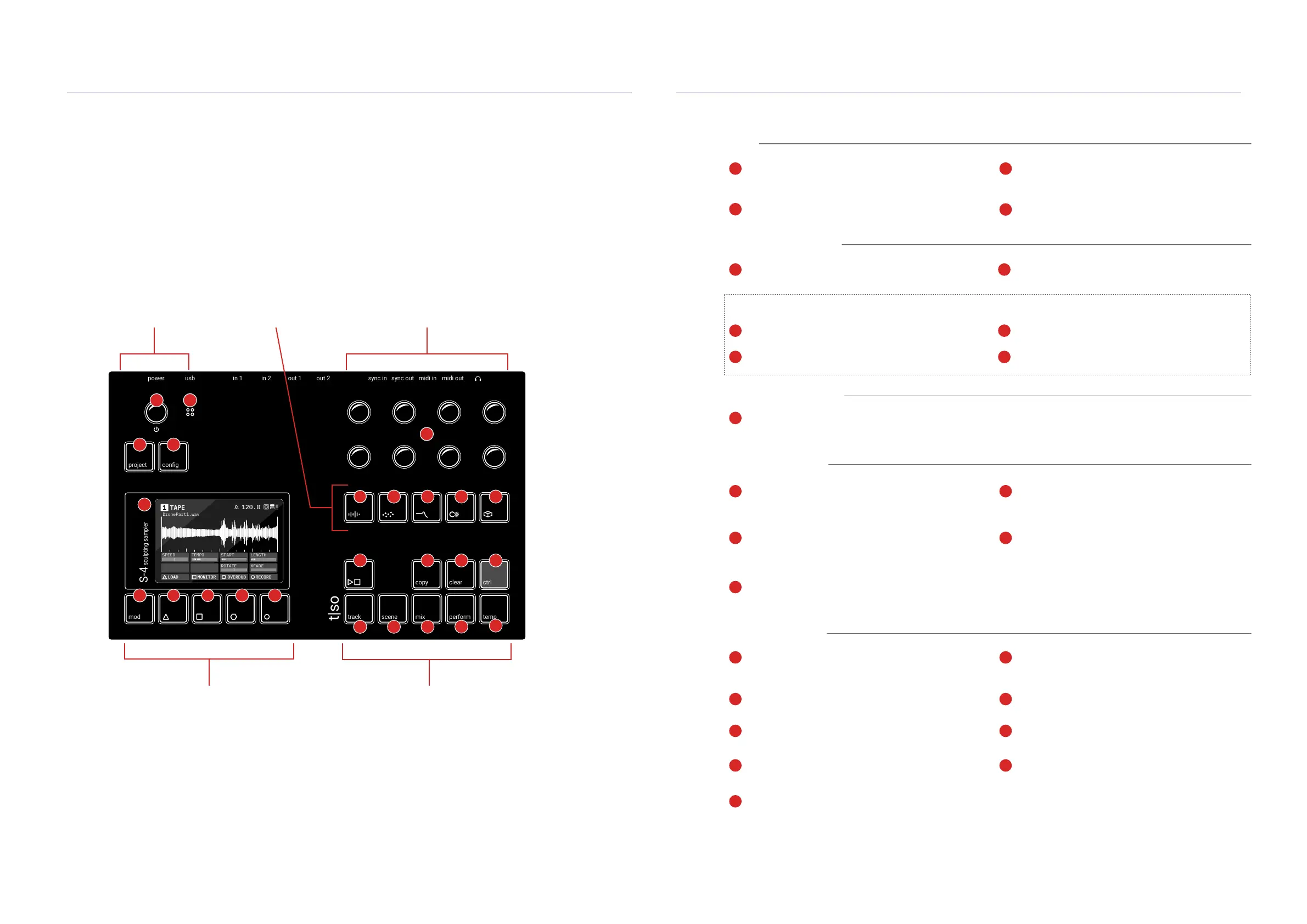
The user interface has 6 control areas consisting of 9 endless rotary / push knobs, 21 Tactile RGB
buttons, internal microphone and a high quality LCD display screen. The 8 multi-functional knobs
are focussed towards specic workow and operating mode parameters as dened on the display.
Action buttons are located below the display which typically control modulation and command
shortcuts. The audio engine devices are selectable individually by using the dedicated audio engine
buttons, some of which will become valid in a future OS release.
Main functions are labelled in black on the button by text or by a unique symbol. Secondary
functions are accessed by holding button combinations. Typically the [CTRL] button plus another
function accesses secondary functions.
power in 1 out 1 sync in midi inusb in 2 out 2 sync out midi out
project
mod track mix
copy ctrl
temp
cong
scene perform
clear
t|so
S-4
sculpting sampler
TAPE1
DronePart1.wav
120.0
120 BPM
SPEED
TEMPO
START LENGTH
ROTATE XFADE
LOAD MONITOR OVERDUB RECORD
0:0 4:0
Select - Detent Push / Rotary Encoder
Primary function is tempo, push / turn for system
options, Press Mix, Turn Select for Master volume.
Action Button
Dynamic Parameters - Push Rotary Knobs
8 Multi-functional push / endless smooth encoders
for parameter adjustment and value setting.
Material
Selects the sound source device. Default is Tape, sample
looper. Other options include Poly and Bypass.
Space
Space and time based effect devices. Vast is the
default device which Includes both reverb and delay.
Play / Stop
Transport control for starting and stopping the
internal clock.
Mix
Press to select the 4 track mixer and master output.
Temp
Planned for future update.
Global
Action Buttons & Display
Parameter Value Controls
Audio Engine Devices
Performance Buttons
Microphone
Internal microphone input.
Action Button
Granular
Granular devices. Default is Mosaic a Live granular
processor with pitch shifting and time warping algorithms.
Track
Press to open the track view option and access to track
selection and track sends.
Copy
Planned for future update.
Ctrl
Hold to access secondary functions.
Perform
Planned for future update.
Project
Access to project management menu options.
Action Button
Filter
Filter devices. Default is the Morphing resonator, Ring
device, a 48 band tuned lter bank with animation.
Scene
Planned for future update.
Clear
Hold along with another function to clear / delete.
Display Screen
3,5 inch LCD High resolution color display.
Cong
Access to global settings and conguration options.
Color
Destructive effect devices. Deform is the default device
which includes bit crushing, drive and compression.
Modulation Options
Allows modulation source conguration and routing.
Action Button
Action Buttons. Allows quick access to context dependant options and controls modulation functions.
5
7
6
4
15
2
9
13
18
21
23
25
3
10
14
19
22
1
8
11
12
16
17
20
24
1
9
5
19 20
22 23
24
25
21
11
3
7
14
2
106
12
4
15 1613
8
17
18
Global Functions
Power On/Off, Select, Mic, project and
global conguration settings
Audio Devices
Selection buttons for 5
audio engine devices
Parameter Value Knobs
8 x Multi functional endless
rotary encoders
Action Buttons
Multi-functional shortcuts and also congurable
modulator slots i.e. LFO, envelopes, random etc.
Performance Buttons
9 buttons for general editing, control,
variations and live performances.
Getting Started
1
Getting Started
1



 To Next Page