89
XR197A
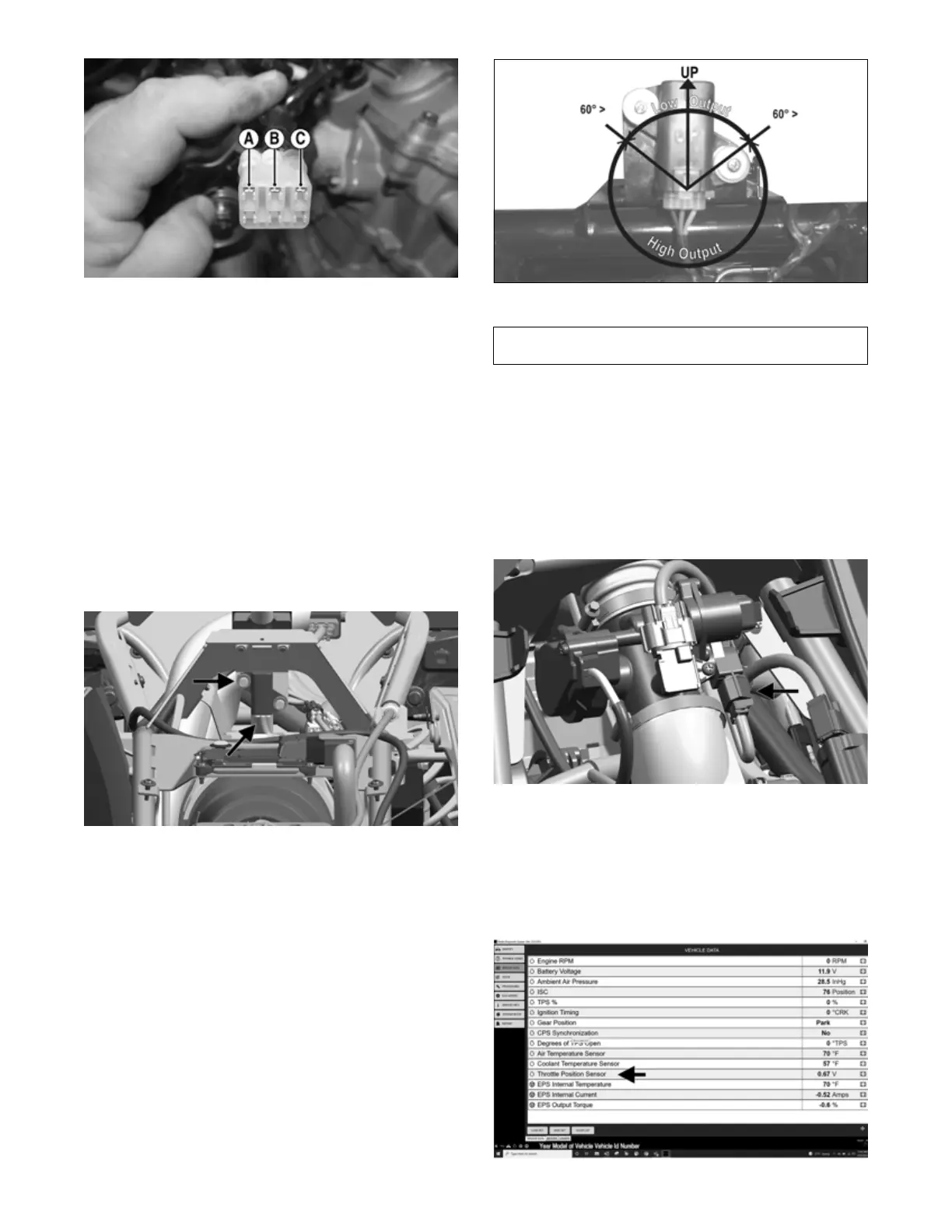
2. Turn the ignition switch to the ON position. The meter
should read battery voltage. If battery voltage is not
indicated, check the 30-amp main and 10-amp ignition
fuses, wiring harness, or the ignition switch.
3. Remove the red tester lead and connect to the
blue/brown wire (B). The meter should read less than
0.2 DC volts. If the specified voltage is not indicated,
check wire connections at the ECM or substitute
another ECM to verify the test.
Output Voltage
NOTE: Needle adapters or a “break-out” harness
will be required on the meter leads as the following
tests are made with the sensor connected:
1. Connect the three-wire plug to the sensor; then
remove the left-side mounting screw securing the
sensor to the frame.
OHA103
2. Install the needle adapters to the multimeter leads;
then select DC Voltage on the multimeter.
3. Connect the red tester lead to the blue/brown wire
(B) and the black tester lead to the pink/black wire
(A); then turn the ignition switch ON and observe the
meter. The meter should read 0.3-2.9 DC volt.
4. Tilt the sensor 60° or more to the left and right
observing the meter. The meter should read 3.0-8.0
DC volts after approximately one second in the tilted
position. If the meter readings are not as specified,
the tilt sensor is defective.
NOTE: When replacing the sensor after testing,
make sure the arrow marking is directed up.
CD705D
THROTTLE POSITION SENSOR (TPS)
NOTE: Prior to testing the TPS, inspect the
three-wire connector plug on the main harness and
the three-pin plug on the TPS for contamination, bro-
ken pins, and/or corrosion.
1. Remove the seat; then disconnect the three-wire TPS
connector plug.
2. Inspect the plug, clean or replace if needed, and
re-connect the TPS connector plug to the main har-
ness.
OHA106
Testing
See the Using Dealer Diagnostic System sub-section at
the beginning of the Electrical System section.
1. Find Throttle Position Sensor voltage on the Dealer
Diagnostic System screen and verify the value is 0.68 V
± 0.02.
OHA157A
Component data can be retrieved using the Dealer
Diagnostic System. Utilize the Sensor Data screen.



 To Next Page