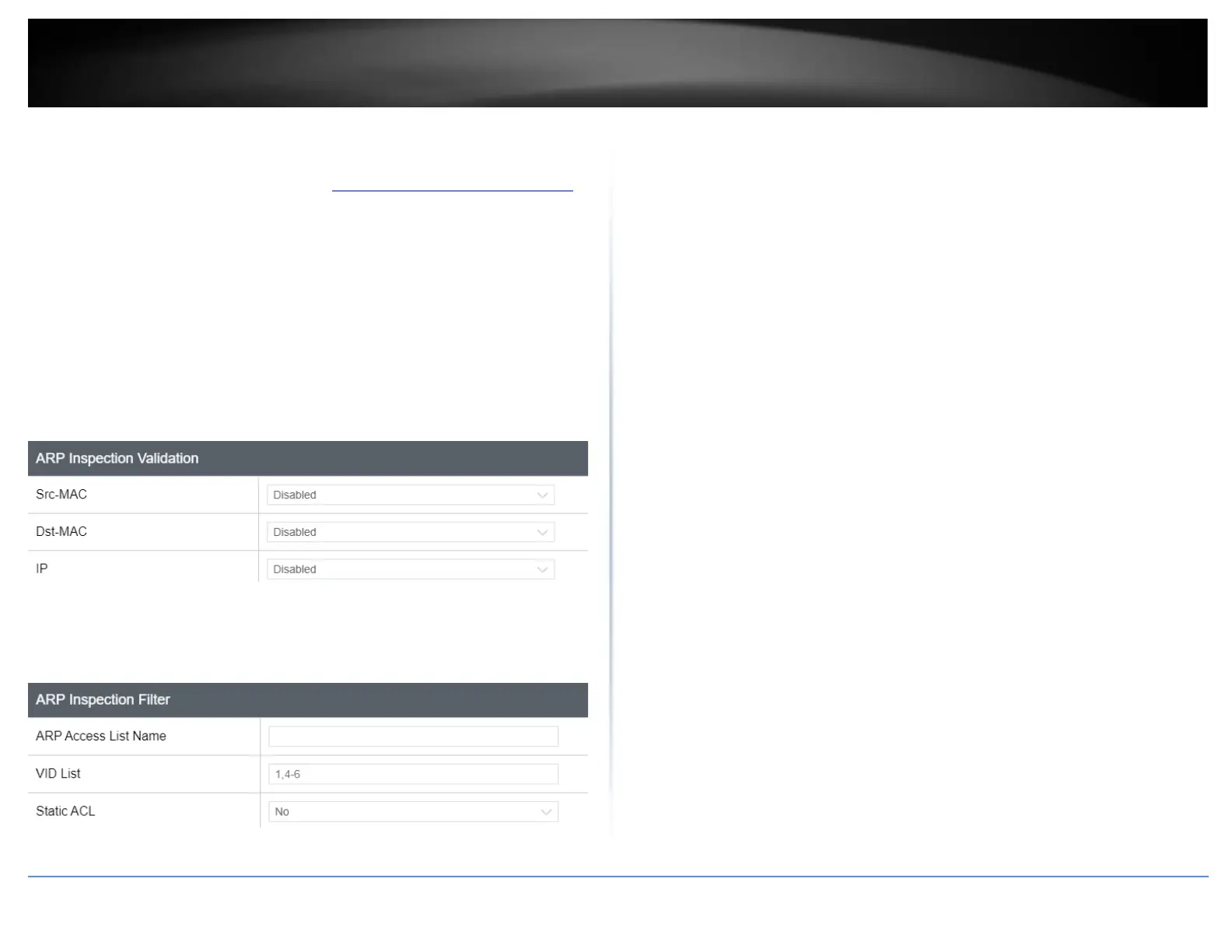
ARP Inspection Validation
Security > Dynamic ARP Inspection > ARP Inspection Validation
1. Log into your switch management page (see “Access your switch management page”
on page 5).
2. Click on Security, click on Dynamic ARP Inspection, and click on ARP Inspection
Validation.
3. Review the settings. Click Apply/Add to save the settings.
• Src-MAC – Select Enable from the drop down to enable ARP inspection
validation on source MAC.
• Dst-MAC – Select Enable from the drop down to enable ARP inspection
validation on desitnation MAC.
• IP - Select Enable from the drop down to enable ARP inspection validation on IP
• ARP Access List Name - Enter a name for the list.
• VID List – Enter a VID.
• Static ACL – Select Yes from the drop down menu to set a static ACL
4. At the bottom of the left hand panel, click Save.
5. Select the Config you would like to save the settings to, then click Save Settings to
Flash,.










 To Next Page