160 Connecting to a TriStation PC
Trident Planning and Installation Guide
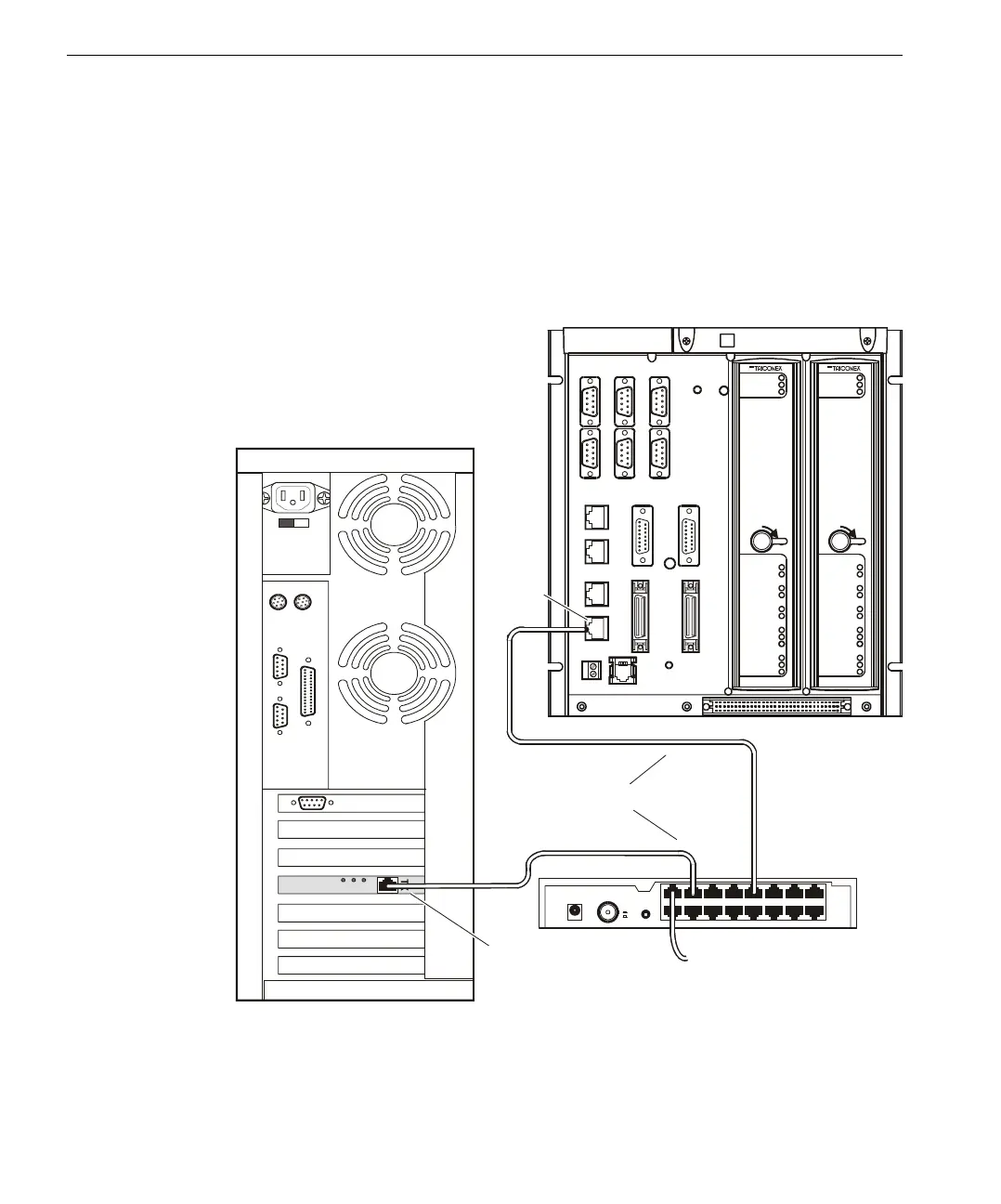
▼ To connect a TriStation PC to a CM using an Ethernet hub:
1
Attach one end of a straight-through cable to a NET1 or NET2 connector on the
CM base plate.
2 Attach the other end of the straight-through cable to an Ethernet hub, as shown
in the example below.
3 Connect the TriStation PC to the hub using another straight-through cable.
Connecting a CM
Using a Network
Hub
Network Adapter Card
1X
9X
8X
16
10BASE-T
POWER
COAX
MDI
MDIX
To External Network
Hub
RJ-45
Connector
CM Baseplate with Modules
LOCK
TX
RX
TX
RX
TX
TX
RX
RX
LINK
LINK
TX
RX
PA S S
FAUL T
ACTI VE
3201
CM
COMMUNICATIONS
SERIAL
SERIAL
SERIAL
NET 1
NET 2
LOCK
TX
RX
TX
RX
TX
TX
RX
RX
LINK
LINK
TX
RX
PA S S
FAUL T
ACTI VE
3201
CM
COMMUNICATIONS
SERIAL
SERIAL
SERIAL
NET 1
NET 2
Straight-Through Cables
TriStation PC, Rear View



 To Next Page