APX 525/625 Generator Revision C Using Del APR Utility
©
2005 Del Medical Imaging Corporation
7/5/2005 Page 191
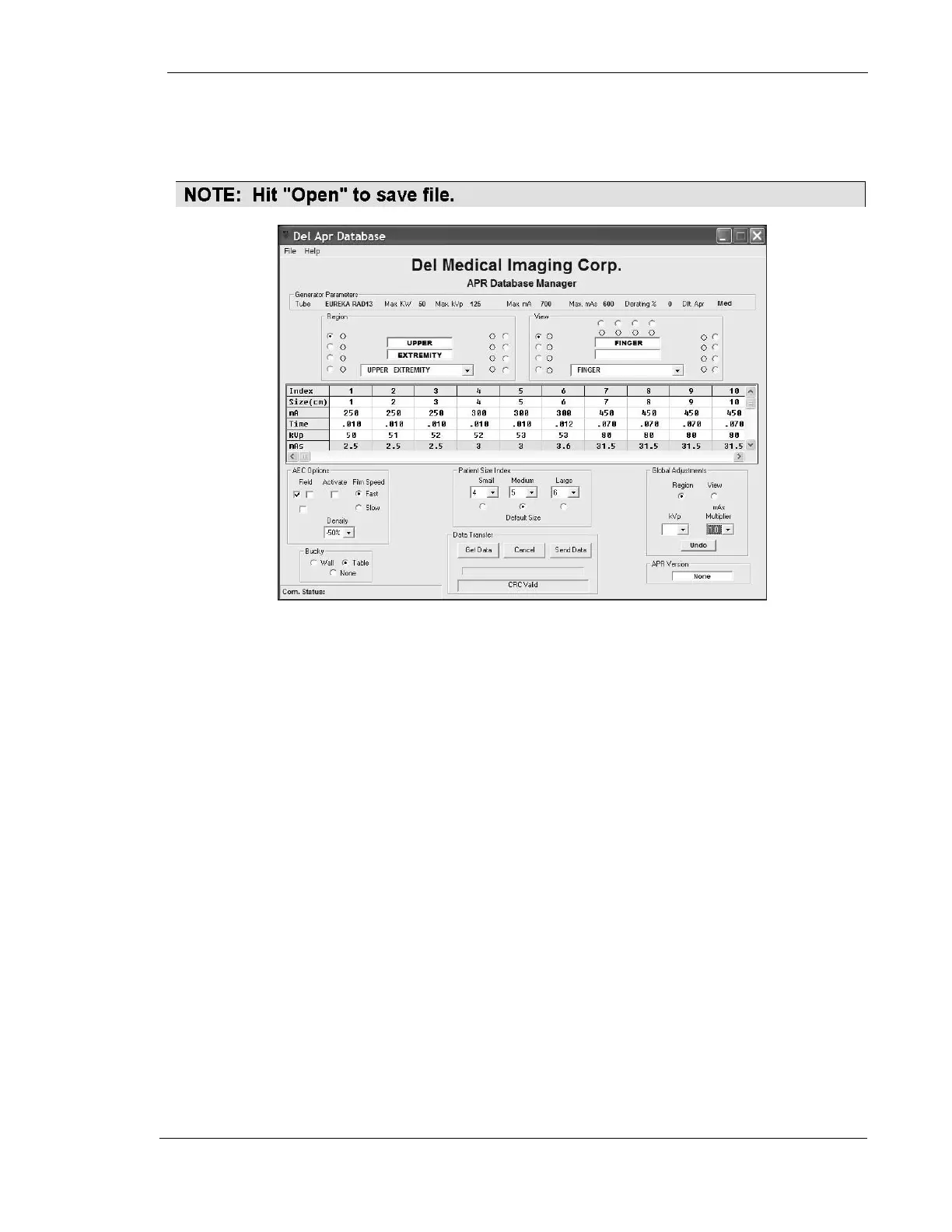
• Select 1.0 from the mAs multiplier window in the Global Adjustments portion
of the screen. The power levels for all views in this anatomic region will now
automatically update to match the capabilities of the installed x-ray tube.
• Select the next anatomical region (Lower Extremity). Re-select the 1.0 mAs
multiplier again, and verify that the power levels have been updated.
These steps must be performed for all eight anatomical regions, in order
to update the entire APR database.
Using the same approach, KV may also be changed by anatomic region or for any
view within any region, by up to +/- 10 KV.
Any parameter for any individual technique or any patient thickness within any
technique may also be changed by double clicking on the exposure parameter you
wish to change. Pulldown menus will appear in that window, listing available choices
for KV, Time, or mA.
Additionally, the AEC may be activated or deactivated for any view, as well as the
selection of ion chamber fields, film/screen combinations, overall film density
compensation, and image receptor selections. Default settings for patient sizes and
thicknesses may also be changed per view, using the Patient Size Index portion of
the APR utility screen.



 To Next Page