MM101 – D-4E HOT MELT UNIT 16
VALCO MELTON S.L.U. Pol. Ind. Agustinos C/G 34 3116 0 ORCOYEN, NAVARRA
TEL: +34 948 321580 Fax: +34 948 326584 melton@melton.es www.valcomelton.com
Warning! The external power source must be turned off before
connecting power to the unit! Failure to observe could result
in personal injury, death, or damage to injury, death, or
damage to equipment.
Warning! Only experienced service personnel should connect power
to the unit! Failure to observe could result in personal injury,
death, or damage to equipment.
Warning! The use of an earth-leakage or ground-fault power Electrical
connections should be made only by experienced service
personnel! Failure to observe could result in personal injury,
death, or damage to equipment.
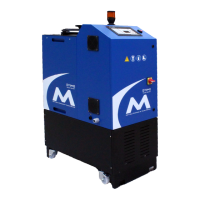
The D4-E hot melt units are configured at the factory to use one of the
following power sources:
• 110/120VAC 20 Amp single phase power with ground.
• 200/240VAC 20 Amp single phase power with ground.
The voltage configuration is located on the data plate of each unit. Always
check the data plate before hooking up power to the unit.
D4-E units are shipped from the factory with an attached power cable. Units
configured for 120V operation have a power cable with a molded plug that
can be connected to a 120V 20 Amp receptacle. Units configured for 240V
operation have a power cable with flying leads that can be connected to a
240V 20 Amp circuit with disconnect.
The unit may also be used in a static type of installation. In this case, the
system should be connected via a suitable type of flexible conduit from a
supply isolator and ground-fault power breaker. The supply should be clean
and free from excess interference from other machines.
If it is necessary to use a power cable that has NOT been supplied with the
unit, you MUST follow these steps to connect power to the unit, or personal
injury and/or damage to the unit may result.
1. Open the electrical enclosure door by unlocking the two spring cam
catches on the top of the unit.
2. Run the power cable through the cord grip in the chassis of the
unit.
3. Connect the power to the terminals marked L1, L2, and GND.



 To Next Page