MM101 – D-4E HOT MELT UNIT 73
VALCO MELTON S.L.U. Pol. Ind. Agustinos C/G 34 3116 0 ORCOYEN, NAVARRA
TEL: +34 948 321580 Fax: +34 948 326584 melton@melton.es www.valcomelton.com
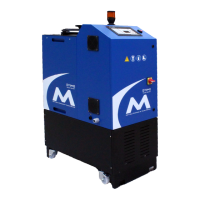
To clean the exterior of the D4-E hot melt unit, follow these steps:
Caution! Never hose- or steam-clean the unit. If the surrounding area
is cleaned in this manner, protect the unit by covering it with
plastic or other waterproof material. Failure to comply could
result in damage to the equipment.
1. Turn off the main power.
2. Using a damp cloth, clean the cabinet with a mild soap-and-water
solution.
Caution! When changing adhesives, always consult adhesive
suppliers to check compatibility between adhesives. Failure
to comply could result in damage to the equipment.
To change the adhesive, follow these steps:
1. If the old adhesive and the new adhesive are compatible, pump
enough of the new adhesive through the system to ensure that all
of the old adhesive has been cleared out (generally 3 to 5 lbs. or
1.1 to 1.9 kg).
2. If the two materials are not compatible, flush the system (see
Flushing the System” below).
The system needs to be flushed under the following circumstances:
• When changing to an adhesive that is not compatible with the
previously used adhesive.
• When loose particles of charred adhesive are causing frequent
clogging of screens and nozzles.
Exterior of
the Unit
Changing
the Adhesive
the System



 To Next Page