MM101 – D-4E HOT MELT UNIT 32
VALCO MELTON S.L.U. Pol. Ind. Agustinos C/G 34 3116 0 ORCOYEN, NAVARRA
TEL: +34 948 321580 Fax: +34 948 326584 melton@melton.es www.valcomelton.com
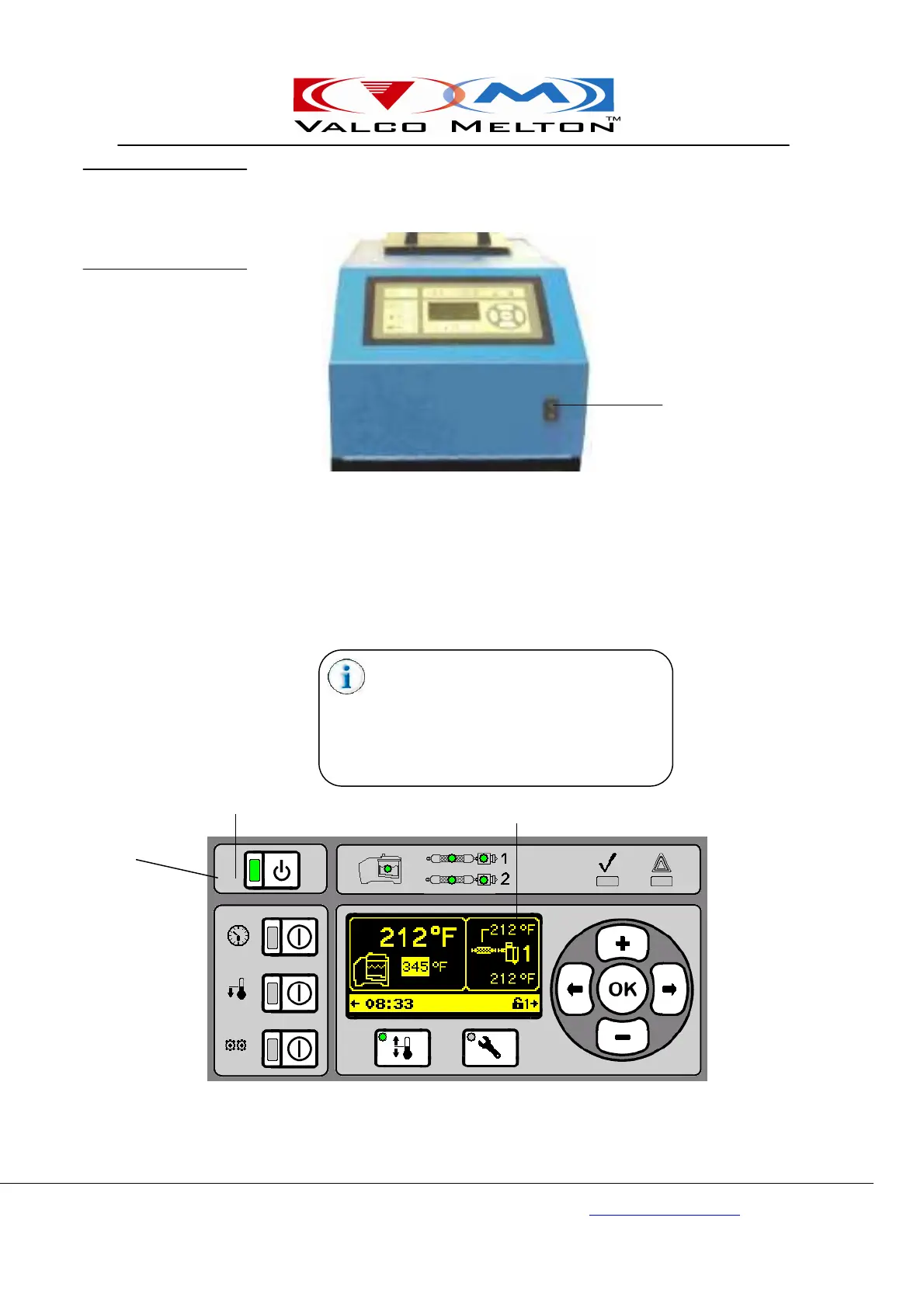
The Power On/Off Switch is located on the front of the unit (see picture
below). The Power Switch controls the power to the system.
The Standby Button controls the power to the D4-E Unit. Press the Standby
Button once. The display screen will come on and the Standby LED will
illuminate green, indicating that the unit is on. When the Standby Button is
pressed again, the display screen will go blank and the Standby LED will
illuminate orange, indicating the unit is in Standby Mode.
Power On/Off Switch
Standby
Standby Button
Display Button
D4-E Unit Control Panel
When the unit is in Standby Mode, the internal
clock is still working. The clock will turn the unit
off and on in the Timer Mode as usual.
However, if the Power Switch is turned Off, the
internal clock will NOT automatically turn the
unit on and off--the internal clock has no power
when the system is off.
and Standby
Mode



 To Next Page