MM101 – D-4E HOT MELT UNIT 66
VALCO MELTON S.L.U. Pol. Ind. Agustinos C/G 34 3116 0 ORCOYEN, NAVARRA
TEL: +34 948 321580 Fax: +34 948 326584 melton@melton.es www.valcomelton.com
•
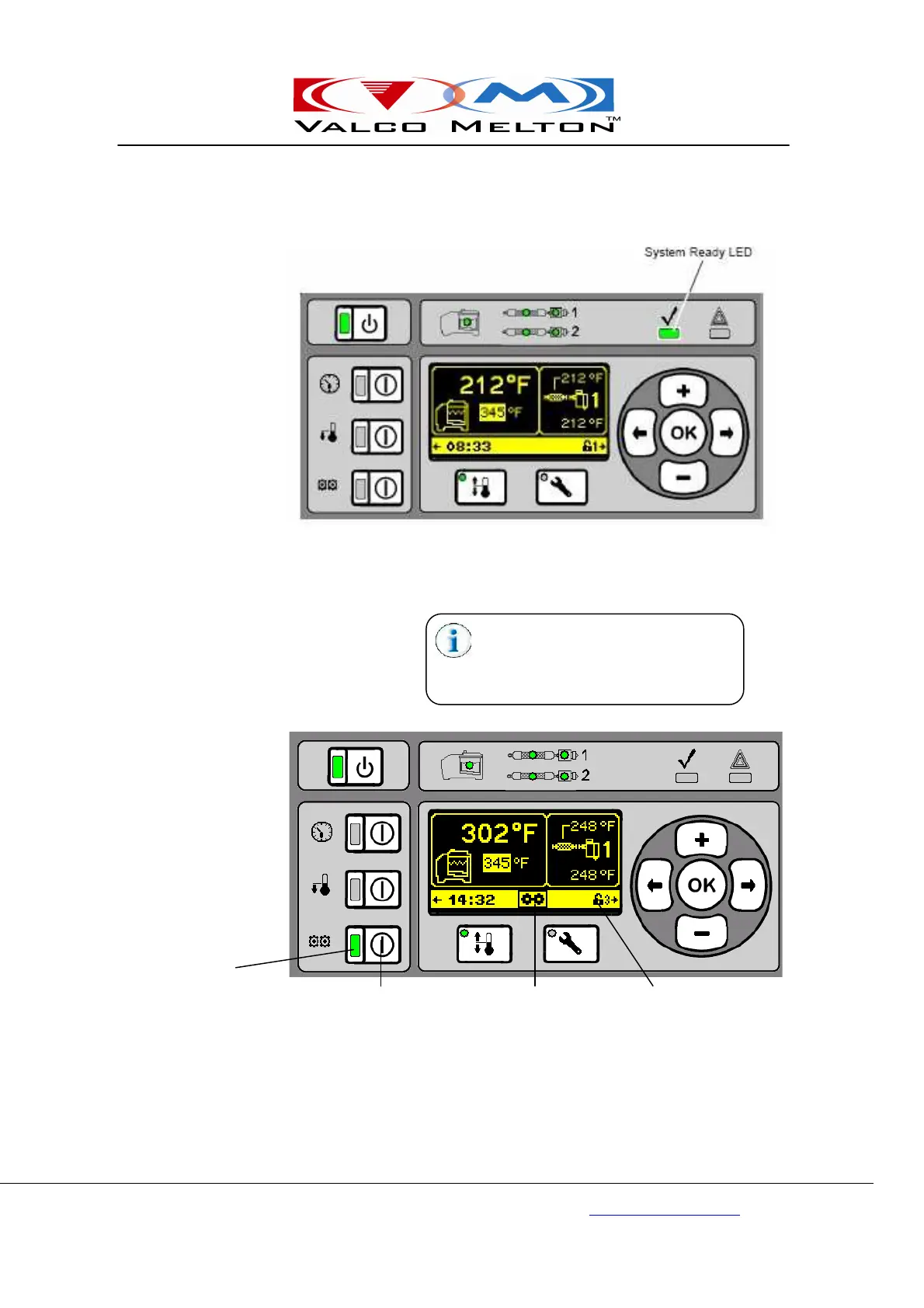
Once the tank, hoses, and guns are within 5°F (3°C) of their
respective setpoint temperatures, the System Ready LED will
illuminate green, indicating that the pump can be enabled.
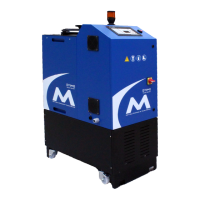
2. Press the Pump On/Off Button to turn the pump on (the Pump
On/Off LED illuminates green) and turn the pump off (the Pump
On/Off LED does not illuminate).
• The pump can be set to come on automatically when the unit is
ready (see Section 5 - Setup, “Programming Temperatures”). Note
that all temperatures must reach the system ready temperature and
the Ready LED must be illuminated green for the pump to operate.
When the pump is enabled but waiting
on the System Ready LED to illuminate
green, the pump symbol flashes in the
status bar.
Pump On/Off LED
Pump On/Off Button Pump symbol (flashes) Status Bar



 To Next Page