Balanced: The preset settings of the program can only be viewed but cannot be
modified.
Economic: The preset settings of the program can only be viewed but cannot be
modified.
Preset Settings: The configuration newly created by the administrator in "Settings"-
"Preset Settings ".
Temporary User Settings: The configuration newly created by the administrator in
"Settings"-"Preset Settings ".
Note: This page can only modify the customized configuration. If you need to modify other
configurations, please go to the "Settings" -”User Configuration” page.
5.2 Device Management
5.2.1 Device Information View
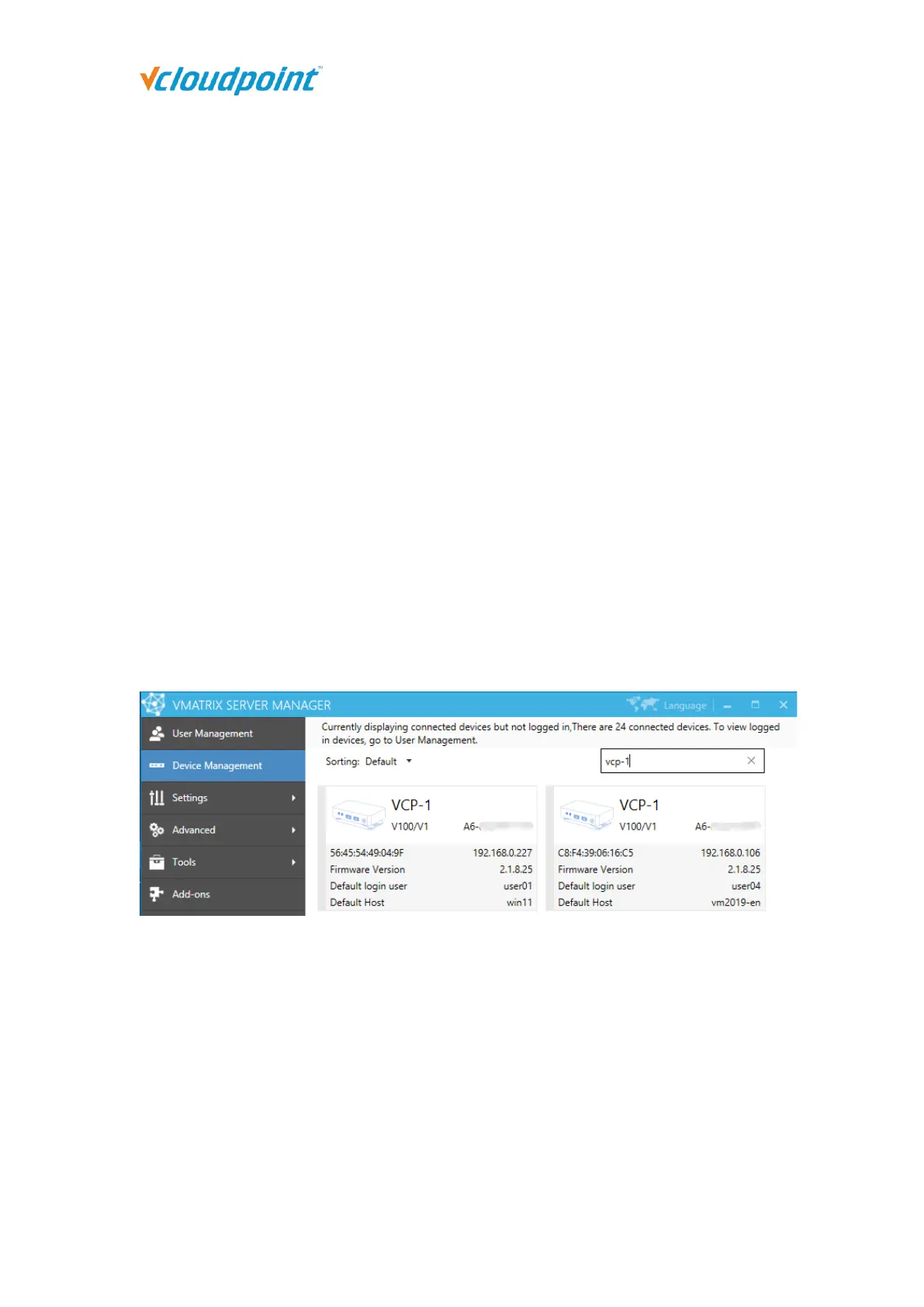
On this page, you can view device information including: Device name, Device model, Serial
number, Mac address, IP address, Firmware version, Default login user and Default host.
Note: This page displays connected devices (powered on devices in the same LAN as the
host or powered on devices that has ever logged into the host) but not logged in. To view
logged in devices, go to User Management.
5.2.2 Right Click Menu
Right click on a single or multiple device modules to open the device management menu.
Each of displayed options (except Notification) performs a function which can be found on
the device interface, allowing administrators to set up or manage the devices centrally and
remotely from the host side. You can drag the mouse, or use shortcut keys like “shift” or



 To Next Page