Vertiv | SmartCabinet | User Manual 97
System Operation
• The MSC intelligent monitoring system can support up to ten dierent shutdown tasks.
• The Shutdown Schedule task can only be activated when Enable Device is selected.
• UPS Shutdown needs to reserve the shutdown time of 10 minutes for the servers connected to the UPS.
Therefore, the Shutdown time can be set after a short timeframe of 10 minutes.
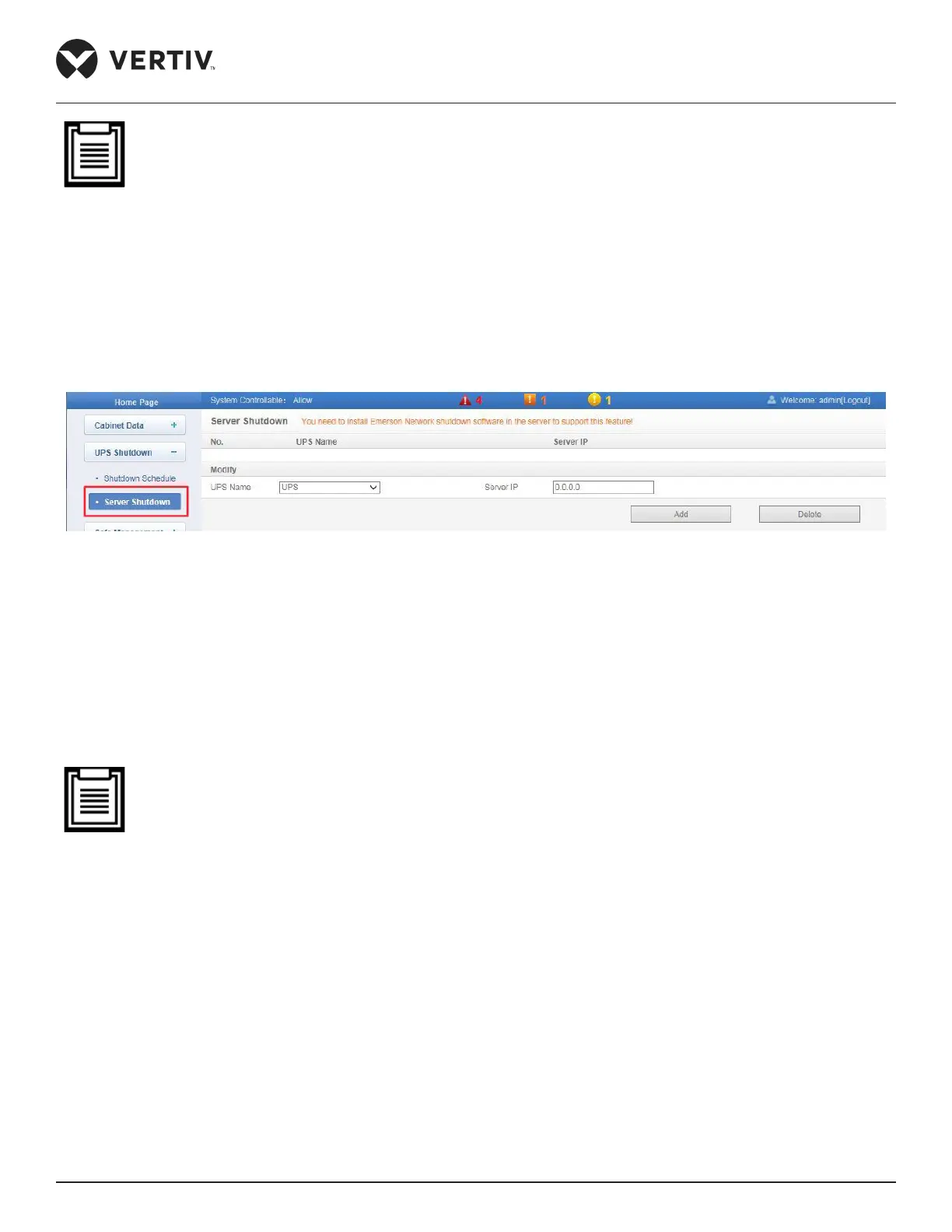
4.2.4.2.2. Server Shutdown
Click Server Shutdown under the UPS Shutdown menu , the Server Shutdown page as shown in Figure 4-60 is
displayed.
Figure 4-60 Server Shutdown
1. Select a UPS from the UPS Name dropdown list.
2.
3.
• To use the Server Shutdown function, install the Vertiv Shutdown software in the server.
4. To delete a Server Shutdown task, Select the task to be deleted in the Server Shutdown task list and click
the Delete button to complete the deletion of the task from the list.
4.2.4.3. Safe Management
The Safe Management menu in the MSC card monitoring system has tow sub menus, namely- “Fire Fighting”
and “Door Access”.
4.2.4.3.1. Fire Fighting
The Fire Fighting sub menu in the Safe Management menu includes two tabs, namely- Fire Fighting Status and
Fire Alarm Strategy.



 To Next Page