Vertiv | SmartCabinet | User Manual 20
System Installation
• Ensure that the equipment stands upright. Do not place the equipment outdoors.
• While using the forklift or the hand pallet truck, ensure that the fork arms,(if adjustable and exible)
open to the greatest extent. This is done so that the fork arms can be placed under the pallet of the
equipment in a precise manner.
• Ensure that the length of the fork arms match with that of the equipment.
2.1.2. Unpacking
Packing materials of the cabinet are recyclable. Retain the packing materials for further use or dispose of
them appropriately as per the protocols and local regulations.
Following are the steps and procedures that are to be observed during the unpacking process:
1. Remove the packing materials.
• Move the equipment of the assembled package to an open, rm, and leveled ground.
• Cut o the packing strip on the package paper box using a utility knife followed by removing the package
paper box of the cabinet.
• Remove the extension lm on the cabinet using a utility knife along with the package materials in the
baggage.
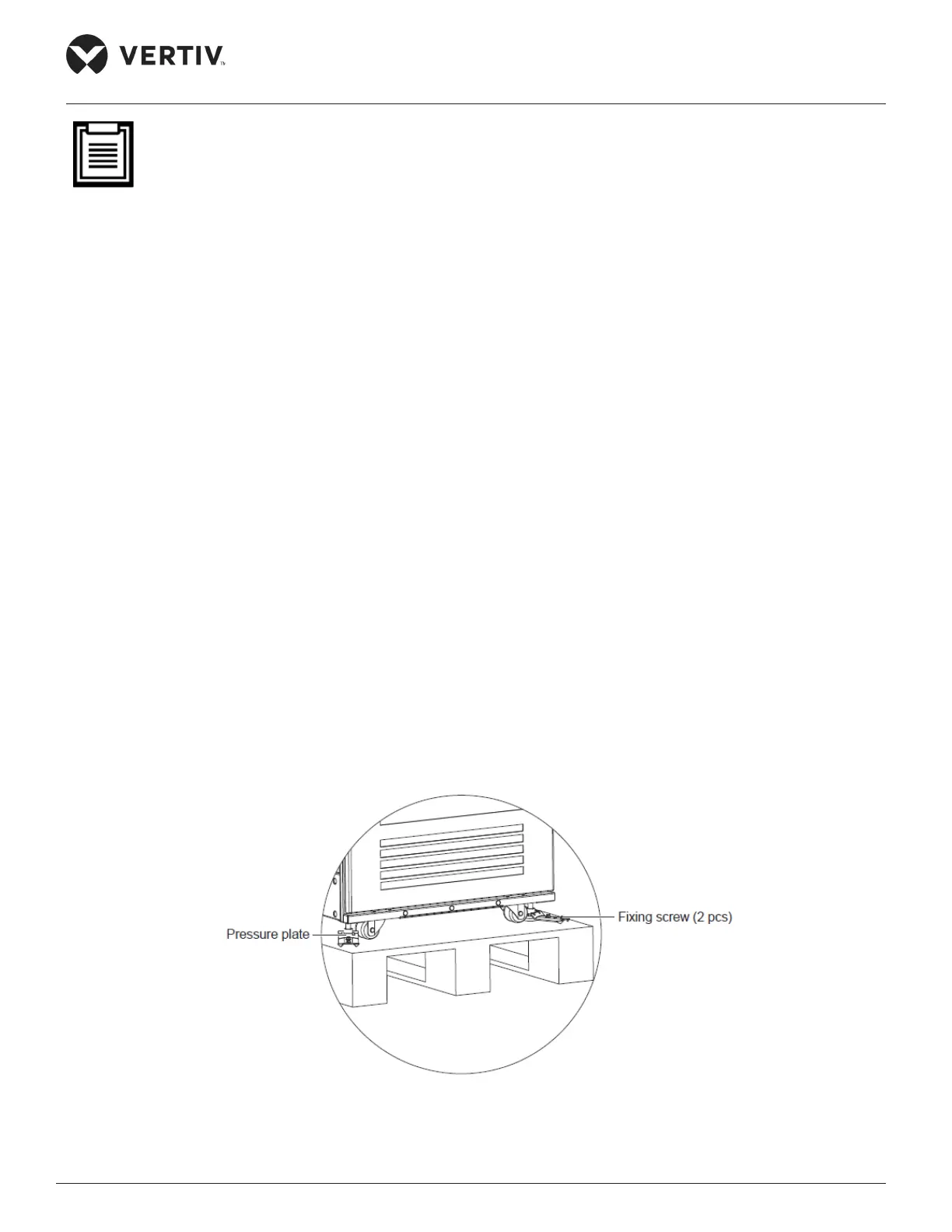
2. Remove the feet pressure plate.
• Remove the xing screws on the pallet using a sleeve or movable wrench followed by removing the
pressure plate as shown in Figure 2-10.
Figure 2-10 Removing the Feet Pressure plate



 To Next Page