Vigilant MX1 Operator Manual Document: LT0344
Page 3-2 8 August 2017 Issue 2.4
This chapter describes using the operator interface to investigate the
details of a fault condition, and to manage disables.
Refer to the page number listed in the following table for information on a
specific topic.
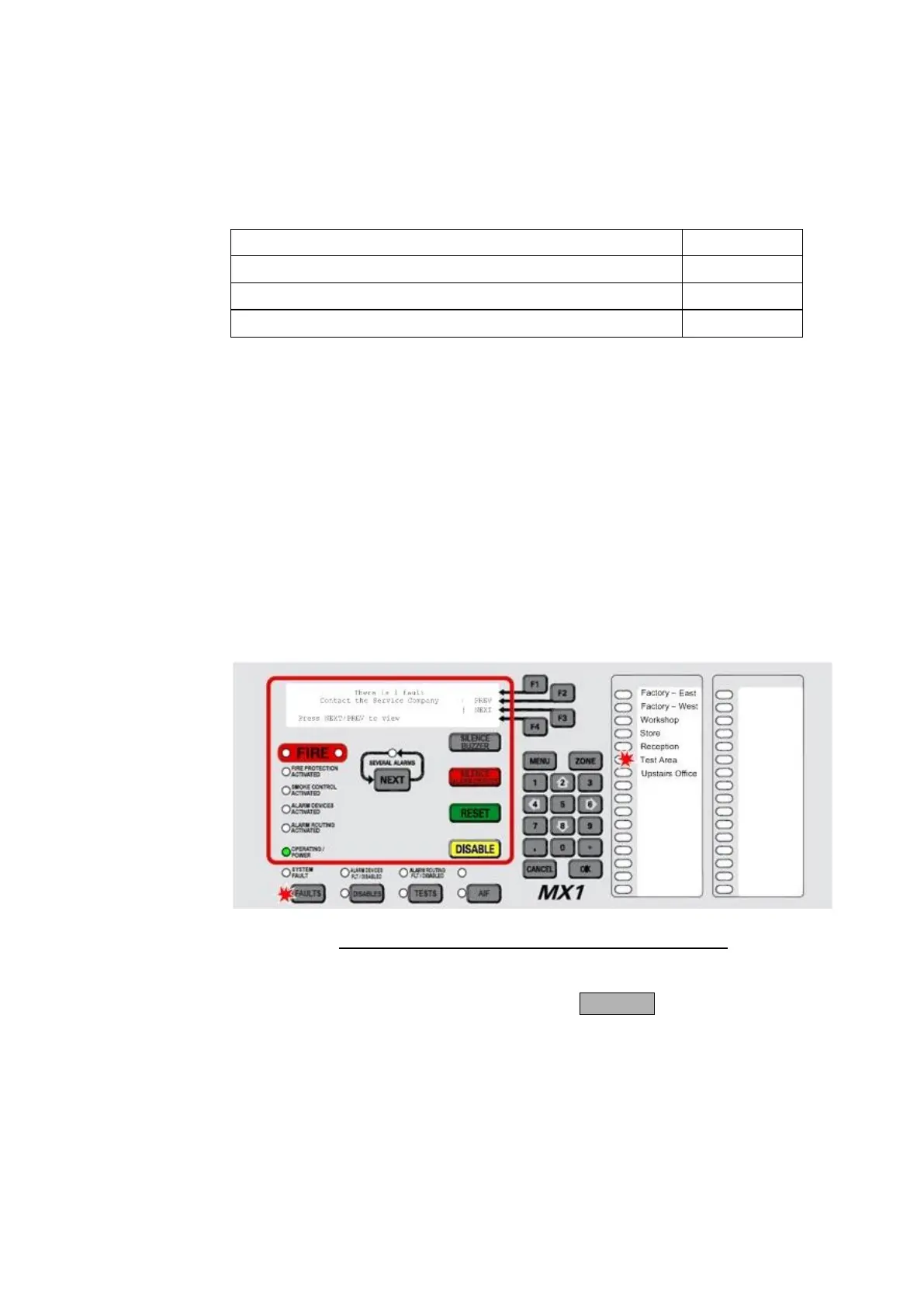
When a fault condition that has not been disabled is detected by the
MX1, the operator interface does the following:
The Common Defect LED will be on.
The yellow FAULTS indicator lights.
If fitted, a yellow zone indicator will flash for a zone fault.
The buzzer sounds continuously (if configured, e.g., local mode
panels).
The LCD displays the number of fault conditions present and may
show a fault action message, for example to call the service
company, as shown below:
Fig 3-1 – Operator Interface Showing Fault Condition
If a fault condition occurs on a disabled item then no indication is given,
but the fault(s) can be viewed by pressing FAULTS.
Faults should be assessed and repaired only by a trained and competent
operator. Otherwise, the service company should be called. Chapter 10
contains a fault finding guide.
How the MX1
Indicates the
Presence of a
Fault
Responding
to a Fault
Indication



 To Next Page