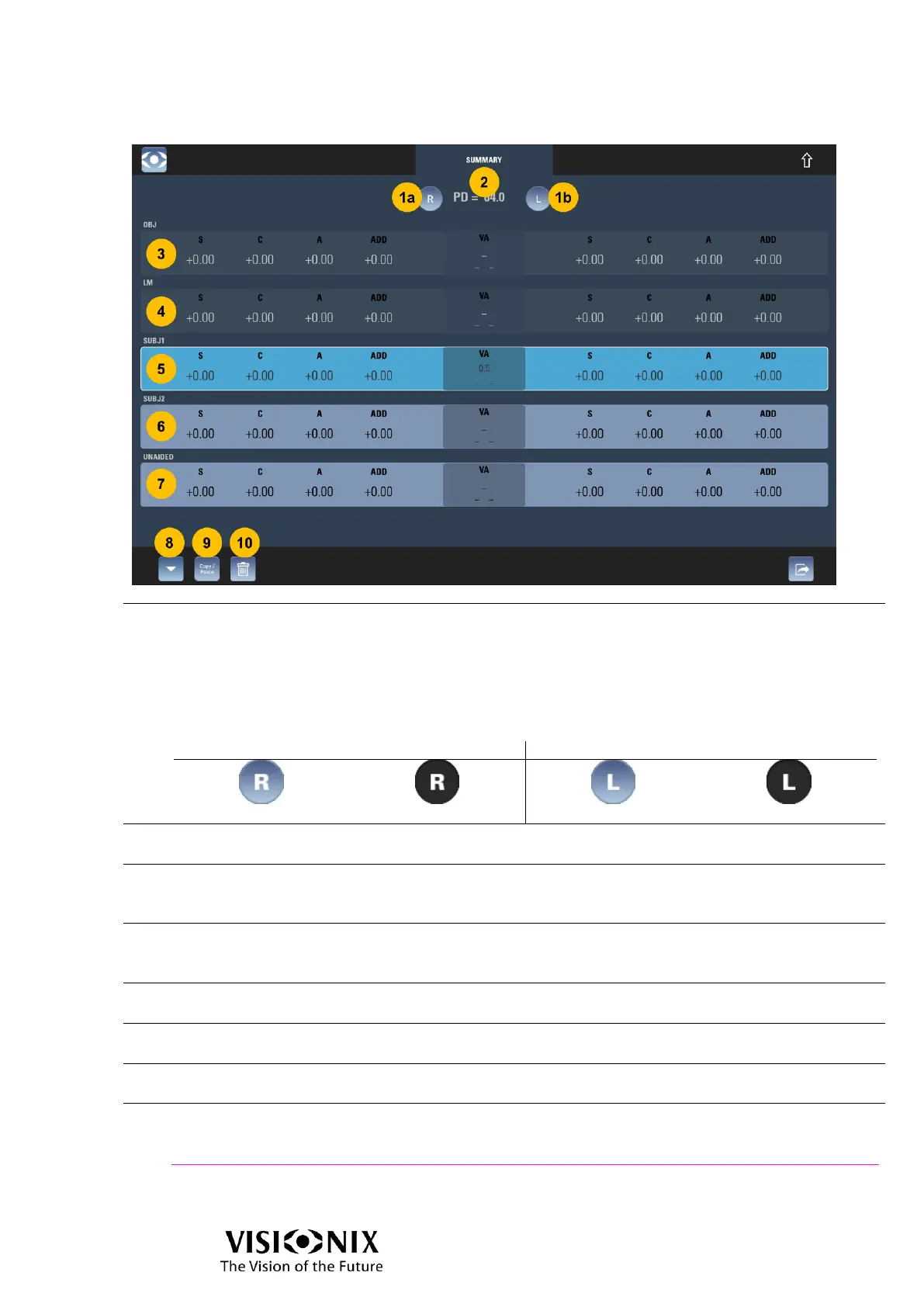
Buttons to open/close right and left eyes
Whatever the setting is (R/L or R/B/L mode), there is only R & L buttons.
(1a): Alternating opening/closing of right eye; no action on left eye
(1b) Alternating opening/closing of left eye; no action on right eye
The meaning of the display is:
PD value
It is the total PD value.
OBJ data
Enabled only if there is data.
Tap on it to place OBJ in front of the patient's eyes.
LM data
Enabled only if there is data.
Tap on it to place LM in front of the patient's eyes.
SUBJ1 data
Tap on it to place SUBJ1 in front of the patient's eyes.
SUBJ2 data
Tap on it to place SUBJ2 in front of the patient's eyes.
Unaided (equivalent to every value at zero / “no glasses”)
Tap on it to place Unaided in front of the patient's eyes.
Input data button
Tap on it to open Input data window.
See also
Input data window page 42.



 To Next Page