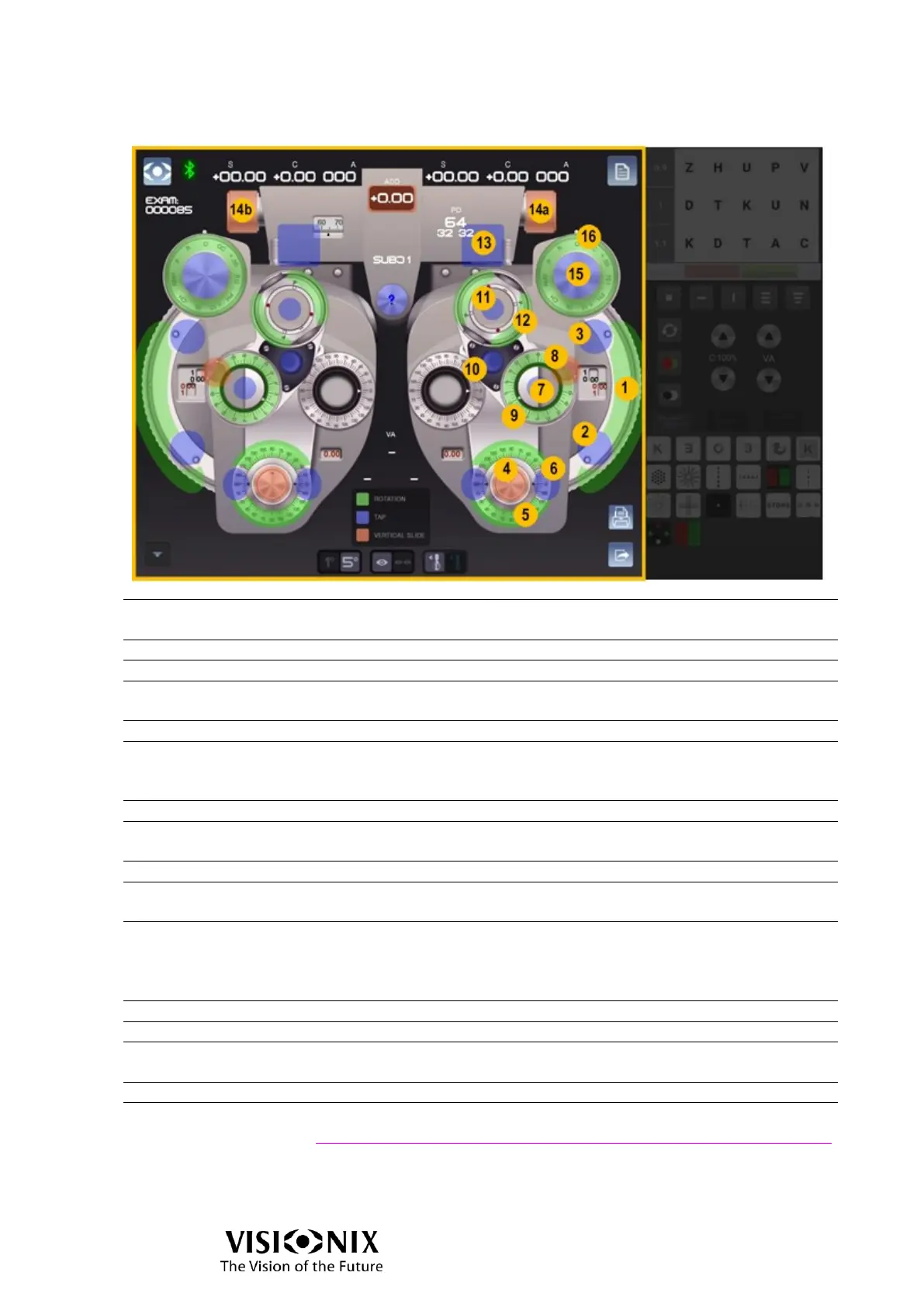
Interactions in Manual mode
Rotate the button to increase (clockwise) or decrease (anti-
clockwise) the sphere value by 0,25D.
Tap the button to decrease the sphere value by 3D.
Tap the button to increase the sphere value by 3D.
Slide the button to increase or decrease the cylinder value by
0,25D.
Rotate the button to change the axis value.
Tap to change the axis by 1° or 5° (according to the 1°/5° toggle):
Tap on the left to increase the axis
Tap on the right to decrease the axis
Rotate the button to change the prism orientation. The choices are:
Up/Down/In/Out.
Slide the button to increase or decrease the prism value by 0,5∆.
Remove Prism or Cross cylinder
When crossed cylinders are not inserted:
➢ Tape to insert cross cylinder.
When crossed cylinders are inserted:
➢ Tap to change “1”/”2” position of Cross cylinder
Rotate to verify axis or cylinder.
Tap to adjust the convergence (far vision or near vision positions).
Slide to adjust the Pupillary Distance (13a: left eye, 13b: right eye)
Tap to open/close the eye.
Rotate to change the accessory.
See also
Accessories abbreviations page 31



 To Next Page