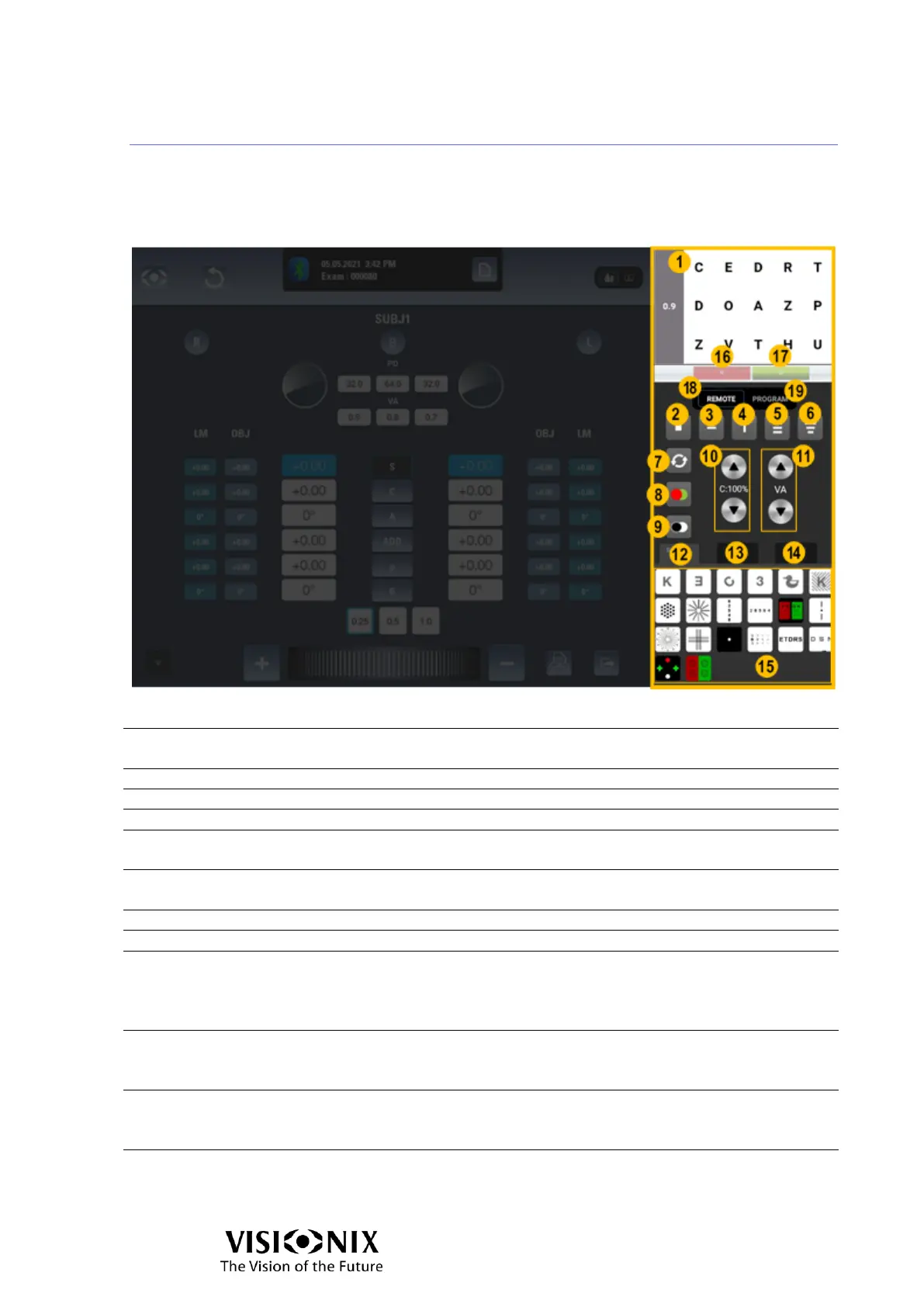
Examination interface: Chart display control
The upper part of the display area enables you to check what is displayed to the patient
by the display unit.
The lower part of the display area enables you to select how and what is displayed to the
patient.
Display on the chart
display
Enables you to check what is displayed to the patient by
the display unit. The visual acuity is displayed on the left.
Enables you to display a single optotype.
Enables you to display one line.
Enables you to display one column.
Enables you to display the letters in three lines of
identical acuity.
Enables you to display the letters in three lines of
different acuity.
Enables you to reorganize the distribution order.
Enables you to switch to a red/green background.
Enables you to reverse the black and white colors and
display optotype in white on a black background.
For some red green tests or polarized tests, enables you
to invert right/left eye display.
Enables you to adjust the contrast.
Note that the change of contrast does not work on the
red/green background.
Enables you to adjust the visual acuity.
When you decrease the acuity the letters become larger,
when you increase it, they become smaller.
Enables you to access to the following tests:



 To Next Page