61
KEYPAD (HMI) OPERATION
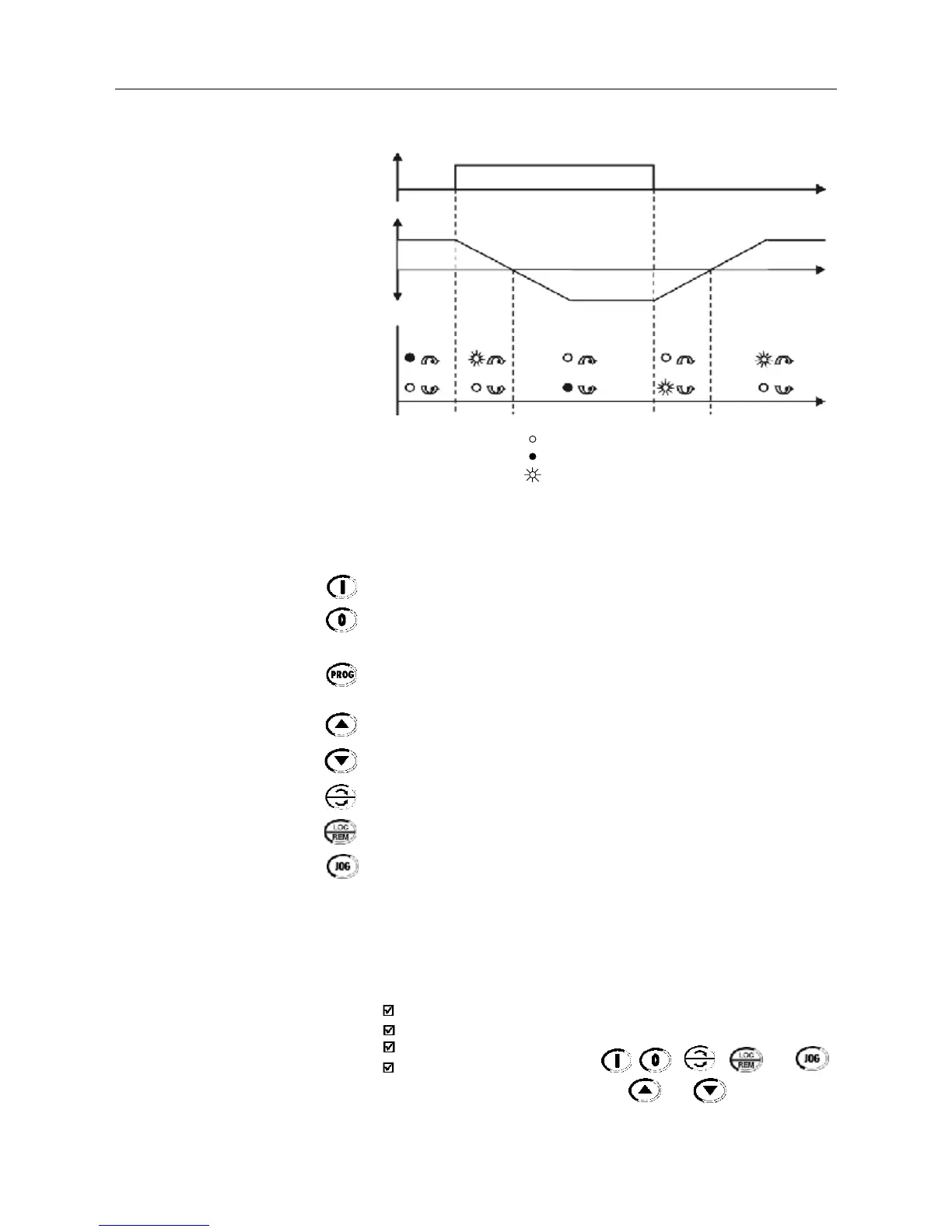
Figure 5.2 - Direction of rotation (FWD/REV) LEDs
OFF
ON
FLASHING
Basic Functions of the Keys:
Starts the inverter via acceleration ramp.
Stops (disables) the inverter via deceleration ramp.
Also resets inverter after a fault has occurred.
Toggles the LED display between parameter number and its value
(number/value).
Increases the frequency, the parameter number or the parameter value.
Decreases the frequency, the parameter number or the parameter value.
Reverses the direction of motor rotation between Forward/Reverse
Toggles between the LOCAL and REMOTE modes of operation .
Performs the JOG function when pressed. Any DI programmed for Gene-
ral Enable (if any) must be closed to enable the JOG function.
The keypad is used for programming and operating the CFW-08, allowing
the following functions:
indication of the inverter status and operation variables;
fault indication and diagnostics;
viewing and programming parameters;
operation of the inverter (keys , , , and )
and speed reference setting (keys and ).
5.2 USE OF THE KEYPAD
HMI
FWD/REV
control
selection
FWD /
REV
HMI LED
Situation
Forward
Reverse
Forward
t
t
t



 To Next Page