3 Copy
74 Xerox 6204 Wide Format Solution
Copy
3
Rendering
The Rendering option permits you to specify the type of image processing that will be
applied to the scanned image information, that is, either [Binary] or [Error Diffusion].
Binary processing is best suited to originals which consist of line and text. Error
Diffusion processing is best suited to photographs. The factory default setting is
[Binary].
Procedure
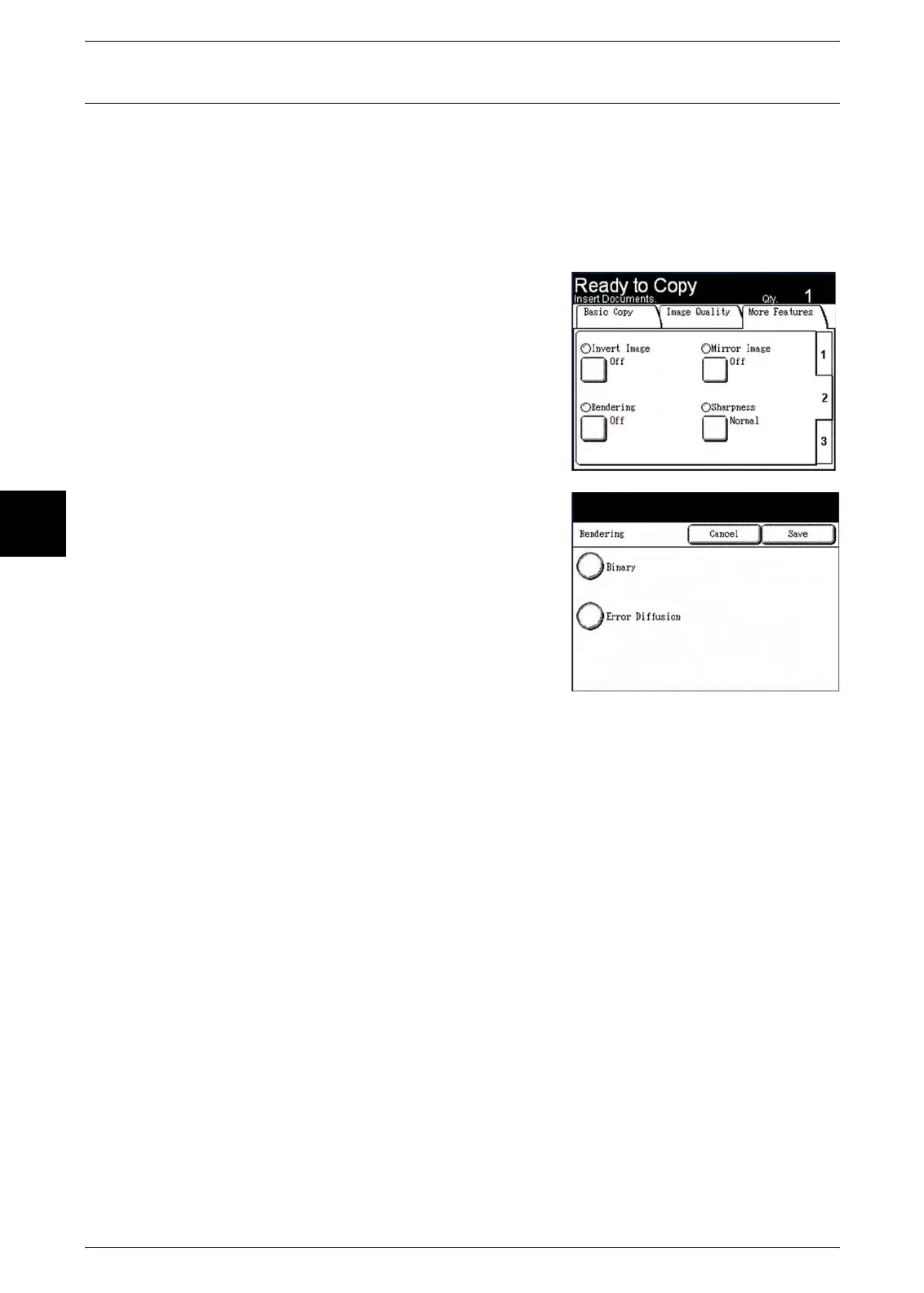
1 Select tab [2] at the right edge of the [More
Features] tab to display the [Rendering] feature
button.
2 Select [Rendering].
The [Rendering] screen will display.
3 Select the appropriate option, either [Binary] or
[Error Diffusion].
Binary
This reproduces images with white and black in
two gradations.
Error Diffusion
Select this item when scanning an original that
needs to be reproduced with halftones, such as
photos.
4 Select [Save].


 To Next Page
 Loading...