5-4
1
2
3
4
5
6
7
8
9
10
ELECTRICAL
FUEL INJECTION SYSTEM
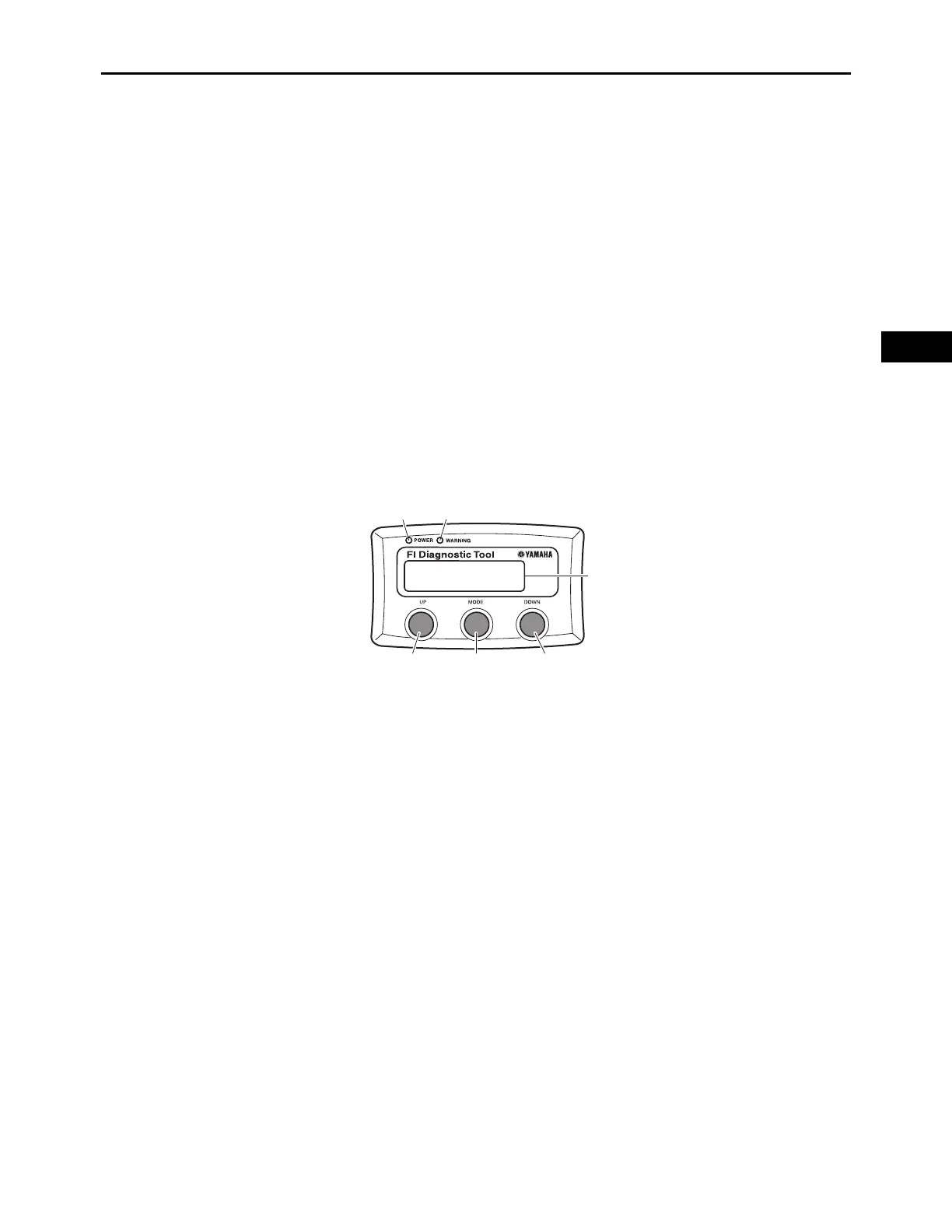
BUTTONs AND LEDs
The “UP” button “1”/“DOWN” button “2”
1.
The “UP”/“DOWN” buttons are used to scroll each MODE.
2.
The “UP”/“DOWN” buttons are used to decide “YES” or “NO” to delete history error code in
“CLEAR” mode.
3.
Reboot FI Diagnostic Tool to push “UP”/“DOWN” buttons simultaneously for more than 3 sec-
onds.
“MODE” button “3”
The “MODE” button is used to move to MODE select function, and decide the operating MODE.
“POWER” LED (Green) “4”
The LED comes on when power (Main Switch Voltage) is supplied to the FI Diagnostic Tool.
“WARNING” LED (Orange) “5”
The LED comes on when error code is detected in “CURRENT” MODE.
LCD Display “6”
This LCD display indicates error codes, sensor outputs, engine run hours, currently selected MODE
or function.
6
312
54


 To Next Page