SU=çÑ=NPQ fåëíêìÅíáçå=j~åì~ä=`êçëëÄÉ~ã=PQM=ÉåMOE`lo F
SK=léÉê~íáçå
lÄí~áåáåÖ=~=Ñáêëí=áã~ÖÉ
6.4.2. Loading the specimen chamber
IMPORTANT
If you use the optional airlock, refer to the respective instruction manual.
To display the inside of the specimen chamber in the image area of the user interface, switch to
the TV mode.
Procedure
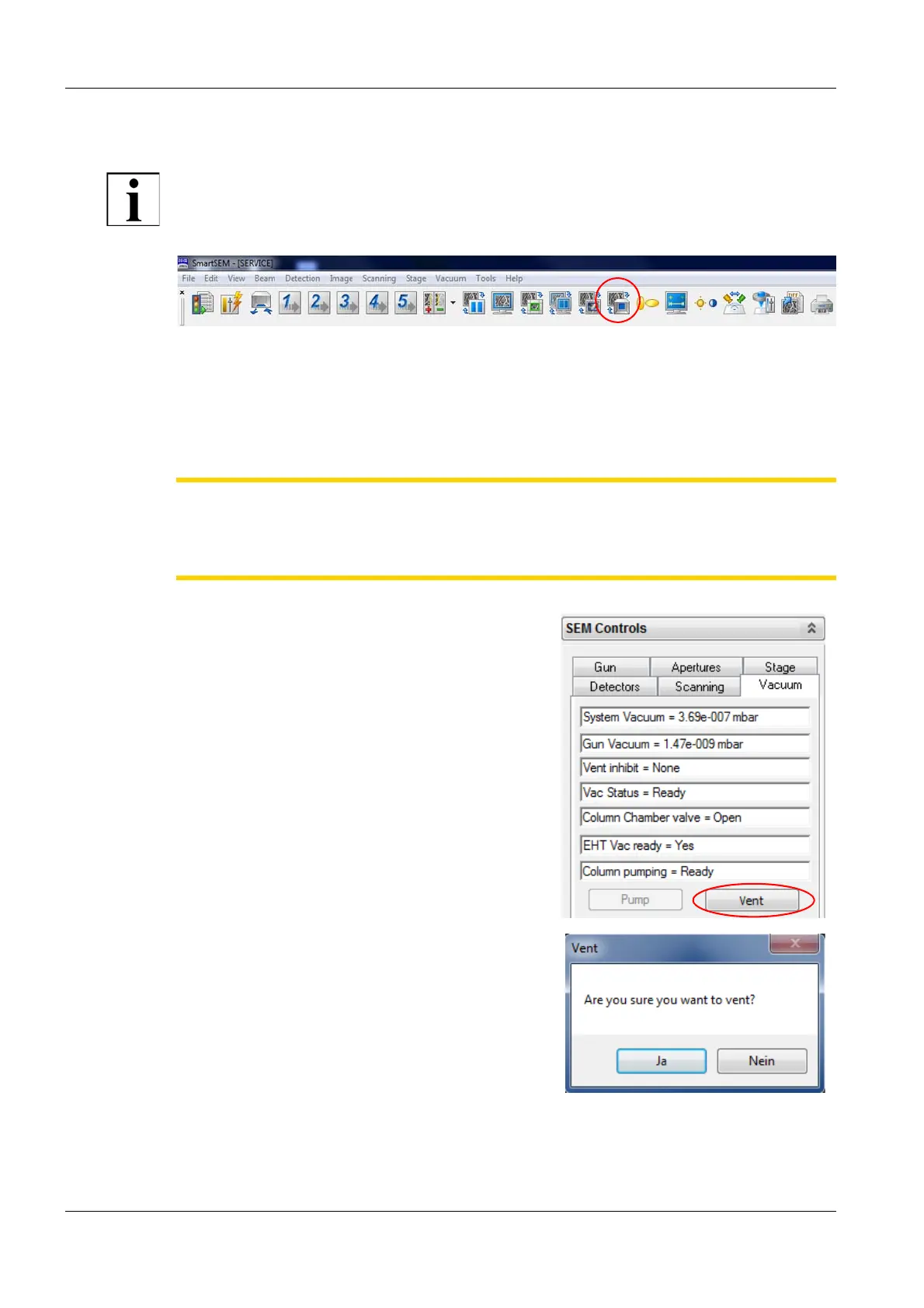
1 In the toolbar, click the ChamberScope icon.
CAUTION
Risk of damaging the objective lens and/or your specimen.
Ensure not to hit the objective lens while driving the stage. Change to TV mode to observe
the moving stage.
2 In the Vacuum tab, click the Vent button.
A message box is displayed asking: ’Are you
sure you want to vent?’.
3 Click Yes.
The specimen chamber fills with gaseous ni-
trogen.


 To Next Page