UO=çÑ=NPQ fåëíêìÅíáçå=j~åì~ä=`êçëëÄÉ~ã=PQM=ÉåMOE`lo F
SK=léÉê~íáçå
`Ü~åÖáåÖ=ÄÉíïÉÉå=î~Åììã=ãçÇÉë
6.5. Changing between vacuum modes
In VP mode, In-lens SE detector and SE2 detector cannot be used.
Instead, backscattered electron detectors or VPSE detectors are frequently used.
6.5.1. Changing to VP mode
Procedure
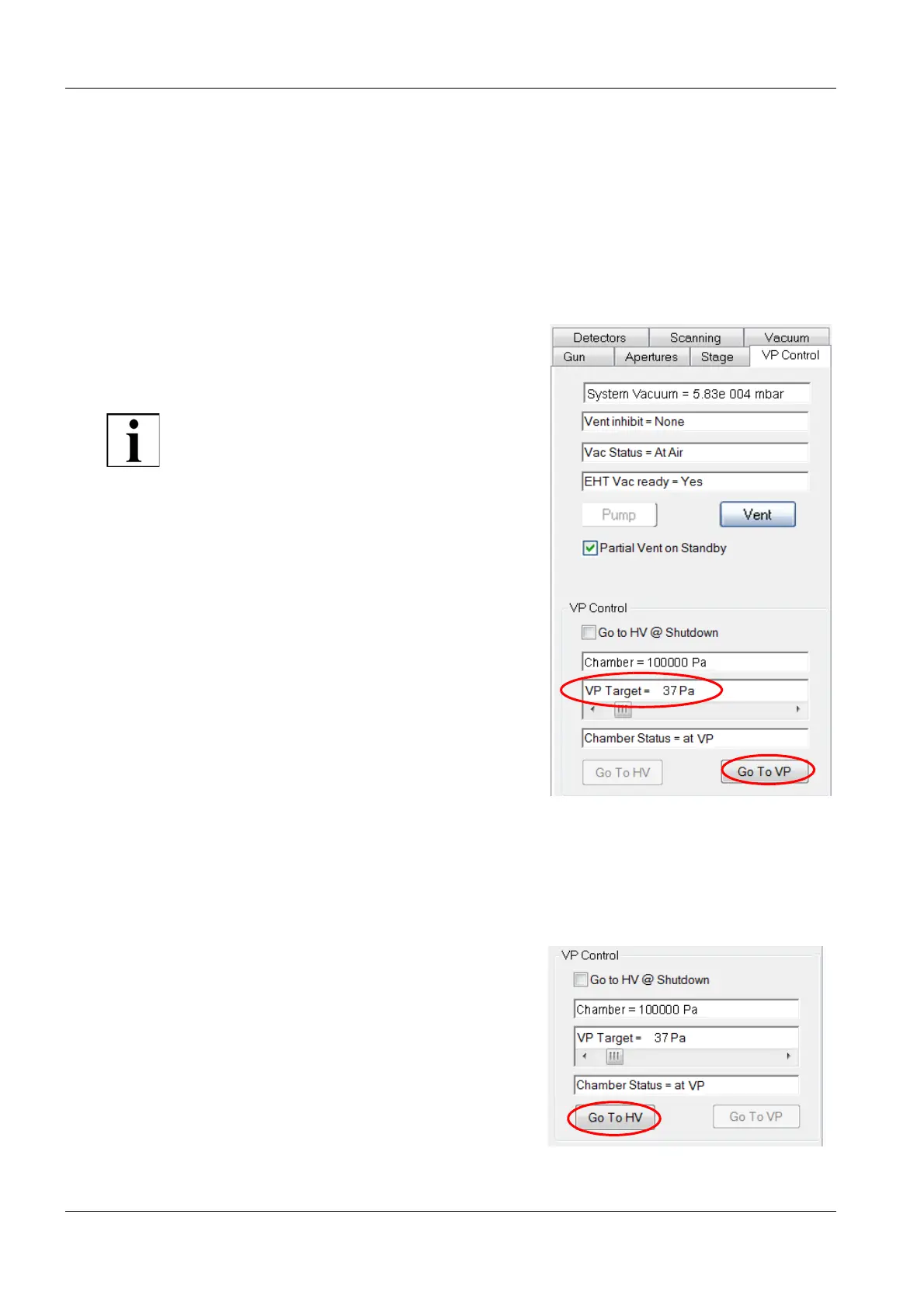
1 Select the VP Control tab.
2 Double-click VP Target field.
The VP Target window appears.
IMPORTANT
If the VP system has not been used for several
days, start with moderate pressures in the
range of 0 – 30 Pa for the first 10 minutes. Af-
terwards the vacuum system is conditioned
and the VP mode can be used with its full
range.
3 Enter the pressure value and click OK.
4 Click the Go To VP button.
6.5.2. Returning to HV mode
Procedure
1 Click Go To HV.
The vacuum in the specimen chamber reduces
to high vacuum conditions.


 To Next Page