SK=léÉê~íáçå
fåëíêìÅíáçå=j~åì~ä=`êçëëÄÉ~ã=PQM=ÉåMOE`loF =TN=çÑ=N PQ
lÄí~áåáåÖ=~=Ñáêëí=áã~ÖÉ
6.4.3. Locating the specimen
Procedure
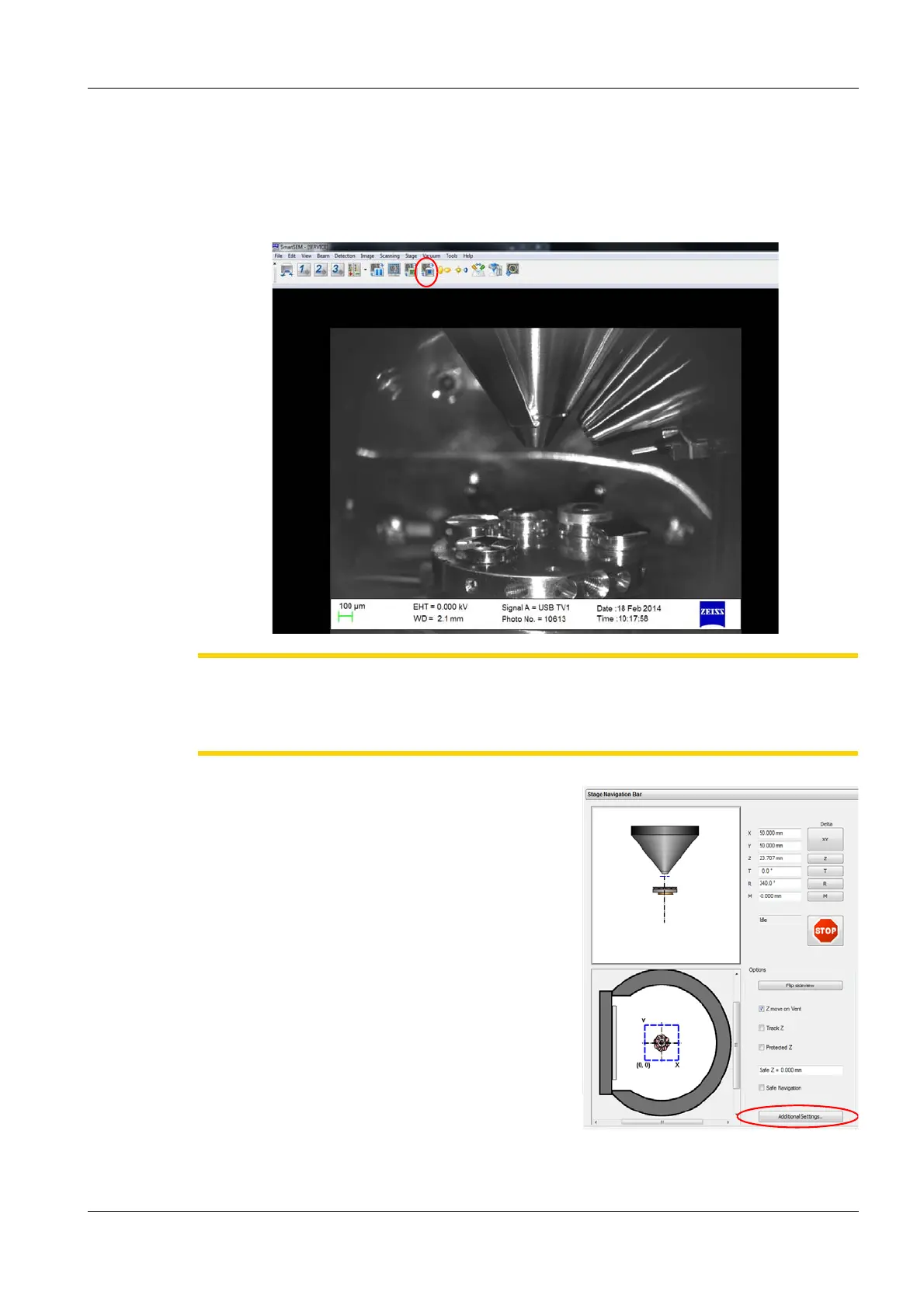
1 In the TV mode (ChamberScope), look at the image area of the user interface to observe the
sample holder and the specimen inside the chamber.
CAUTION
Risk of damaging the objective lens and/or your specimen.
Ensure not to hit the objective lens while driving the stage. Watch the moving stage in TV
mode.
2 To open the Stage Navigaton bar, on the
menu, select Stage/Navigation.
The Stage Navigation shows specimen
chamber schematics. The upper schematic
shows a lateral view of the specimen stage.
The lower schematic shows a plan view of the
stage with the different stubs.
3Press Additional Settings.
The Stage Nav Settings dialog appears.
4Press Show Gallery.
The Sample Holder Gallery dialog appears.
5 Double-click your stub.
6Close the Sample Holder Gallery dialog and
the Stage Nav Settings dialog.


 To Next Page