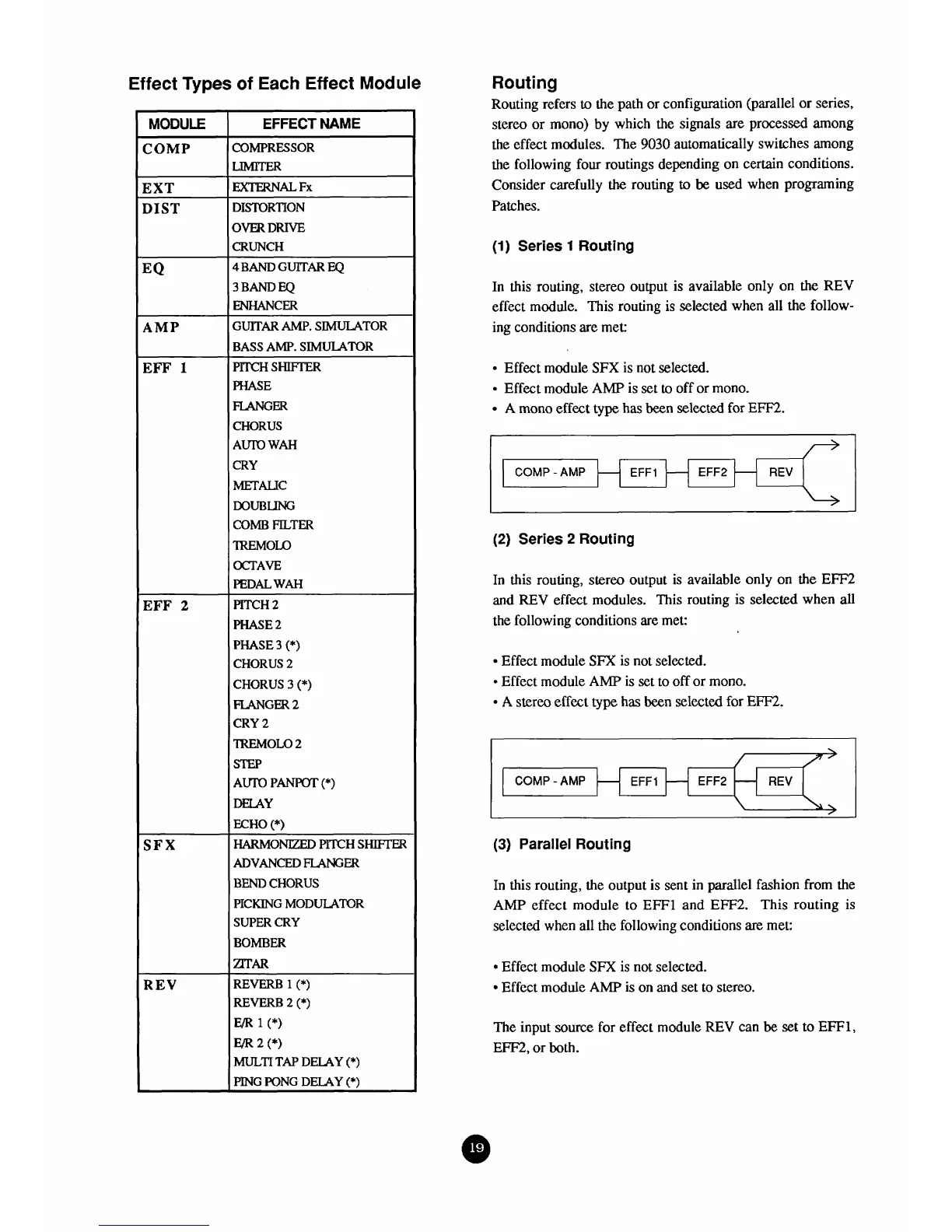
Effect
Types
of
Each
Effect
Module
MODULE
COMP
EXT
DIST
EQ
AMP
EFF
1
EFF
2
SFX
REV
EFFECT
NAME
COMPRESSOR
DISTORTION
OVERDRIVE
CRUNCH
4
BAND
GUITAR
EQ
3
BAND
EQ
ENHANCW
GUITAR
AMP.
SIMULATOR
BASS AMP. SIMULATOR
PlTCH
SHIFTER
PHASE
FLANGW
CHORUS
AUrO
WAH
CRY
METALE
DOUBLING
COMB
FILTER
?REMOLO
OCTAVE
PEDAL
WAH
PITCH
2
PHASE
2
PHASE
3
(*)
CHORUS
2
CHORUS 3
(*)
MGW
2
CRY
2
'IREMOLO
2
STEP
Am
PANPOT
(*)
DEIAY
ECHO
(*)
HARMONIZED
PITCH
SHIE.TW
ADVANCED
FLANG
W
BEND
CHORUS
PICKING
MODULATOR
SUPER
CRY
BOMBER
rnAR
REVERB
1
(*)
REVERB
2
(*)
Em
1
(*)
Em
2
(*)
MULTI
TAP
DELAY
(*)
PING
PONG
DELAY
(*)
Routing
Routing refers
to
the path or configuration (parallel or series,
stereo or mono) by which the signals are processed among
the
effect modules. The
9030
automatically switches among
the following four routings depending on certain conditions.
Consider carefully
the
routing
to
be
used when programing
Patches.
(1)
Series
1
Routing
In
this routing, stereo output is available only on
the
REV
effect module. This routing is selected when all the follow-
ing conditions
are
met:
Effect module
SFX
is not selected.
Effect module
AMP
is
set
to
off or mono.
A
mono effect
type
has
been
selected for
Em.
(2)
Series
2
Routing
COMP
-AMP
In this routing, stereo output is available only on the
EFF2
and
REV
eflect modules. This routing is selected when
all
the following conditions are met:
Effect module
SFX
is not selected.
Effect module
AMP
is set to
off
or mono.
-
A
stereo effect
type
has
been selected for
EFF2.
-
EFFI
(3)
Parallel
Routing
/
/
In this routing, the output is sent in
parallel
fashion from the
AMP
effect module to EFFl and
EFF2.
This routing is
selected when all the following conditions are met:
REV
EFF2
COMP
-
AMP
EFF1
Effect module
SFX
is not selected.
Effect module
AMP
is on and set
to
stereo.
-
The input
source
for effect module REV can
be
set to
EFF1,
EFF', or both.
-
EFF2
-
REV



 To Next Page