(3)
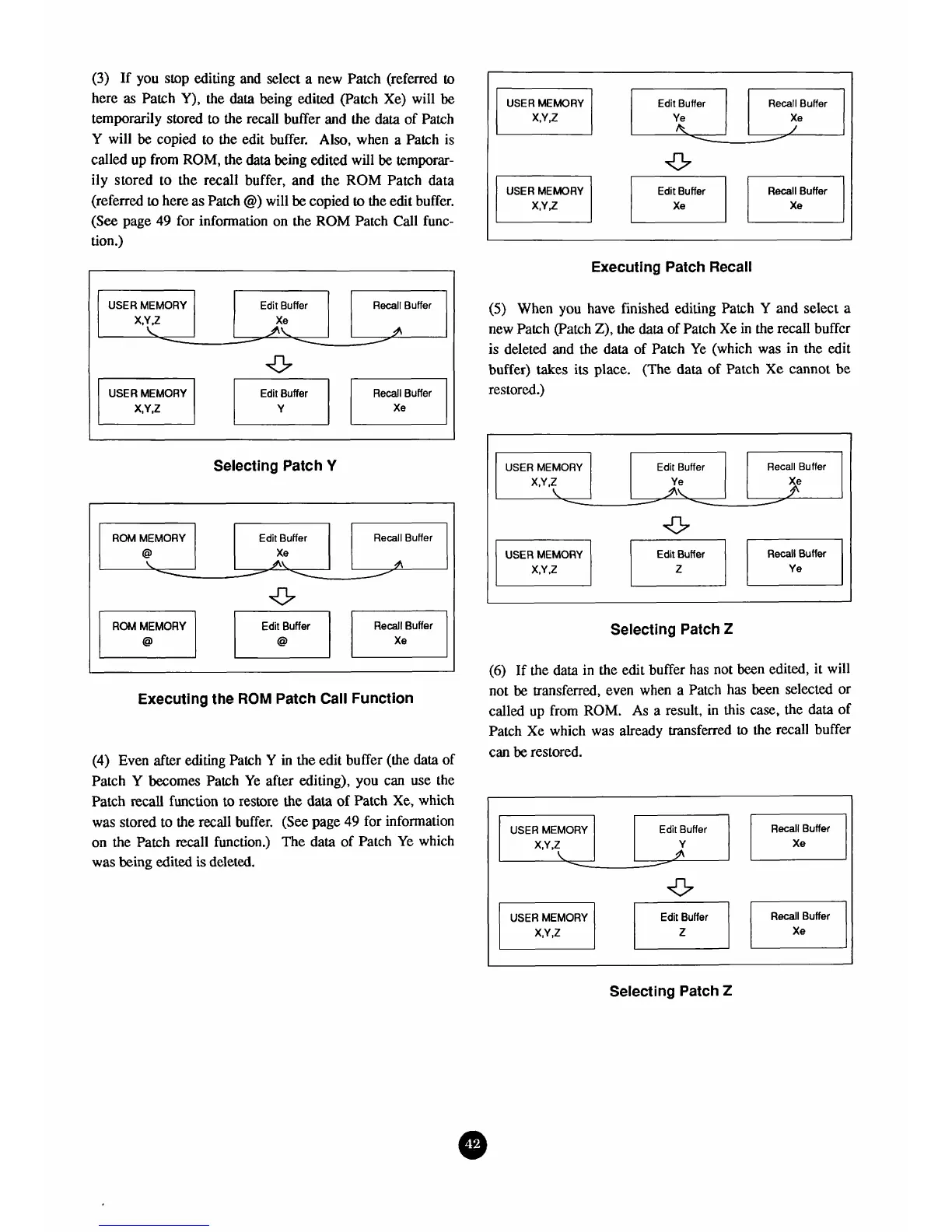
If you stop editing and select a new Patch (referred
to
here
as
Patch
Y),
the
data
being edited (Patch Xe) will
be
temporarily stored to the recall buffer
and
the
data
of Patch
Y
will
be
copied to
the
edit buffer.
Also,
when a Patch is
called up from
ROM,
the
data
being edited
will
be
temporar-
ily stored to the recall buffer, and the
ROM
Patch data
(referred
to
here as Patch
@)
will
be
copied
to
the edit buffer.
(See
page
49
for information on the
ROM
Patch Call func-
tion
.)
Selecting Patch
Y
USER
MEMORY
X,Y
2
ROM
MEMORY
Edit Buffer
Recall
Buffer
@
Xe
ROM MEMORY
Ll
.
4
a
Edit
Buffer
Xe
I
Executing the
ROM
Patch Call Function
Recall
Buffer
(4)
Even after
editing
Patch
Y
in the edit buffer (the data of
Patch
Y
becomes Patch Ye after editing), you
can
use the
Patch recall function
to
restore the
data
of
Patch Xe, which
was stored to the recall buffer.
(See
page
49
for information
on the Patch recall function.) The data of Patch Ye which
was
being
edited is deleted.
L
USER MEMORY
XI/l
Edit
Buffer
Recall
Buffer
Edit
Buffer
Recall
Buffer
Executing Patch Recall
(5)
When you have finished editing Patch
Y
and select
a
new Patch (Patch
Z),
the
data
of Patch Xe in the recall buffer
is deleted and the
data
of Patch Ye (which was in the edit
buffer) takes
its
place. (The
data
of
Patch Xe cannot be
restored.)
USER
MEMORY
Edit Buffer
Recall
Buffer
X,YZ
Ye
Xe
Selecting Patch
Z
(6)
If the data in the edit buffer has not been edited, it will
not
be
transferred, even when a Patch has been selected or
called up from
ROM.
As
a result, in this case, the
data
of
Patch Xe which was already transferred
to
the recall buffer
can
be
restored.
1
USER MEMORY
I
I
Edit Buffer
I
I
Recall
Buffer
I
Selecting Patch
Z



 To Next Page