413D SYSTEMS, INC. PN:80-D27 Rev.B
Step 3 : Loading powder
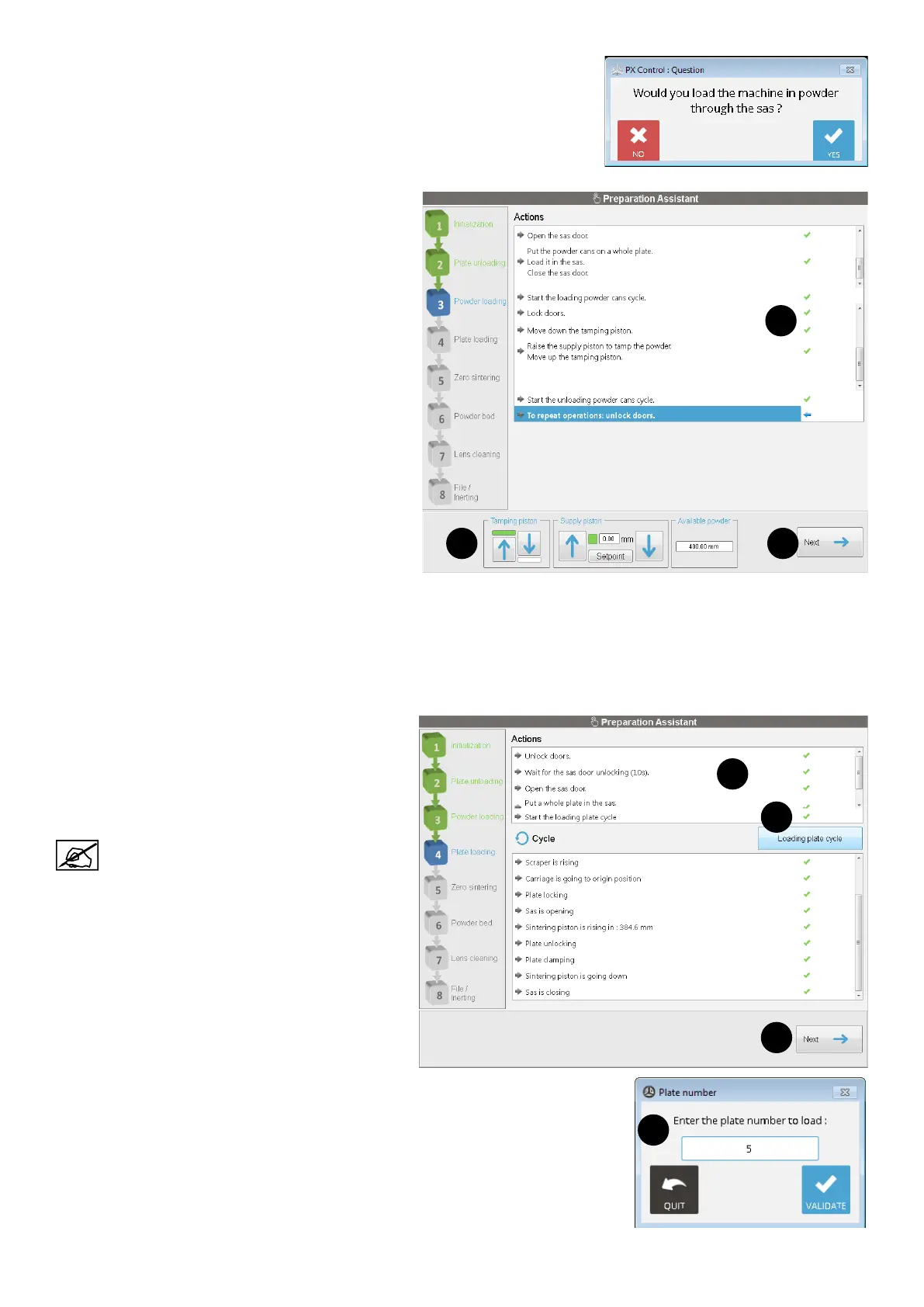
In this step, the operator can choose whether to load powder on the printer.
If "No" is selected, the Preparation Assistant will go directly to the next step.
If "Yes" is selected:
1. Perform the actions (1) by using the available
commands (2) and the external controls panel.
Consult the section "Loading the feeding piston" on
page 57 for details.
2. Click on the automatic cycles launch button when
requested (Loading powder cans and Unloading
powder cans cycles).
3. Follow the instructions to continue to load powder
on the printer. Or click on Next (3) to go to the next
step.
1
2 3
Step 4 : Loading plate
This step includes both automatic and manual actions. When the manual actions are done, then an automatic action is
required.
1. Perform the actions (1) by using the external controls panel. Consult the section "Plate preparation and loading" on
page 58 for details.
2. Click on the automatic cycle launch button (2)
when requested.
3. Indicate the plate number to be loaded on the
printer (3) : click "Validate" to conrm, or "Quit" to
cancel.
: the pre-lled number is the rst number plate
available.
4. When all actions completed, click on Next (4) to go
to the next step.
1
2
4
3










 To Next Page