INSTALLATION PROCEDURES
56 FOX615Installation
A subsequent installation of the FAMO1 or FAMO1-F power and alarm cable
is normally not possible without service interruption and requires substantial
installation effort!
The installation of the FAMO1 or FAMO1-F power and alarm cable requires
unlimited access to the bottom rear of the FOX615 subrack. This access is
normally only possible with unplugged signal cables and if the subrack is
removed from the rack.
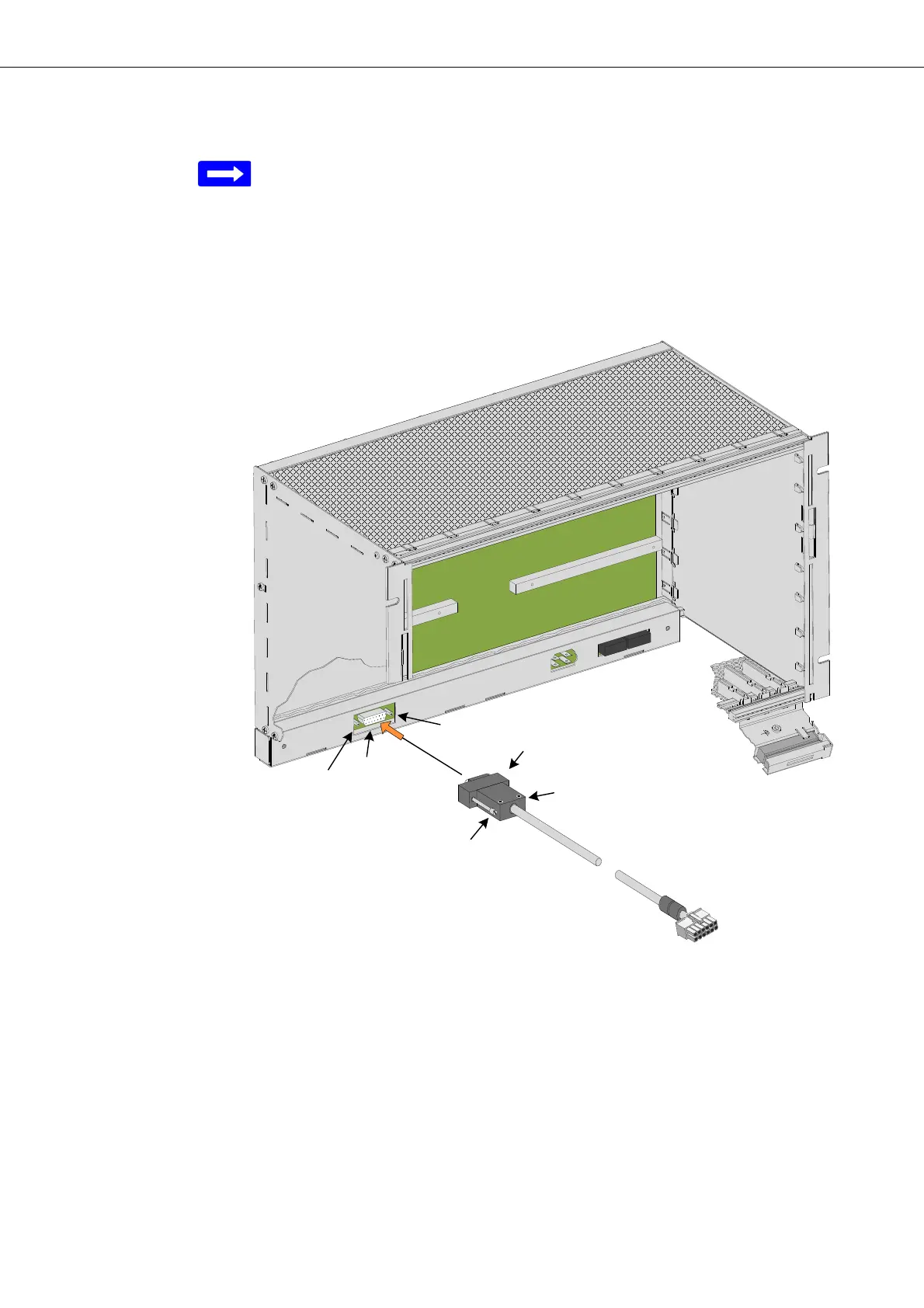
Figure 31: FOX subrack FAMO1 or FAMO1-F power and alarm cable
installation
FAMO1 or FAMO1-F power
and alarm cable installation
Proceed as follows:
1. Place the FOX subrack on its back (backplane).
2. Plug (K) the subminiature-D connector (F
11
) into the interface (P
2
) of the
FOX subrack.
If the DUPF1 option is installed the connector fits through the hole in the
DUPF1 housing (refer to Figure 30).
3. Secure (43), (44) the connector with the 2 fixing screws (33), (34) inte-
grated in the connector housing.
End of instruction


 To Next Page