INSTALLATION PROCEDURES
FOX615Installation 79
3.9.3.3 Clamping cables to the subrack earthing bar
Clamp the cables to the bar only if all cables are installed and properly
arranged with respect to the units and the cable tray:
Cable clamping Proceed as follows:
1. Snap in the cable clamp and close the earthing bar.
For details of this procedure, refer to section Cable clamps, earthing bar
and EMC clips (on page 73) and Figure 47: Cable clamps and earthing
bars (conductive foam in bars and clamps is dark shaded) (on page 73).
Proceed as instructed in the corresponding paragraphs for the right and/
or the left side cable clamps.
End of instruction
Risk of operating trouble!
Attention to EMC properties!
Assure the specified EMC characteristics of the FOX.
→ Connect all shields properly to the earthing bar of the subrack.
3.9.3.4 Removing units
Electrostatic discharges. Risk of equipment damage!
Units are sensitive to electrostatic discharges!
→ Use a grounded protective wristband when handling units! Pack units
into an ESD protective bag immediately after removal. The original
packing provides the best protection for the units.
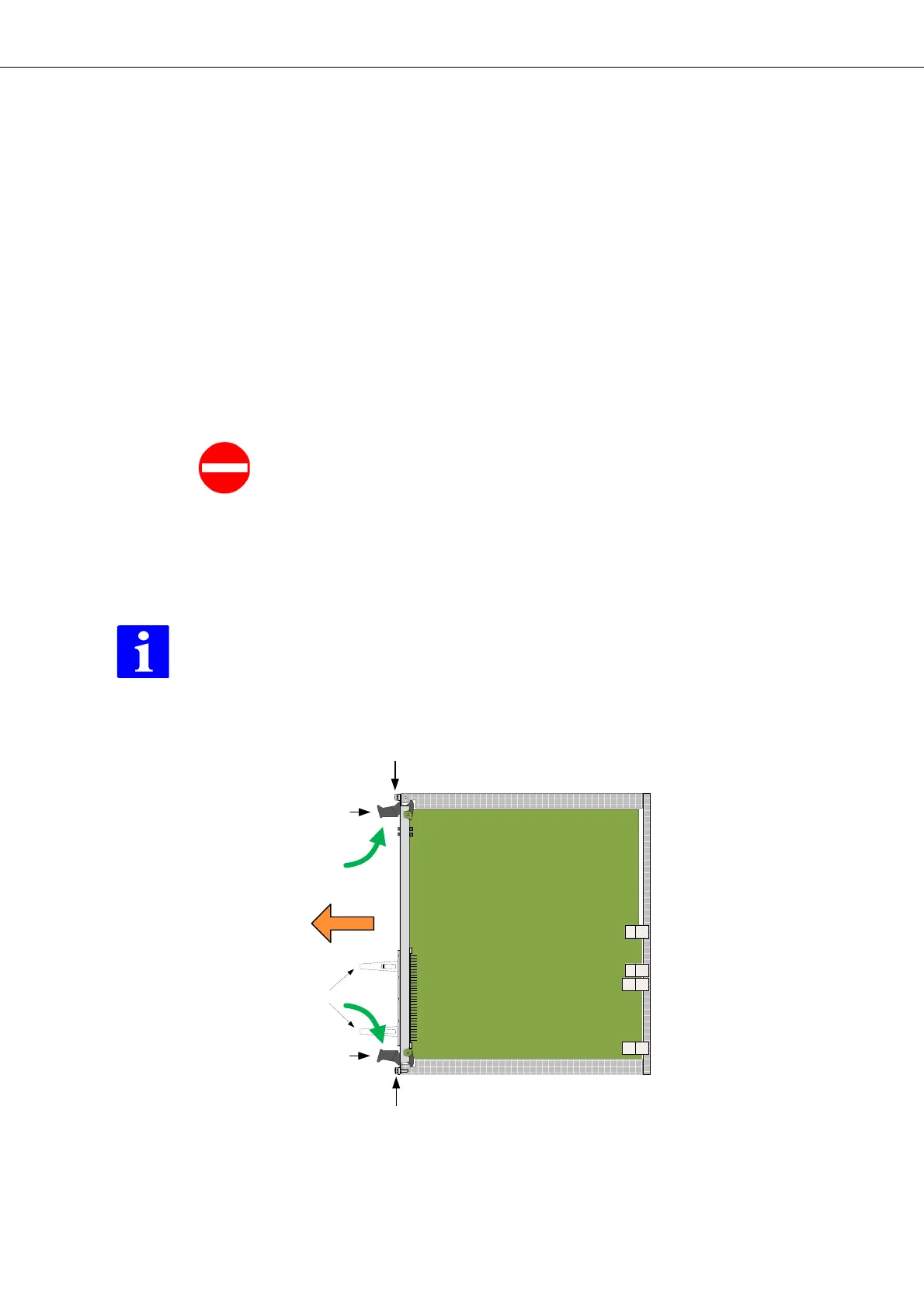
Figure 51: Removal of units from the subrack
Legend:
BP Backplane with connectors


 To Next Page