MNR-310 System Administrator’s Manual
106
4. After configuring the actions, click “Apply” to save this response.
5. Go to Setup pageSchedule tab and set the Event Handling schedule for this device.
Event responses will only be triggered when the trigger time falls within either the Event
Handling recording or the Event Handling with Schedule recording period.
6. To check if this rule is successfully set, please make sure you have properly configured the
involved (1) trigging side settings like Motion Detection Regions or DI, and (2) response
side settings like PTZ Preset Points, SMTP Server and Email Recipients, FTP Server
or DO. Then set the Event Handling schedule for current time and trigger this rule.
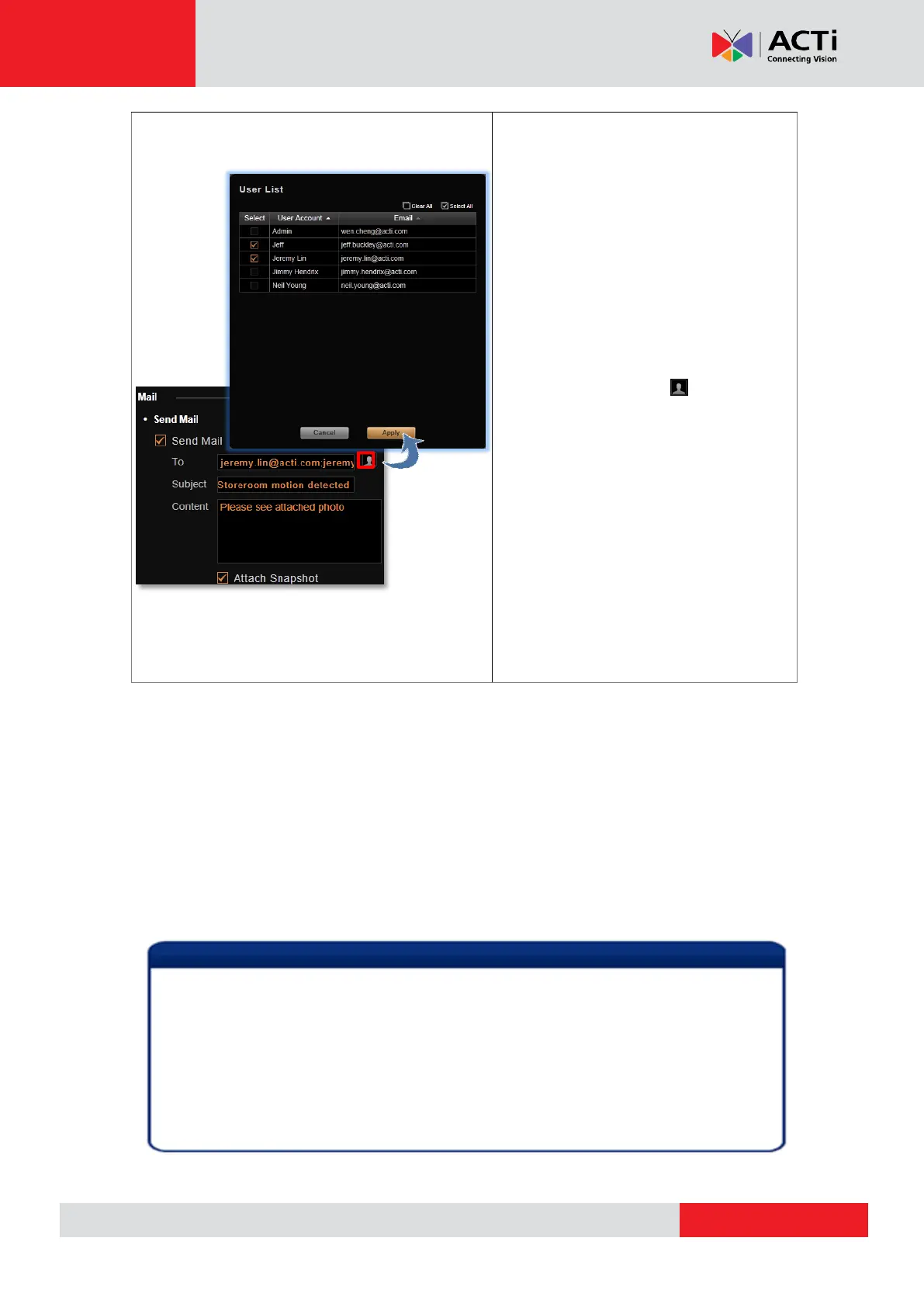
Enable the NVR to send email
notifications via the SMTP server. The
default SMTP and sender’s email settings
can be set in advance in Setup page
System tab Settings Email& SMTP
Settings.
1. Type one or more recipients’ email
addresses in “To” column (if more than
one, please separate them by “;”
symbol) or click the icon to select
recipients from existing the NVR User
list. The Email address should be set
in advance (in Setup page Users
tab Users) for an NVR User so that
it can be selected in this list.
2. Edit the email subject and content.
3. Choose to attach a snapshot or not.
If the event trigger type is Video
Recovery or Network Recovery, this
function is disabled.
1. Sending email, Uploading snapshot to FTP and Executing command actions are
executed on the NVR server, not from the client computer.
2. There must be video stream from the device when the event happens for event
responses to work.
3. Internet Explorer browser may become unstable due to frequent pop-up instant
playback windows, please avoid setting the “Pop-up” action as the event rule for a
device which is too frequently triggered.



 To Next Page