MNR-310 System Administrator’s Manual
33
Connect the Devices
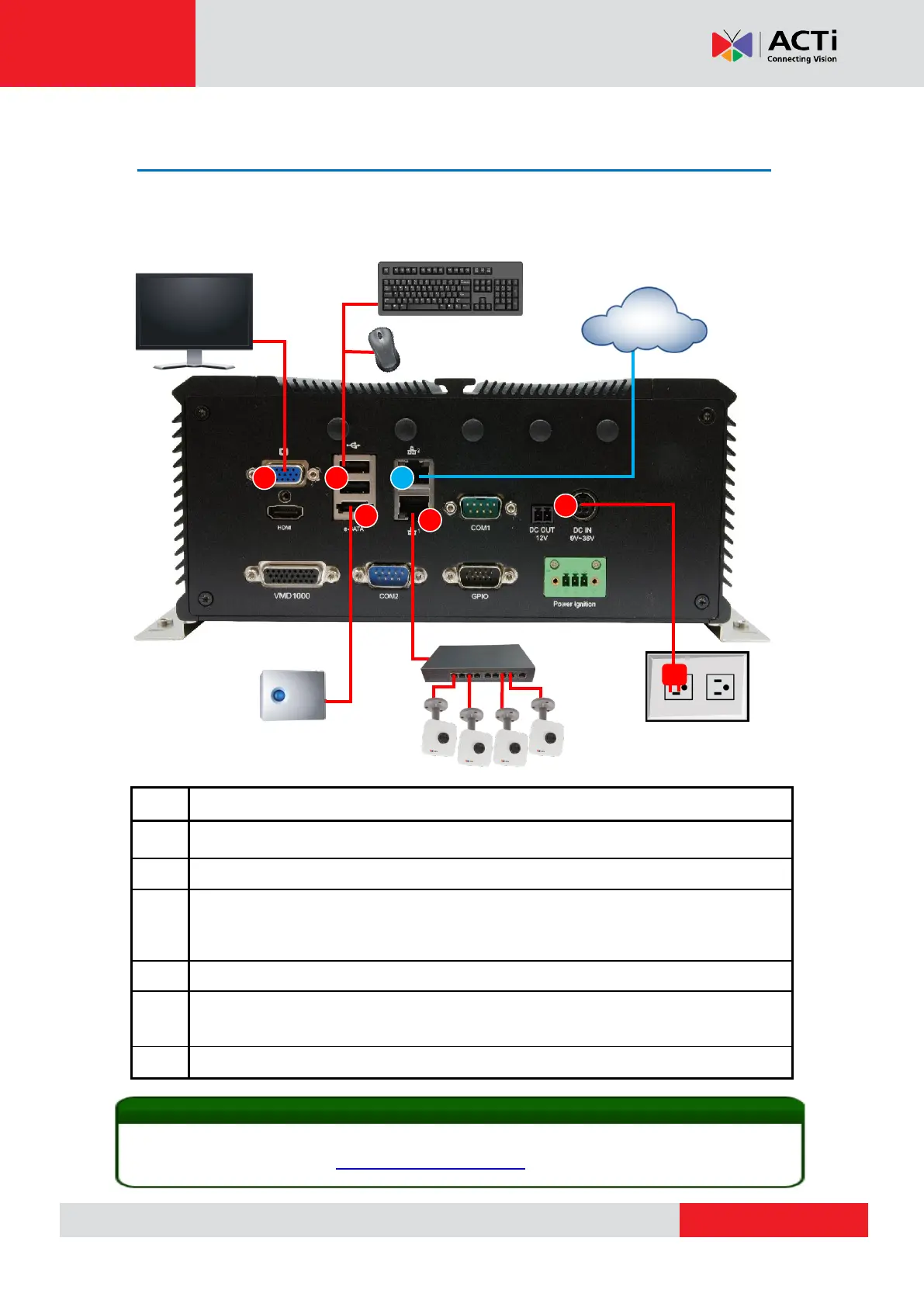
Follow the procedures to connect the devices. These devices are supposed to be connected in
the sequence shown below.
Connect the monitor to MNR.
(Local display can support up to 2 different ports at the same time: HDMI + VGA)
Connect the USB keyboard and mouse to MNR
Finish setting up your eSATA storage device if needed (e.g. RAID configuration for
multiple disks), connect it to MNR and power it on. MNR will recognize it as a normal
single hard disk.
Connect the network switch to MNR via one of the LAN ports
Plug the power adapter into MNR and electricity outlet. If your MNR’s set up includes
a power ignition control module, refer to POWER IGNITION CONTROL MODULE
INSTALLATION for proper installation.
Connect MNR to the Internet if remote management via the Internet is required
MNR supports iSCSI NAS. For detailed information on how to use iSCSI NAS with MNR, please
refer to our article introducing Using iSCSI NAS with NVR.



 To Next Page