MNR-310 System Administrator’s Manual
82
Configure Motion Settings
To make use of the motion and PIR detection functions supported by your devices, you need to
configure the detection regions and settings. Once a motion is detected, the NVR server can
trigger events and recording, bring up instant pop-up windows and show the detected area on
live view.
Before configuring motion detection settings, first make sure you can connect properly to the
IP camera / video server and get device settings. On Device tabVideo tab, and click
“Motion Detection” to start.
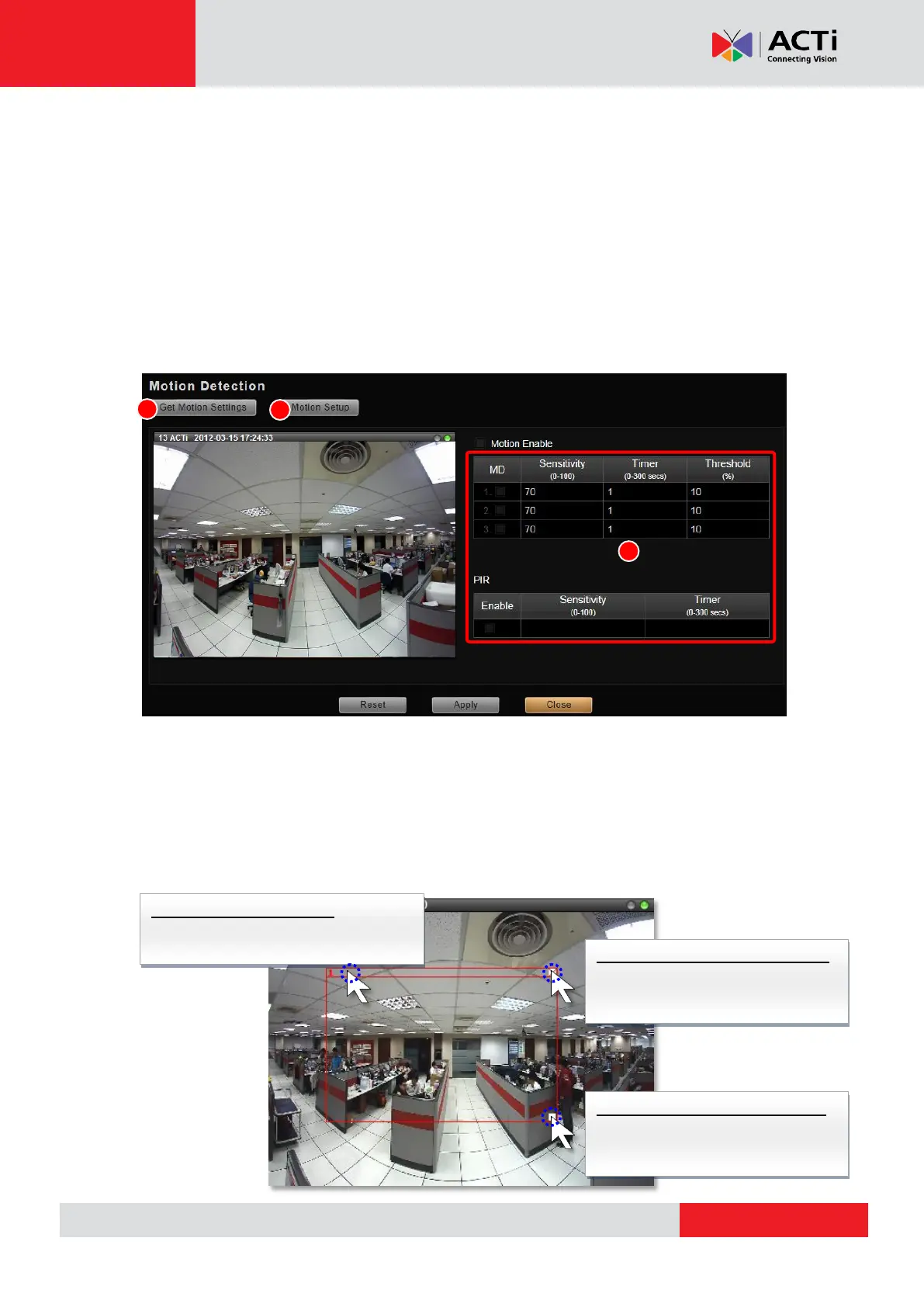
1. Click “Get Motion Settings” to retrieve the live view. For Dual Mode, the video you get in
this window will always be Stream 1
2. Click “Motion Setup” to enable the property fields.
3. There are three motion regions for you to set. To enable one region, check the MD box,
and a red frame will appear in the view. You may start setting the detection area by
adjusting this red frame on the view. Simply use your mouse to move and resize the frame.
To move the entire frame
Place the mouse cursor over the title
bar, and drag to move.
To adjust the region dimension
Place the mouse cursor over the
downright corner, and drag to
resize.
To disable this detection region
Place the mouse cursor over the
upper right corner, and click the
“X” to close this frame.



 To Next Page