MNR-310 System Administrator’s Manual
84
Configure Storage Card Settings
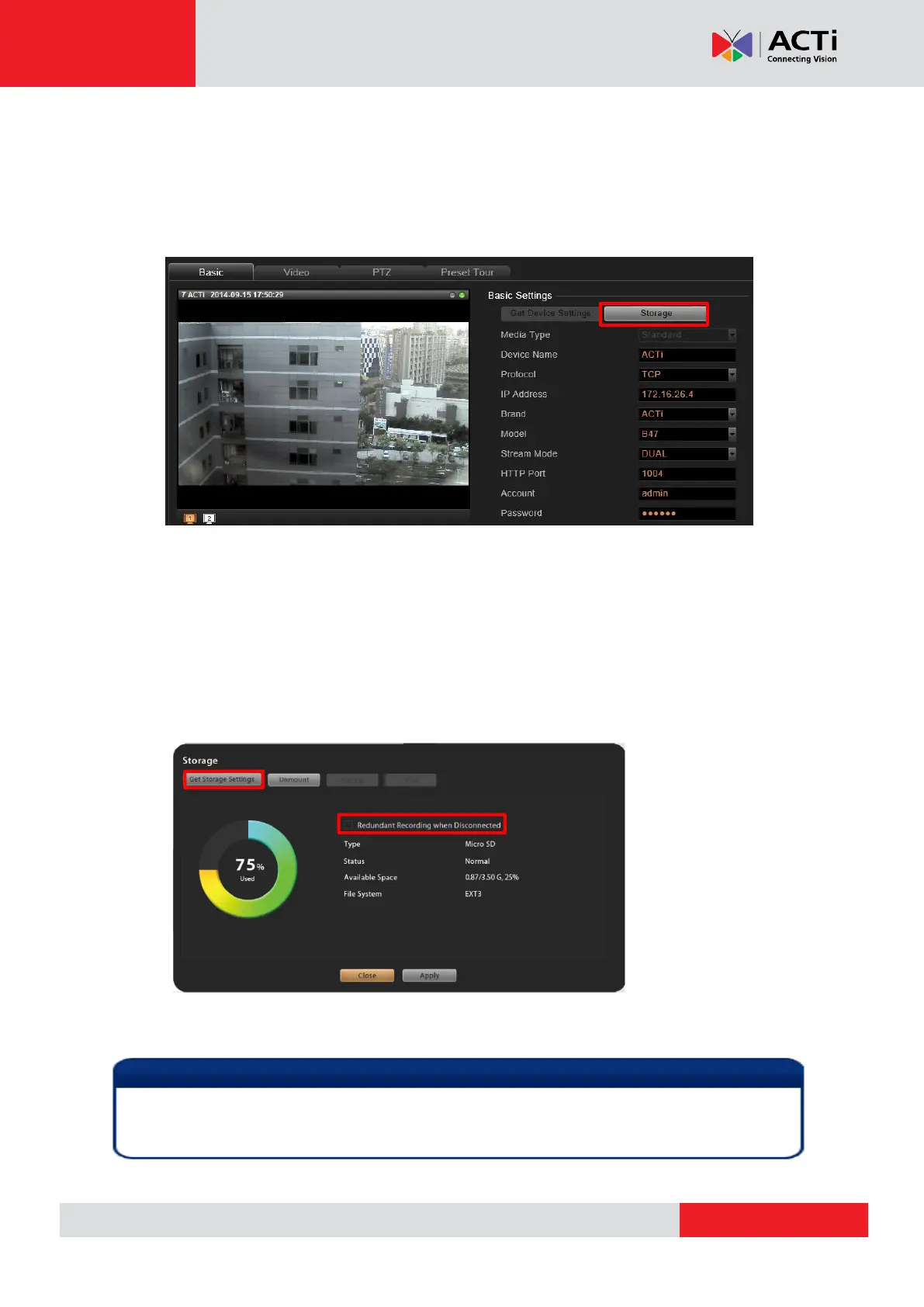
Certain camera models come with the internal storage feature. Via NVR interface, you can
observe the storage card’s memory status, and configure related settings.
1. Make sure the SD card is installed properly in the camera.
2. On Setup page Device tab, select the device form Device List. Click “Storage”.
3. On Storage window, click “Get Storage Setting” to sync with the SD card.
You can enable “Redundant Recording when Disconnected” function to have this
SD card take over the recording service for this channel when this device is
disconnected with NVR server. The video recorded on SD card during the
disconnection period will automatically be restored back to NVR server upon the
recovery of the connection. Click “Apply” to save the setting.
Before you enable “Redundant Recording when Disconnected” function, please do the
following (1) upgrade the camera firmware to 6.07 or later version, and then (2) format the SD
card either on camera firmware interface or on NVR interface.



 To Next Page