MNR-310 System Administrator’s Manual
51
Local Workstation Client Login
Local Workstation Client refers to the user who runs NVR3 Workstation on the NVR server
to log in to the NVR system. The login process is described as follows.
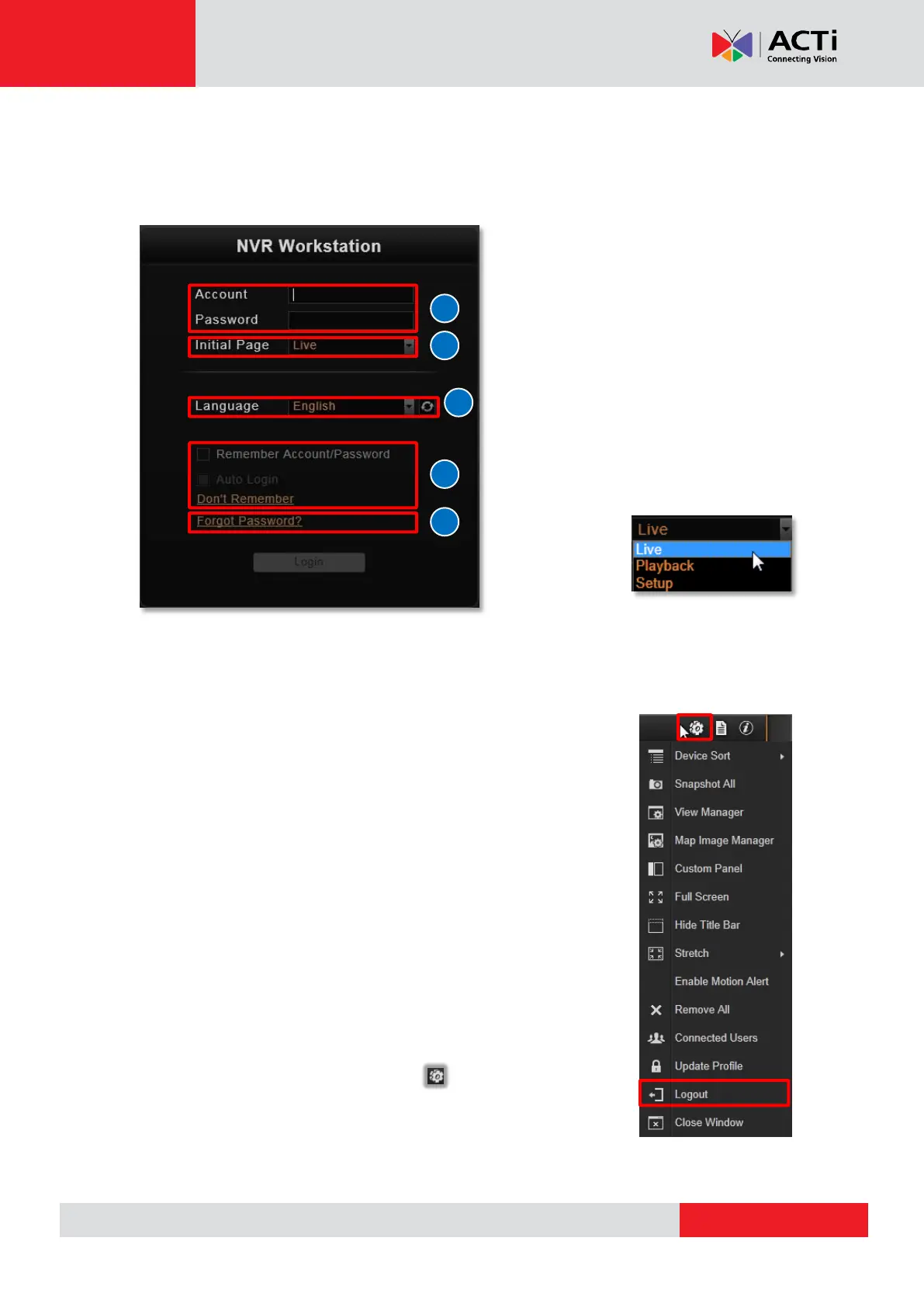
A. Enter Account & Password
Account (non case-sensitive)
Admin (default)
Password (case-sensitive)
123456 (default)
B. Choose the Initial Page
The user interface consists of three main
module screens, Live View, Playback
and Setup. You may choose one where
you would like to
enter after login.
Default is Live
View screen.
C. Language
Choose a UI language from the dropdown list.
D. Remember Login Information and Auto Login
To have NVR3 Workstation remember the Account, Password,
Initial Page and UI Language, simply check “Remember login info”.
Click “Don’t Remember” will clear your input text and reset to default.
If the NVR server or remote client computer may be accessed by
someone else, you might consider not to use this function.
To automatically login to the NVR system, please check both
“Remember login info” and “Auto Login” to skip the Login page. If
the NVR server or remote client computer may be accessed by
someone else, you might consider not to use this function.
To cancel auto-login, on title bar, click “Logout” to return to
login page, and this function will be cancelled.



 To Next Page