Delta AESFill AF4 – 12 Machine Manual 27/58 Setup
1st Container Sensor 6.6
Please note that depending on your container type and your
machine, the exact type of sensor may differ.
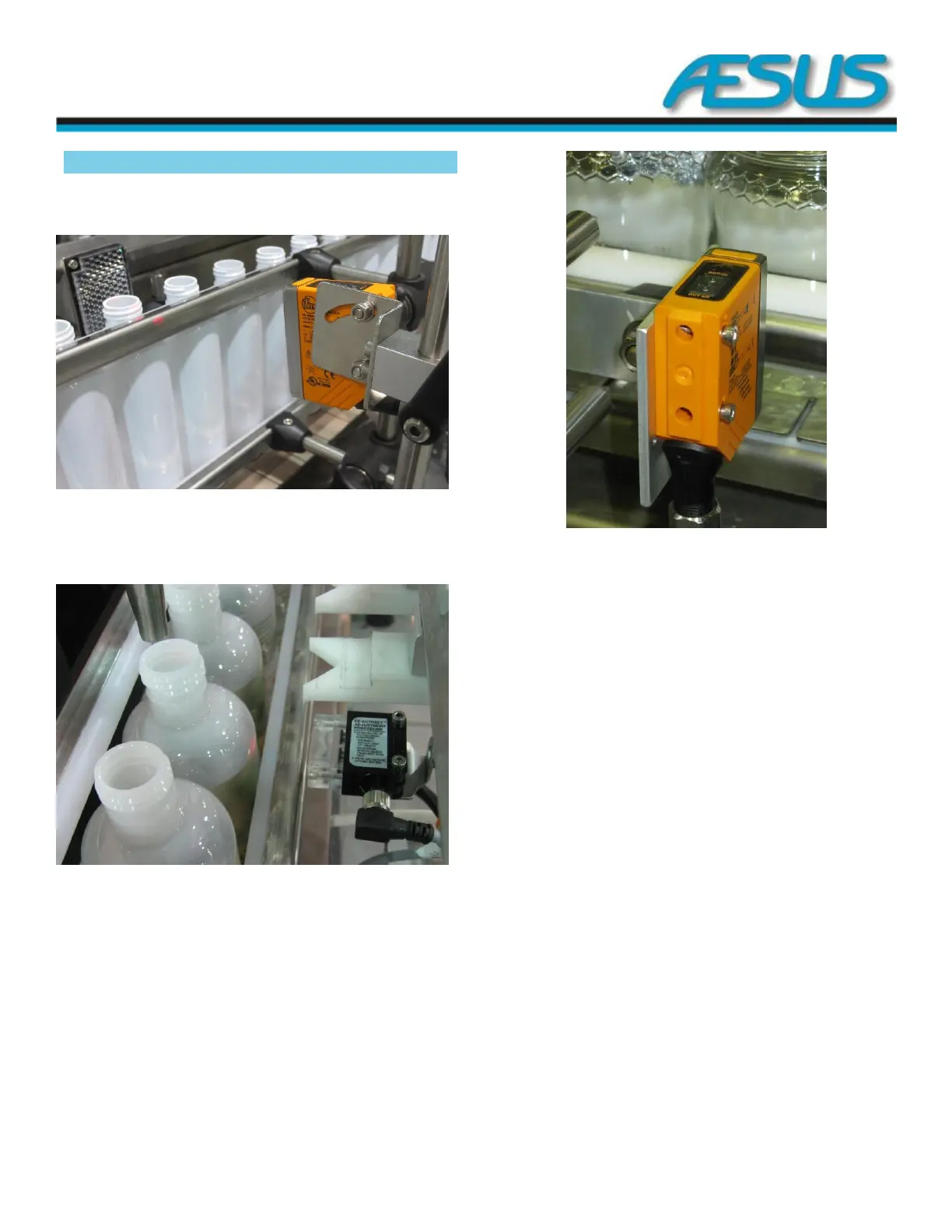
Figure 6-14: Outfeed gate adjustment
i. Adjust the 1
st
container sensor 1” back from the
container, below the neck.
Figure 6-15: Outfeed gate adjustment
ii. Adjust the 1
st
container sensor 1” from the side of the
container.
iii. This adjustment will change depending on the actual
container in use. These specifications are only a
guide, not exact rules.
Figure 6-16: Outfeed gate adjustment
iv. Teach the sensor (if needed) in order to learn the type
of container that is in front of it.
v. In order to teach this sensor, press the Off button
without a container in front of it. The light will flash
once it is learned. Repeat with a container in front of
the sensor and press the On button.
It may be necessary to teach the sensor several times until it
reads properly. If it is not possible to get a good reading, it
may be required to re-adjust the sensor position relative to the
container. When you are filling, the colour of the fill can affect
sensor operations. If this occurs, simply re-teach the sensor to
get a good reading.
Please note that this 1
st
container sensor must go off between
each container and should not stay triggered for the whole set
of containers. If the sensor does not go off between the
containers, please reposition it so that it does go off. Normally
the best place to position the sensor is near the neck since
there is a space between containers.


 To Next Page