AESFill AF1C Machine Manual 40/58 Cleaning & Accessories
Neck Clamp: This enables or disables the neck clamp from
running in the filling sequence. If you do not need a neck
clamp, you can turn it off or on as necessary.
Indexing System: This enables or disables the indexing
system from working during the filling sequence. If you do not
need the indexing system, you can turn it off or on as
necessary.
Conveyor Stop: If you want to stop the conveyor for setup
purposes, you may do this by selecting on/Off.
Dive: You can turn the diving On or Off.
NECK: Nozzle will dive to neck level, fill, wait for the bottom
delay and go back up.
FULL: Nozzle dive to bottom position, wait for bottom delay,
start rising, end filling and lifting at neck position, wait for
neck delay and go back up.
8.1.2.3 Alarms Screen
This is the screen that appears if you press the alarms button
from the main screen.
Figure 8-5: Alarms screen
8.1.3 Login Screen
It allows entering and altering password settings on the
system. It can be accessed from the MAIN Screen. Refer to
Figure 8-6.
Press the login button on the right to access this screen. The
popup menu appears and allows you to switch between user
accounts. The username that is currently logged in, is
displayed in the black box at the top under User Name.
Figure 8-6: Login Menu
From the popup Login Menu:
User name: Log into the machine with one of the user
accounts.
Logout: Log out of the current user account.
Password: Enter the password related to the user name
chosen.
: Return to the Main Screen.
Settings: Go to the setting page.
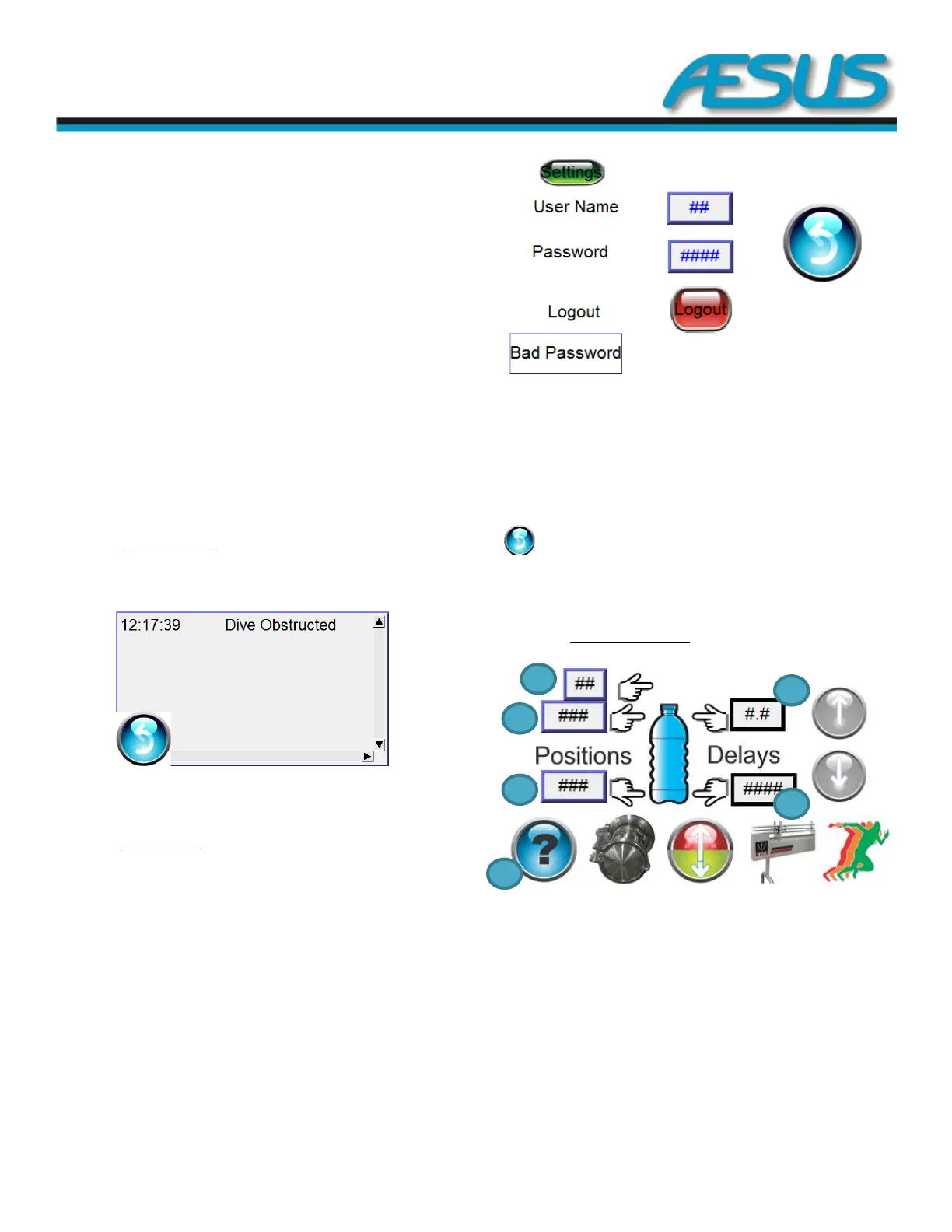
8.1.4 Dive setup screens
Figure 8-7: Dive Setup Screen
1: Enter the recorded setting for the Top position.
2: Enter the recorded setting for the Neck position.
3: Enter the recorded setting for the Bottom position.
4— Neck Delay: Delay before exiting the container after the
filling action has been completed.
5— Bottom Delay: Delay in pulse before the nozzles start
rising after the pumps have started.
6: Bottom banner


 To Next Page