AESFill AF1C Machine Manual 43/58 Cleaning & Accessories
8.1.6.4 Pump 4 Setup Screen (Optional)
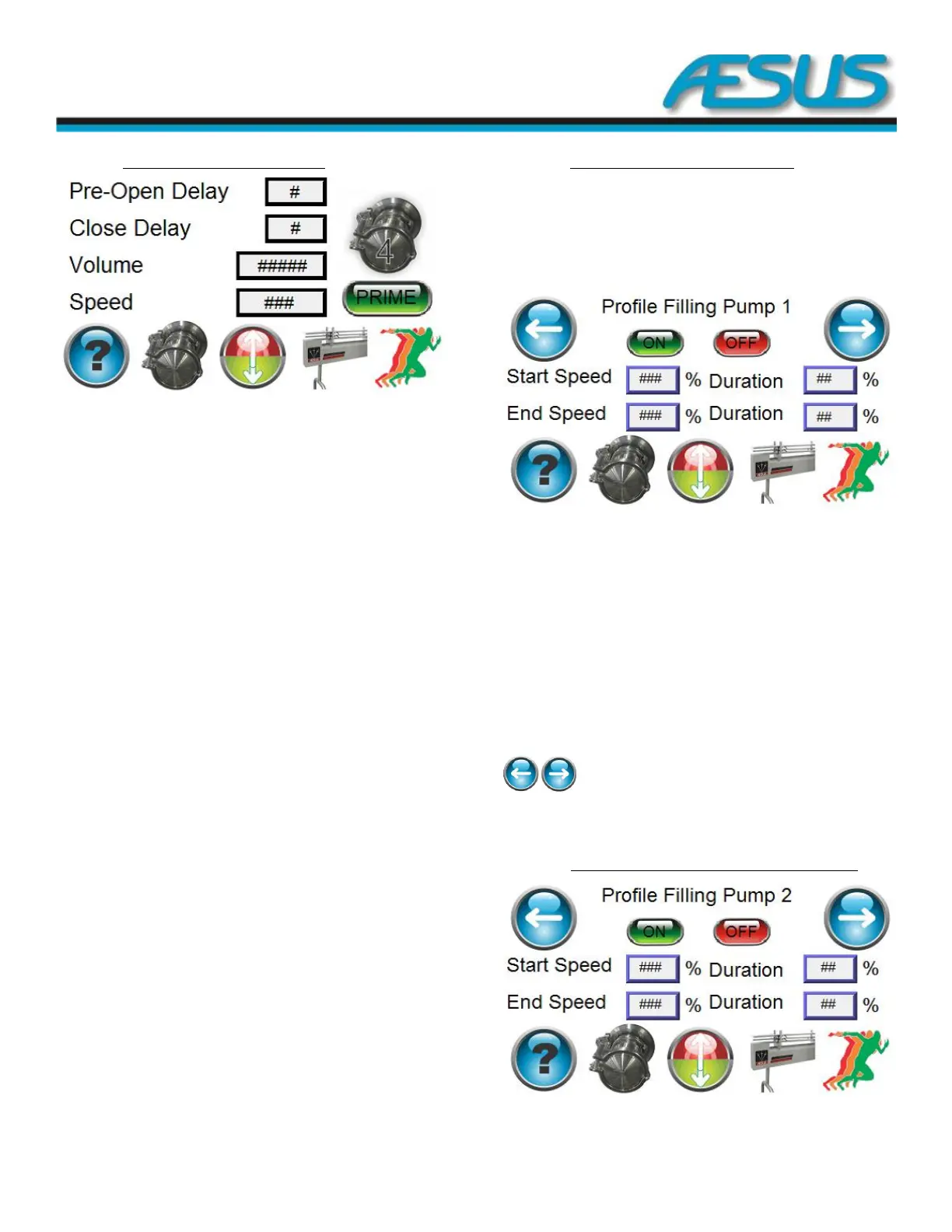
Figure 8-13: Pump 4 Setup Screen
Pre-Open Delay (ms): This is the time delay between the
opening of the nozzles, and the pumps beginning to rotate.
This delay is handy where it is desired to relieve some
pressure in the hose from the pump to the nozzle prior to
commencing a fill. The action may reduce or eliminate a
sudden gush of products when the nozzles open at the
beginning of a fill.
Close delay (ms): This is the time delay between the end of a
fill and the closing of the nozzles. This delay is handy where it
is desired to relieve some pressure in the hose from the
pump to the nozzle at the end of a dispense. The action may
reduce or eliminate a sudden gush of products when the
nozzles open again at the beginning of the next fill. This effect
may also be useful in reducing or eliminating back flow of
pressurized products from the pump outlet hose back though
the pump gears all the way to the supply tank. If the pressure
is not eliminated, and there are varying pauses between fills,
residual pressure in the hose may contribute to varying and
unexpected variations in fills.
Volume (Pulse): The amount of liquid in pulses that the pump
needs to dispense every time.
Speed (%): You can enter the speed at which you want to run
your pumps. You enter a value between 200 and 1700 RPM.
Prime:
Pressing will open the nozzle and start pumping
continuously.
Releasing will stop the pump and shut the nozzle.
Bottom banner: To change menu
8.1.7 Pump 1 Profile Filling Setup Screen
This screen allows the setting of different pumping speed for
one dispense. Example if you want to start fast and finish
filling more slowly.
If you change the set speed or volume, these settings will
adjust accordingly.
Figure 8-14: Pump 1 Profile Filling Setup Screen
ON/OFF: Enables or disables the profile filling for pump 1.
Start Speed (%): This represents a % of the pump set speed
for the beginning of the dispense process for pump 1.
Duration (%): This represents a % of the full-filling volume for
which you want to keep the start speed for pump 1.
End Speed (%): This represents a % of the pump set speed for
the end of the dispense process for pump 1.
Duration (%): This represents a % of the full-filling volume for
which you want to keep the end speed for pump 1.
**NOTE: The combine % of both duration can be more than
100%.
: Allow to go back to the previous page or go to
the next.
Bottom Banner: Change menu
8.1.7.1 Pump 2 Profile Filling Setup Screen (Optional)
Figure 8-15: Pump 2 Profile Filling Setup Screen


 To Next Page