AESFill AF1C Machine Manual 39/58 Screens
8. AF1 Remote Screens (OPTIONAL)
8.1.1 Remote Screen
The remote screen can be placed anywhere on the frame of
the machine.
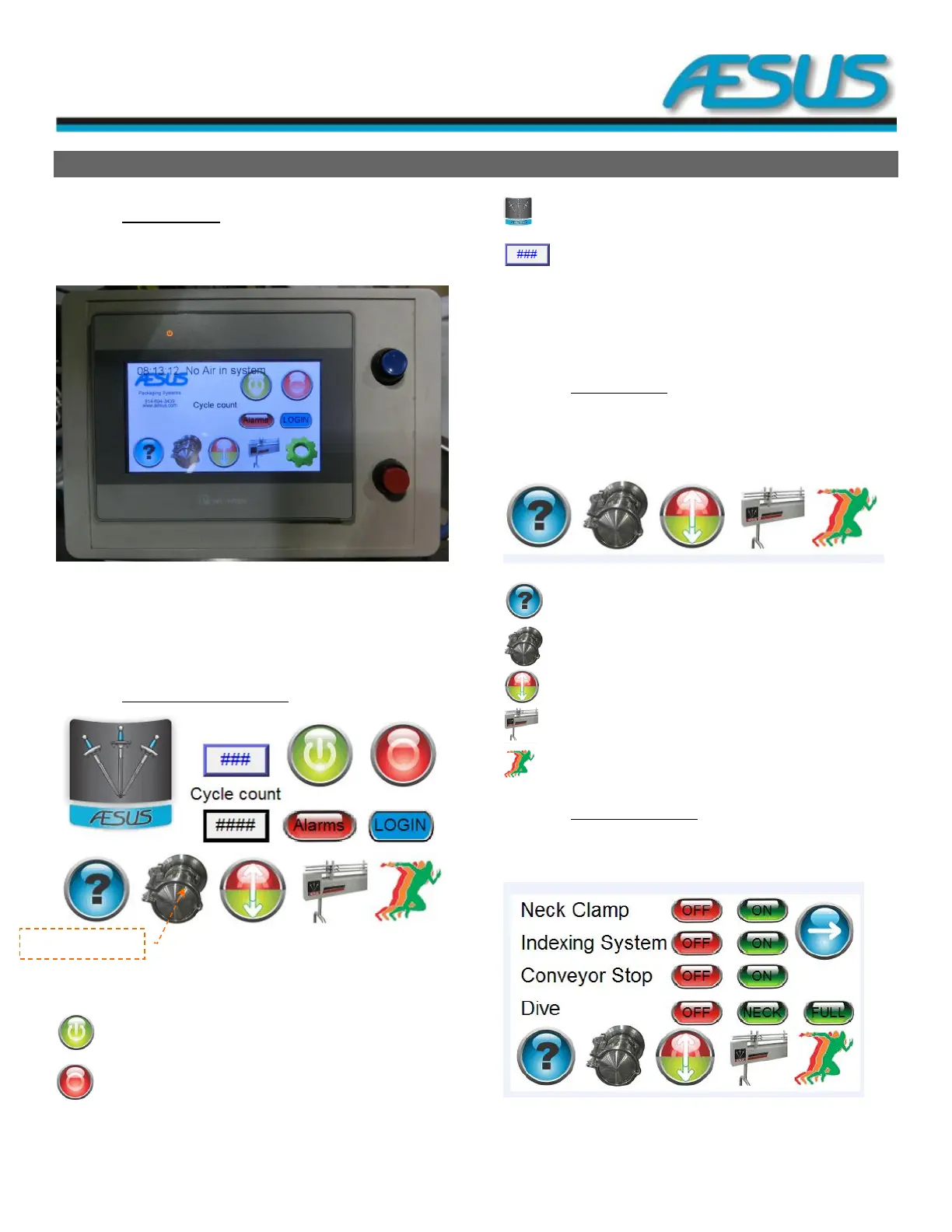
Figure 8-1: Remote Screen
Blue Bouton: Reset.
Red Bouton: Fast stop, which stops the machine instantly.
8.1.2 Main Screen (Run Screen)
Figure 8-2: Main Screen
From the HMI Main Screen, you can access to either of the
following actions:
Start: To start the machine.
Stop: To stop the automatic operation of the machine.
Aesus Logo: To open the configuration menu ().
: Monitor the lifting system’s position
Alarms: To open the Alarms page ().
Login: To login with a specific username (Section 8.1.3).
Cycle count: Set and monitor the cycle counter.
8.1.2.1 Bottom banner
The bottom banner is comprised of five (5) icons that will lead
you to different menu.
Figure 8-3: Bottom banner
The help screen.
The pump setup pages (Section 8.1.6).
The dive setup page (Section 8.1.4).
The indexing system setup page (Section 8.1.8).
The main screen (Section 8.1.1).
8.1.2.2 Configuration menu
The configuration menu allows you to setup the different part
of the machine.
Figure 8-4: Configuration menu


 To Next Page