EasyManua.ls Logo

Aesus AESFill AF1 - Pump Screens

Aesus AESFill AF1
58 pages
Print Icon
To Next Page IconTo Next Page
To Previous Page IconTo Previous Page
Loading...
AESFill AF1C Machine Manual 29/58 Screens
7. Pump Screens
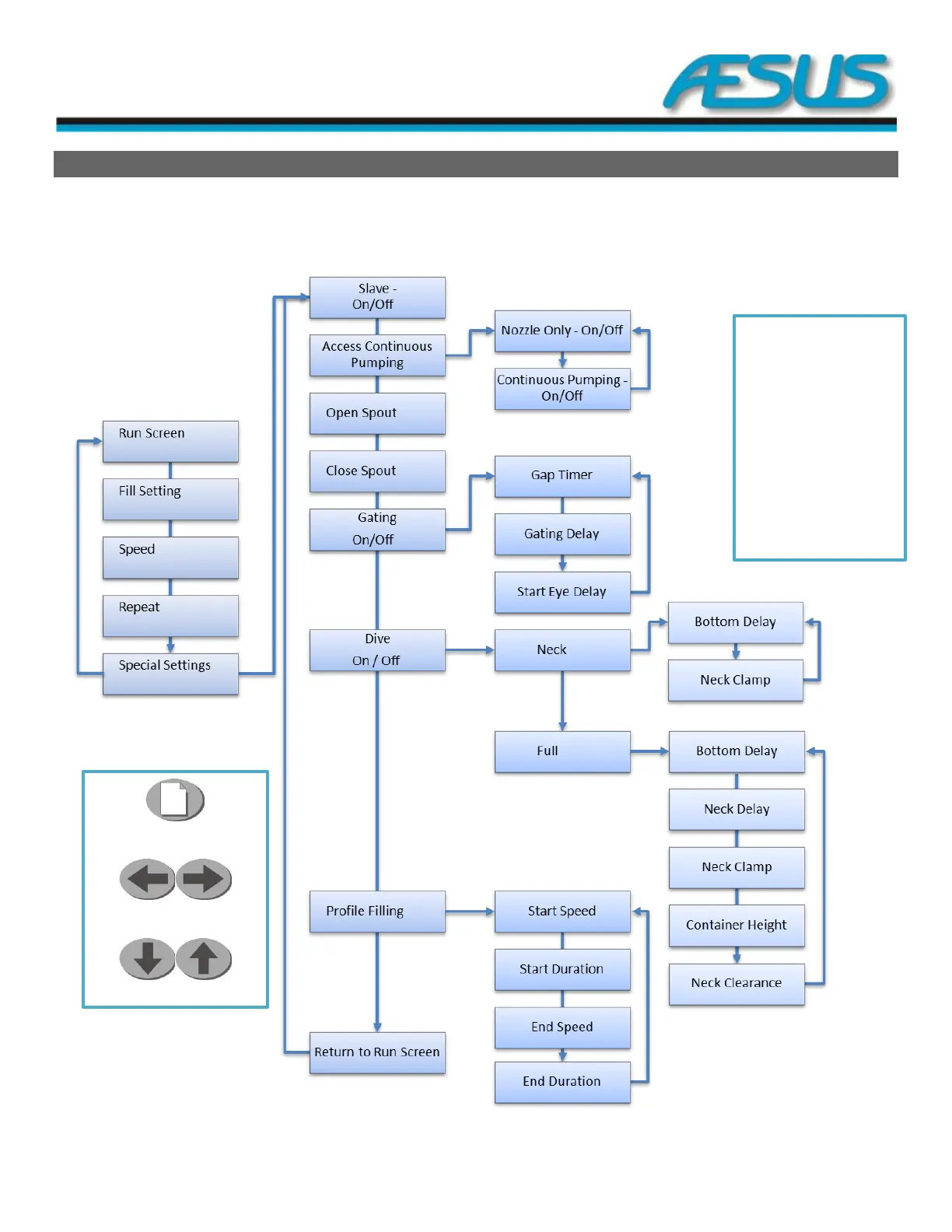
Below, shows the screen hierarchy for the AF1C. To access and scroll through the settings press the menu key repeatedly. When
extra options are available for that setting, press the marked arrow to access the extra options. Use the Up/Down arrows to change
the feature’s setting.
Menu Key
Left & Right Arrow Keys
Up & Down Arrow Keys
Please note that there
are screens that are
only used when
certain options are
installed with the
machine. If the
options are not
installed then the
options are of no use
and may cause issues
with proper running of
the machine.
Figure 7-1: Diagram des Screens