AESFill AF1C Machine Manual 41/58 Cleaning & Accessories
8.1.5 Gating Setup Screen (Optional)
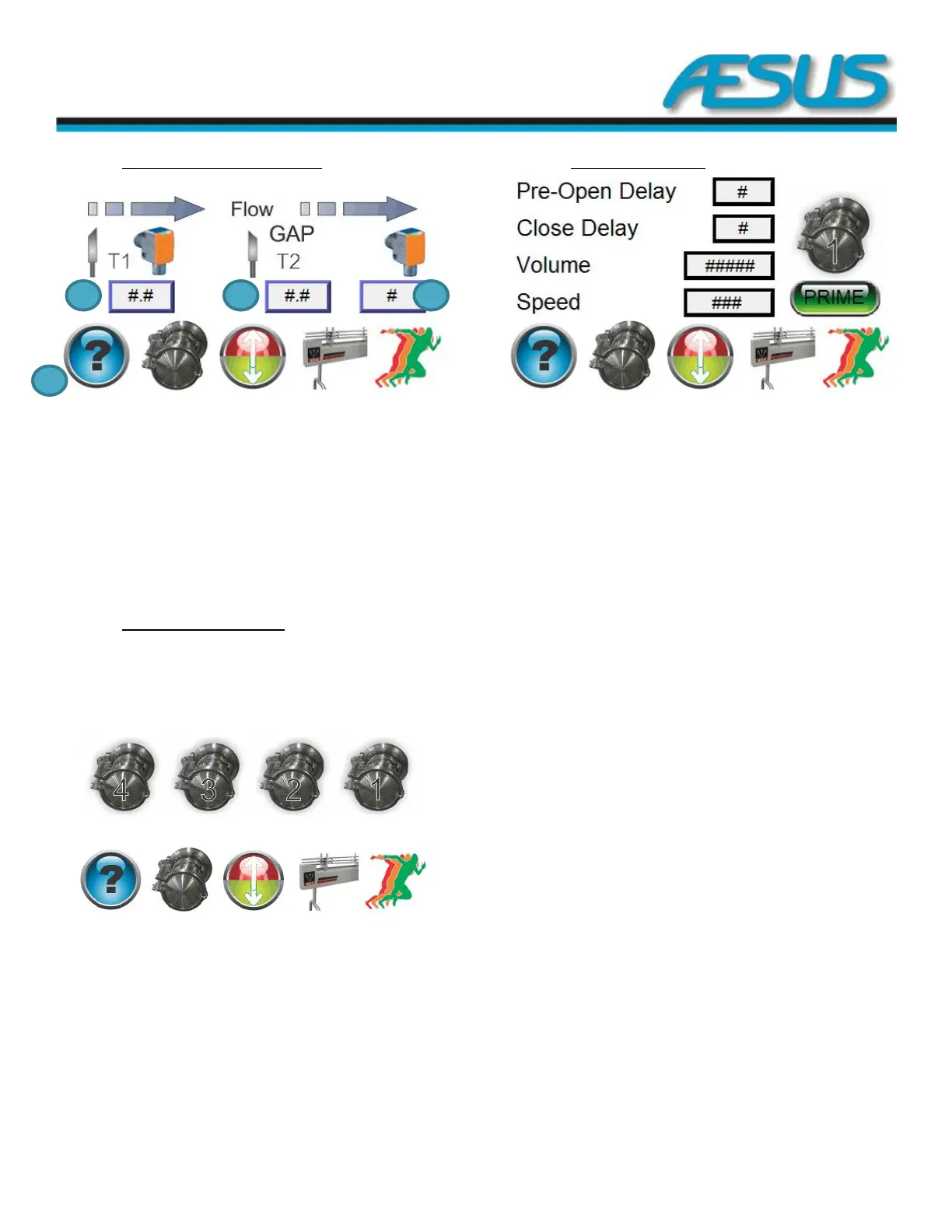
Figure 8-8: Gating Setup Screen (Optional)
1— Start eye delay: Delay before the machine acknowledges
container presence or starts diving while the start eye is
activated.
2- Gap delay in standard gating mode: Delay between the
release of the filled and empty containers to allow the
downstream gate to intercept the empty containers.
3— Count in counting mode: Number of containers to index
at every cycle.
4: Bottom banner.
8.1.6 Pump Main Setup Screen
From page 1 of the pump setups screens it is possible to
select the pump number for which you want to see the
settings.
Figure 8-9: Pump Main Setup Screen
8.1.6.1 Pump 1 Setup Screen
Figure 8-10: Pump 1 Setup Screen
Pre-Open Delay (ms): This is the time delay between the
opening of the nozzles, and the pumps beginning to rotate.
This delay is handy where it is desired to relieve some
pressure in the hose from the pump to the nozzle prior to
commencing a fill. The action may reduce or eliminate a
sudden gush of products when the nozzles open at the
beginning of a fill.
Close delay (ms): This is the time delay between the end of a
fill and the closing of the nozzles. This delay is handy where it
is desired to relieve some pressure in the hose from the
pump to the nozzle at the end of a dispense. The action may
reduce or eliminate a sudden gush of products when the
nozzles open again at the beginning of the next fill. This effect
may also be useful in reducing or eliminating back flow of
pressurized products from the pump outlet hose back
through the pump gears all the way to the supply tank. If the
pressure is not eliminated, and there are varying pauses
between fills, residual pressure in the hose may contribute to
varying and unexpected variations in fills.
Volume (Pulse): The amount of liquid in pulses that the pump
needs to dispense every time.
Speed (%): You can enter the speed at which you want to run
your pumps. You enter a value between 200 and 1700 RPM.
Prime:
Pressing will open the nozzle and start pumping
continuously.
Releasing will stop the pump and shut the nozzle.
Bottom banner: To change menu


 To Next Page